
You have just installed a new GE dishwasher, or maybe you have owned one for years and never fully figured out what half the icons on the panel actually do. Either way, those symbols are worth understanding. Every icon represents a specific function that affects how clean your dishes come out, how much energy the machine uses, and how long the cycle runs.
GE dishwashers have some of the most feature-rich control panels in the standard and mid-range market. Models across the GE, GE Profile, and GE Cafe lines each carry a distinct set of symbols, but the core icons appear across most of them. This guide covers every one you are likely to encounter — organized by category so you can find what you need fast.

GE Dishwasher Wash Cycle Symbols
The wash cycle symbols are the foundation of every load. They determine water temperature, spray pressure, and how long the machine runs.
Choosing the right cycle is the single most impactful decision you make each time you run the dishwasher. The wrong cycle either undercleans a heavy load or wastes water and energy on a light one.
AutoSense Cycle
The AutoSense icon typically shows a sensor beam or is simply labeled Auto. This is GE’s most intelligent cycle and the one that GE engineers recommend as the default for most households.
Built-in sensors measure the soil level in the wash water and detect how many dishes are loaded. The machine then automatically adjusts water temperature, spray intensity, and cycle duration to match the actual demand. Running AutoSense on a lightly soiled load uses less water than a Normal cycle. Running it on a heavy load adjusts upward automatically without any manual input from you.
Normal Wash
A plate outline or the word Normal. This is the reliable workhorse for mixed everyday loads with average soil levels. It uses a fixed water temperature and cycle duration, making it predictable and consistent for standard weeknight dinner dishes.
Heavy Wash
A bold pot or the words Heavy Wash. This cycle runs at the highest water temperature and most aggressive spray pressure available on the machine. It is built specifically for pots with baked-on food, casserole dishes, heavily soiled pans, and any load that spent time in a high-heat oven.
Reserve it for genuinely tough loads. Using Heavy on everyday dishes adds cycle time and water consumption without any benefit to cleaning.
1-Hour Wash
A clock face or the words 1-Hour Wash. This cycle cleans and dries a full load of moderately soiled dishes in approximately 60 minutes. It does not use the Steam pre-soak, and results are best when dishes have not been sitting with dried-on food for hours.
GE specifically notes this cycle is for when you need dishes ready quickly — not as an energy-saving shortcut. It uses more water and energy per wash than AutoSense or Normal because it has to achieve the same result in compressed time.
Rinse Only
A water droplet icon. A brief cold or warm rinse with no detergent, typically completing in 12 to 15 minutes. Useful for rinsing a partial load you plan to run later, preventing food from hardening and becoming more difficult to clean in the next full cycle.
| Cycle Symbol | What It Looks Like | Best Load Type | Typical Duration |
|---|---|---|---|
| AutoSense | Sensor beam or wave | Mixed everyday loads | Variable, sensor-determined |
| Normal Wash | Plate outline | Standard daily dishes | 90 to 120 minutes |
| Heavy Wash | Bold pot or pan | Baked-on grease, pots, pans | 120 to 150 minutes |
| 1-Hour Wash | Clock face | Lightly to moderately soiled | 60 minutes |
| Rinse Only | Water droplet | Partial loads, no food removal | 12 to 15 minutes |
GE Dishwasher Option and Add-On Symbols
GE’s option symbols are where the brand differentiates itself from competitors. Several are GE-specific technologies that do not appear under the same name on other brands.
These are secondary buttons that modify the selected wash cycle. Not every option works with every cycle — the panel will indicate which combinations are valid by illuminating available options after a cycle is selected.
Steam + Sani
A steam cloud or cloud with a thermometer icon. This is one of GE’s most used add-on features and one of the most practically useful on the panel.
Pressing Steam + Sani adds a pre-wash steam burst that penetrates and loosens hardened food before the main wash cycle begins. The result is that dishes come out cleaner without any pre-soaking or scrubbing. The Sani portion refers to a final rinse certified under NSF Standard 184, which reaches a minimum temperature of 150 degrees Fahrenheit and reduces bacteria on dishes by 99.999 percent.
If the Sanitized indicator light does not illuminate at the end of a cycle where you selected this option, the required temperature was not reached. Run the kitchen hot tap for 30 seconds before the next cycle to ensure hot water is in the supply line.
Dry Boost
A sun with upward arrows, or the words Dry Boost. Standard heated dry uses the heating element at the tub floor to evaporate moisture. Dry Boost adds a fan that actively circulates the heated air throughout the tub, producing results that GE claims are up to three times drier than standard heated dry — particularly on plastics, which normally emerge still damp.
GE Profile models include Twin Turbo Dry Boost, which runs two heaters and two fans simultaneously for the most aggressive drying performance in the GE lineup.
Bottle Jets
A water bottle or narrow cylinder icon. GE’s Bottle Jets feature directs four powerful water jets inside the upper rack specifically at tall, narrow items — water bottles, travel mugs, baby bottles, reusable drink containers, and carafes.
Standard spray arms cannot effectively clean these because water cannot reach inside the narrow opening at the right angle. When you select Bottle Jets, a dedicated set of nozzles in the upper rack activates in addition to the normal wash arms. Position tall narrow items directly over the jet nozzles for best results.
Wash TempBoost
A thermometer arrow icon. This raises the water temperature during the main wash phase above the cycle’s default setting, improving grease removal and cleaning performance on heavily soiled loads without switching to the full Heavy cycle.
It extends the cycle duration slightly as the machine heats the water internally. Most useful when incoming water from your home supply is cooler than the optimal 120 degrees Fahrenheit.
Wash Zone: Upper Only / Lower Only
A rack icon with the relevant rack highlighted. This is a GE-exclusive feature that allows you to wash a true half load in either the upper or lower rack without running a full cycle.
Select Upper Only for glasses, mugs, bowls, and smaller items. Select Lower Only for plates, pots, and larger items. The machine runs water and spray only in the selected zone, saving energy and water compared to a full cycle for a partial load.
Delay Start
A clock with an arrow, or the words Delay Start with hour increments. Programs the dishwasher to start a cycle at a future time, from 1 to 12 hours ahead. Press Delay Start repeatedly to cycle through hour increments, then press Start to confirm.
Useful for running the dishwasher overnight to avoid peak electricity rate hours, or timing the cycle to finish just before you wake up.
| Option Symbol | What It Looks Like | What It Does |
|---|---|---|
| Steam + Sani | Steam cloud or thermometer | Pre-wash steam loosens food; final rinse kills 99.999% bacteria |
| Dry Boost | Sun with upward arrows | Fan-assisted drying, up to 3x drier than standard heated dry |
| Bottle Jets | Water bottle outline | 4 targeted jets clean inside tall narrow items |
| Wash TempBoost | Thermometer with arrow | Raises main wash temperature above default |
| Wash Zone Upper | Upper rack highlighted | Washes upper rack only — saves energy on partial loads |
| Wash Zone Lower | Lower rack highlighted | Washes lower rack only — saves energy on partial loads |
| Delay Start | Clock with arrow | Schedules cycle start up to 12 hours ahead |
GE Dishwasher Status and Indicator Symbols
These symbols appear during or after cycles to tell you where the machine is in its process — and what it needs from you. They are informational, not cycle selections.
Understanding status symbols saves the confusion of opening a dishwasher mid-cycle thinking it has finished, or ignoring a maintenance light that is trying to prevent a repair bill.
Clean Light
A steady green Clean light after a cycle confirms the wash completed successfully. On older GE models, a flashing Clean light signals a control panel or communication issue. If you see the Clean light flashing rather than glowing steady, a power reset — turning off the circuit breaker for one minute — is the correct first response before investigating further.
For persistent control panel issues on GE models, our GE Profile dishwasher control panel troubleshooting guide covers ribbon cable checks, board resets, and how to distinguish between a software glitch and a hardware failure.
Sanitized Light
A distinct indicator that illuminates at the end of a cycle where Steam + Sani was selected, confirming the 150-degree Fahrenheit threshold was reached and maintained. If this light does not come on after a Sani cycle, the dishwasher is telling you the dishes were not sanitized — most commonly because the door was opened mid-cycle or the incoming water was too cold.
Rinse Aid Indicator
A star pattern, droplet symbol, or the words Add Rinse Aid. GE’s rinse aid indicator appears when the reservoir inside the door needs refilling. Rinse aid is not optional for good results on a GE dishwasher. It is the primary reason dishes emerge spot-free and dry thoroughly — particularly important when using Dry Boost, which circulates hot air but still benefits from reduced water surface tension.
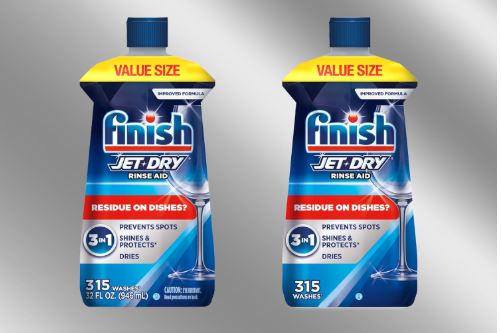
Finish Jet-Dry Rinse Aid (View on Amazon) is widely compatible with GE dishwashers and delivers 315 washes per 32-ounce bottle, covering most households for four to six months between refills.
Cycle Progress Indicators
Many GE models include a row of indicators showing Washing, Rinsing, and Drying in sequence as the cycle advances. Some models project a red or blue light beam onto the floor through a door-mounted LED when the machine is running — a particularly useful feature on top-control GE dishwashers where the panel is hidden on the top of the door and not visible when the machine is closed.
GE Dishwasher Control Lock and Safety Symbols
GE’s safety and lock symbols are among the most frequently misunderstood on the panel. A locked panel that appears unresponsive is one of the most common GE dishwasher issues reported by owners, and it almost always has a two-step solution.
Knowing what each safety symbol means prevents a false alarm service call.
Lock Controls (Child Lock)
A padlock icon or the words Lock Controls. When active, this symbol indicates the control panel is locked and will not respond to button presses. It is designed to prevent accidental cycle changes and to protect selected settings from being altered by children.
To unlock on most current GE models, press and hold the Dry Boost button for three seconds. On some models, pressing and holding Steam and Dry Boost simultaneously for three seconds deactivates the lock. A confirmation beep and the indicator light turning off confirm successful deactivation.
If buttons remain unresponsive after attempting the unlock sequence, confirm the dishwasher has power and try pressing Start/Cancel first, then retry the unlock sequence. For models where the start button itself is not responding, our GE dishwasher start button not working guide covers membrane switch diagnostics and control board checks.
Active Flood Protect / Water Leak Indicator
A water drop with a downward arrow or an alert icon. On GE models equipped with Active Flood Protect, this indicator illuminates if the sensor beneath the tub detects 1.5 ounces or more of water in the base pan — the area below the tub where water would accumulate in a leak.
When this triggers, the dishwasher automatically runs the drain pump to remove any water from the tub, then stops the cycle. If you see this indicator and find no visible leak, the sensor may have been triggered by condensation. Disconnect power for one minute, wipe the base area dry, and restart.
If it triggers on multiple consecutive cycles, a door gasket leak or internal hose connection is the likely cause.
Tableware Symbols: What Goes in a GE Dishwasher
These symbols appear on the bottom of dishes and cookware, not on the GE control panel itself. Understanding them prevents damage that gets blamed on the dishwasher but actually results from ignoring the item’s own care guidance.
| Symbol on Dishware | Meaning |
|---|---|
| Wine glass with water droplets | Fully dishwasher safe |
| Plates beneath diagonal lines | Dishwasher safe, all racks |
| Item above a horizontal line | Top rack only — keep away from heating element |
| Hand in a water basin | Hand wash only |
| Wine glass with X through it | Not dishwasher safe — hand wash required |
| Snowflake | Safe for freezer storage |
Top rack only designations exist for a reason. Plastics, insulated containers, and certain coatings that seem durable will warp or degrade when exposed to the heating element at the floor of the tub. When in doubt, top rack.
Getting the Best Results from Your GE Dishwasher
Understanding GE dishwasher symbols only delivers its full value when combined with consistent maintenance and the right supplies. Two habits matter more than any others.
Keep the filter clean. GE dishwashers with the Piranha Hard Food Disposer still accumulate debris in the removable filter at the tub base. Pull it out monthly, rinse it under warm water, and replace it before running the next cycle. A clogged filter is the most common cause of poor cleaning results and drainage issues. Our dishwasher not cleaning dishes guide covers all the symptoms of filter neglect and how to address them.
Run a machine cleaning cycle monthly. Grease, limescale, and mineral deposits accumulate inside the pump, spray arms, and internal hoses over time. Affresh Dishwasher Cleaner (View on Amazon) is designed specifically for this — drop one tablet in the detergent dispenser and run a Normal cycle on an empty machine.
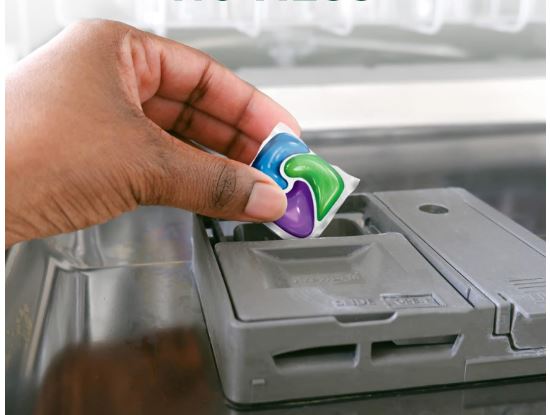
For the detergent itself, GE recommends using quality pods or tablets over powder or gel, which can leave residue in the dispenser and on dishes. Cascade Platinum ActionPacs (View on Amazon) are among the most consistently top-rated pods for GE dishwashers, combining a degreaser, water softener, and rinse aid in a single dose.
Conclusion: Your GE Control Panel Is a Cleaning Tool
GE dishwasher symbols are not designed to be confusing — they are designed to be efficient. Once you know what each icon represents, the panel becomes a precise set of controls rather than a guessing game.
The AutoSense cycle handles most loads automatically. Steam + Sani handles hygiene. Dry Boost handles the drying gap that heated dry alone cannot close. Bottle Jets address the narrow-item problem that standard spray arms have never solved. Lock Controls keeps the panel safe. The Clean and Sanitized lights tell you when the job is done.
Understanding these symbols and error codes takes five minutes. Using them correctly takes five seconds per load. The result is cleaner dishes, better drying, and a dishwasher that lasts longer because it is being used the way it was designed to be used.
Frequently Asked Questions
What does the padlock symbol mean on a GE dishwasher?
It means the control panel is locked. On most current GE models, press and hold the Dry Boost button for three seconds to unlock it. On some models, hold Steam and Dry Boost simultaneously for three seconds. The padlock light will turn off when the panel is unlocked.
What does the Clean light mean on a GE dishwasher?
A steady Clean light confirms the cycle completed successfully. A flashing Clean light indicates a communication or control issue and is a diagnostic signal rather than a cycle confirmation. Turn off the circuit breaker for one minute and restore power as a first step.
What is the Dry Boost symbol on a GE dishwasher?
Dry Boost is represented by a sun with upward arrows or the text Dry Boost. It adds a fan-assisted drying cycle that circulates heated air throughout the tub, producing significantly drier results than standard heated dry — particularly for plastics that standard drying methods leave damp.
Why is my Sanitized light not coming on after a Steam + Sani cycle?
The dishwasher did not reach the required 150-degree Fahrenheit minimum for NSF Standard 184 certification. Run the kitchen hot tap for 30 seconds before starting the next cycle to ensure hot water is at the supply line, and verify your water heater is set to at least 120 degrees Fahrenheit. Opening the door mid-cycle also causes this by allowing heat to escape.
What does Bottle Jets mean on a GE dishwasher?
Bottle Jets activates four dedicated water jets in the upper rack that direct pressurized water and detergent inside tall, narrow items like water bottles, travel mugs, and baby bottles. Position these items directly over the jet nozzles in the upper rack and select the Bottle Jets option alongside your chosen wash cycle.

Hi, I’m Barlgan! I created Repair Me Yourself to empower homeowners to tackle appliance repairs with confidence. From decoding error codes to fixing cooling issues, I break down complex repairs into simple, actionable steps that save you time and money.