
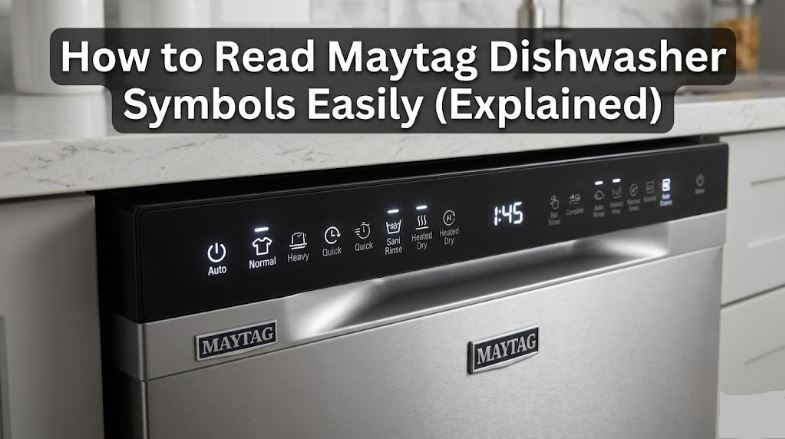
Staring at a Maytag dishwasher control panel for the first time can feel like deciphering a foreign language. Symbols for cycles, drying options, alerts, and status indicators all share the same small panel, often without labels.
Understanding Maytag dishwasher symbols is not just about knowing which button to press. It is about getting cleaner dishes, catching problems early, and using your appliance the way it was designed to be used. This guide breaks every symbol down clearly, with tables for quick reference.
Maytag Dishwasher Wash Cycle Symbols
The wash cycle symbols are your primary selection buttons. They determine water temperature, spray intensity, and how long the machine runs.
Choosing the right cycle matters for both performance and efficiency. Running Heavy on a light load wastes water and energy. Running Quick on a baked-on pan leaves residue behind.
Normal or Auto
This is the everyday cycle for mixed loads with average soiling. On Auto-equipped models, internal sensors detect soil levels in the water and adjust cycle length accordingly. Most households use this for the majority of their loads.
Heavy
The Heavy cycle uses the highest water temperatures and most aggressive spray pressure available on the machine. Reserve it for baked-on casserole dishes, pots, and anything that came off a high-heat cooking surface. Running it unnecessarily adds time and water consumption.
Quick Wash or Express Wash
A clock, timer arrow, or lightning bolt icon represents this short-cycle option. Most Maytag models complete Quick Wash in 30 to 60 minutes. It is for lightly soiled dishes only and does not reach sanitizing temperatures.
PowerBlast or Power Scrub
This is Maytag’s most intensive cleaning cycle, combining elevated water temperature, concentrated spray pressure, and a longer cycle duration. It is the right choice for your toughest loads and is the cycle that supports the High Temp and Sanitize add-on options.
Rinse Only
A water drop or circular icon. This brief rinse uses no detergent and runs in under 15 minutes. It is useful for rinsing a partial load you plan to run later, preventing food from drying and hardening before the full cycle.
Delicate or China/Crystal
A wine glass outline. This cycle runs at lower water temperatures and reduced spray pressure to protect fragile items. It pairs best with Air Dry rather than Heated Dry to avoid thermal stress on thin glass or hand-painted surfaces.
| Cycle Symbol | What It Looks Like | Best For |
|---|---|---|
| Normal / Auto | Plate outline or water droplet | Everyday mixed loads |
| Heavy | Bold pot or pan outline | Baked-on food, pots, pans |
| Quick Wash | Clock face or lightning bolt | Lightly soiled dishes, fast turnaround |
| PowerBlast | Strong spray jets | Toughest loads, heavy grease |
| Rinse Only | Water droplet or circle | Partial loads, no detergent |
| Delicate | Wine glass outline | Thin glass, china, fragile items |
Maytag Dishwasher Drying Symbols
After the final rinse, these options determine how moisture is removed from your dishes. The choice you make here affects both results and electricity consumption.
Getting drying right eliminates rewashing and reduces water spots on glassware — especially important when no rinse aid is in the dispenser.
Heated Dry
A sun or radiating heat lines. This activates the heating element at the bottom of the tub, raising the interior temperature to evaporate moisture. It produces the driest results but adds 12 to 46 minutes to the cycle and uses more electricity. Items will be very hot to the touch when the cycle ends, so allow time to cool before unloading.
Air Dry or Energy Saver Dry
A fan icon. This skips the heating element entirely and relies on residual heat and natural air circulation. It uses significantly less energy but leaves plastics and concave shapes with some residual moisture. Cracking the door open for 15 to 20 minutes after the cycle speeds drying without added energy cost.
No Heat Dry
Where available, this setting completes the wash and leaves drying entirely to ambient air. Rinse aid is particularly important when using this option, as it reduces water surface tension and helps water sheet off dishes rather than beading and leaving spots.
| Drying Symbol | What It Looks Like | Energy Use | Best Result On |
|---|---|---|---|
| Heated Dry | Sun or heat waves | Higher | Glass, metal, ceramics |
| Air Dry / Energy Saver | Fan icon | Lower | Most items — expect some moisture on plastics |
| No Heat Dry | No icon on some models | Lowest | Light loads with rinse aid |
Maytag Dishwasher Option and Add-On Symbols
These secondary buttons modify the primary cycle you have selected. They give you more control over temperature, hygiene, and timing without switching cycles entirely.
Not all options work with every cycle. On most Maytag models, High Temp and Sanitize are available with PowerBlast, Auto, and Normal. Heated Dry can be added to any of those plus Quick Wash.
High Temp Wash
A thermometer icon. This raises the water temperature during the main wash above the standard setting, improving grease removal and bacteria kill rates. It adds roughly 20 minutes to the cycle and is particularly useful when incoming water runs below 120 degrees Fahrenheit.
Sanitize
A baby bottle, plus sign, or thermometer with a dedicated indicator light. This adds a final rinse certified under NSF Standard 184 to reach a minimum of 150 degrees Fahrenheit, eliminating 99.999 percent of common household bacteria. Use it for baby bottles, cutting boards used for raw meat, and any load where hygiene is a priority.
If the Sanitize light flashes after a cycle ends, the required temperature was not reached. This usually means incoming water was too cold or the door was opened mid-cycle. Run the kitchen hot tap for 30 seconds before starting the next cycle, and check that your water heater is set to at least 120 degrees Fahrenheit.
Delay Start
A clock with an arrow or the words Delay Start. This programs the dishwasher to begin at a future time, typically between one and 24 hours later. Press Delay to set the hour increment, then press Start within 30 seconds to activate the countdown. It is useful for running the dishwasher overnight during off-peak electricity hours.
| Option Symbol | What It Looks Like | What It Does | Adds to Cycle Time |
|---|---|---|---|
| High Temp Wash | Thermometer | Raises wash temperature for better cleaning | About 20 minutes |
| Sanitize | Baby bottle or plus sign | Final rinse at 150°F, kills 99.999% bacteria | About 30 minutes |
| Heated Dry | Sun / heat waves | Activates heating element for dry dishes | 12 to 46 minutes |
| Delay Start | Clock with arrow | Programs cycle to start later | No change to cycle length |
Maytag Dishwasher Status and Alert Symbols
These indicators appear during or after cycles to tell you what the machine is doing — or what it needs from you. Knowing the difference between a normal status light and an alert saves time and prevents unnecessary service calls.
Most status lights are informational. Most alert symbols have a simple fix.
Clean Light
A steady Clean light after a cycle confirms the wash completed successfully. A flashing Clean light, however, is a diagnostic signal — count the blinks in the repeating pattern. Seven blinks typically indicates a heating element fault. A 30-second power reset by disconnecting the dishwasher from the breaker is always the first step before interpreting any flash code as a component failure.
Washing, Rinsing, and Drying Progress Lights
Many Maytag models include a row of progress indicators that illuminate in sequence as the cycle advances. These tell you exactly where in the cycle the machine is without opening the door. If any status light stays illuminated without advancing for an extended period, the cycle may have stalled due to a drainage issue or door latch problem.
If your dishwasher won’t clean, use our guide to troubleshoot it!
Rinse Aid Indicator
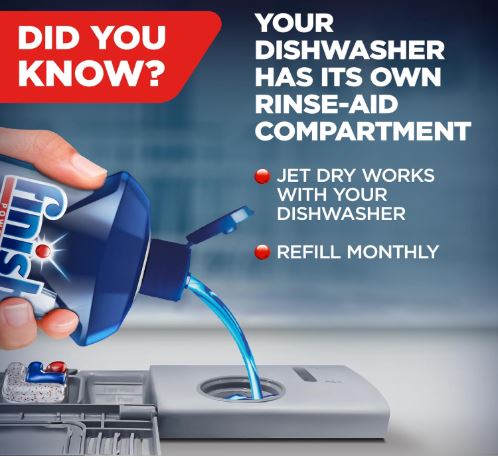
A star pattern, droplet with an X, or the words Add Rinse Aid. This light appears when the rinse aid reservoir needs refilling. Rinse aid is essential for spot-free results and improved drying — it is not optional. The dispenser is located on the inside of the door and is accessible without tools.
Maytag recommends using a quality rinse aid consistently. The Finish Jet-Dry Rinse Aid (32 oz, 315 washes) is a reliable, widely compatible option available on Amazon.
Maytag Control Lock and Safety Symbols
These symbols address safety features and control panel access. They are some of the most misunderstood indicators on the panel — and often the simplest to resolve.
Knowing what a padlock icon actually means prevents a lot of unnecessary confusion when the dishwasher suddenly appears unresponsive.
Control Lock
A padlock icon or the words Control Lock. This symbol indicates the control panel has been locked to prevent accidental changes. If the lock light is on and no buttons are responding, press and hold the Control Lock button for three seconds. You will hear a beep and the light will turn off, restoring panel operation.
If the light flashes three times when you press it, the lock has just been activated rather than deactivated. Hold again to reverse it.
Wrench or Service Symbol
A wrench icon indicates a fault condition that may require technician attention. The first step is always a power reset — turn off the circuit breaker for at least one minute, restore power, and try again. If the symbol returns immediately, the fault is persistent and component diagnosis is needed.
Flashing Lights with No Clear Pattern
Multiple lights flashing simultaneously usually means the cycle was interrupted — by a power fluctuation, an opened door, or a water supply issue. Press Cancel/Drain, allow the drain pump to complete its cycle, then power-cycle the dishwasher before restarting.
Tableware Symbols: What Can Go in the Dishwasher?
These symbols appear on the bottom of dishes and cookware, not on the Maytag control panel itself. They tell you whether an item is safe to wash in the machine and how.
Ignoring these symbols is one of the most common causes of warped plastics, faded finishes, and cracked handles — issues that have nothing to do with the dishwasher itself.
| Symbol on Tableware | Meaning |
|---|---|
| Wine glass with water droplets | Fully dishwasher safe |
| Dishes beneath diagonal lines | Dishwasher safe |
| Wine glass with X or crossed out | Hand wash only |
| Item above a horizontal line | Top rack only |
| Snowflake icon | Safe for freezer storage |
Always check the bottom of new items before loading them. Top-rack-only designations exist for heat-sensitive plastics that will warp when exposed to the heating element at the bottom of the tub.
What Detergent Works Best With Maytag Dishwashers?
Maytag officially recommends detergent tablets or pods over powder or liquid, noting that pods produce less filming on dishes. Cascade is the brand Maytag includes sample packs of with new dishwasher purchases.
Cascade Platinum Plus ActionPacs (View on Amazon) are the top-rated pick for performance. They include a degreaser, water softener, and rinse aid in one pod, delivering spot-free results across Normal, Heavy, and PowerBlast cycles.
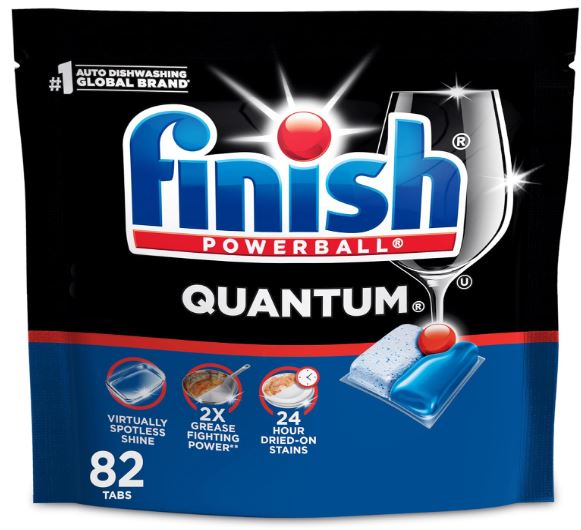
For a strong budget alternative, Finish Quantum Dishwasher Pods 82-count (View on Amazon) use a three-chamber system — powder, gel, and liquid Powerball — to break down food, cut grease, and enhance shine without pre-rinsing.
Conclusion: Know Your Panel, Get Better Results
Maytag dishwasher symbols are a practical communication system built into every control panel. The cycle icons match cleaning intensity to load type. The drying symbols give you control over energy use and results. The status indicators tell you where the machine is in its process. The alerts warn you before small issues become expensive repairs.
Most problems that look alarming — flashing lights, an unresponsive panel, a locked control — have solutions that take under two minutes. Understanding what you are looking at is the difference between a quick fix and an unnecessary service call.
If your machine is showing symbols alongside error codes and performance issues, start with the basics: clean the filter, check the rinse aid level, and run a power reset. Do that before calling a pro.
Frequently Asked Questions
What does the flashing Clean light mean on a Maytag dishwasher?
A flashing Clean light is a diagnostic signal, not a confirmation that the cycle finished. Count the blinks in the repeating pattern — seven blinks typically indicates a heating element fault. Always try a 30-second power reset first before treating it as a component failure.
How do I turn off the Control Lock on my Maytag dishwasher?
Press and hold the Control Lock button for three seconds until you hear a beep. If buttons still do not respond, check whether the dishwasher has entered sleep mode by pressing Start/Resume or opening and closing the door.
Why is the Sanitize light flashing after my cycle ended?
The dishwasher did not reach the required 150 degrees Fahrenheit for sanitization. Run the kitchen hot tap for 30 seconds before starting the next cycle, and verify your water heater is set to at least 120 degrees Fahrenheit. Opening the door mid-cycle also causes this by allowing heat to escape.
What does the Delay Wash symbol mean?
It means you have programmed the dishwasher to start at a later time. The countdown begins after you press Start. If the dishwasher does not start at the programmed time, check that the door was fully latched within three seconds of pressing Start.
Why are all the lights blinking at once on my Maytag dishwasher?
This usually means the cycle was interrupted by a power fluctuation, an opened door, or a water supply issue. Press Cancel/Drain, allow the drain pump to finish, then turn off the circuit breaker for one minute before restarting. If the lights flash again immediately, a component-level fault is present and professional diagnosis is the appropriate next step.

Hi, I’m Barlgan! I created Repair Me Yourself to empower homeowners to tackle appliance repairs with confidence. From decoding error codes to fixing cooling issues, I break down complex repairs into simple, actionable steps that save you time and money.