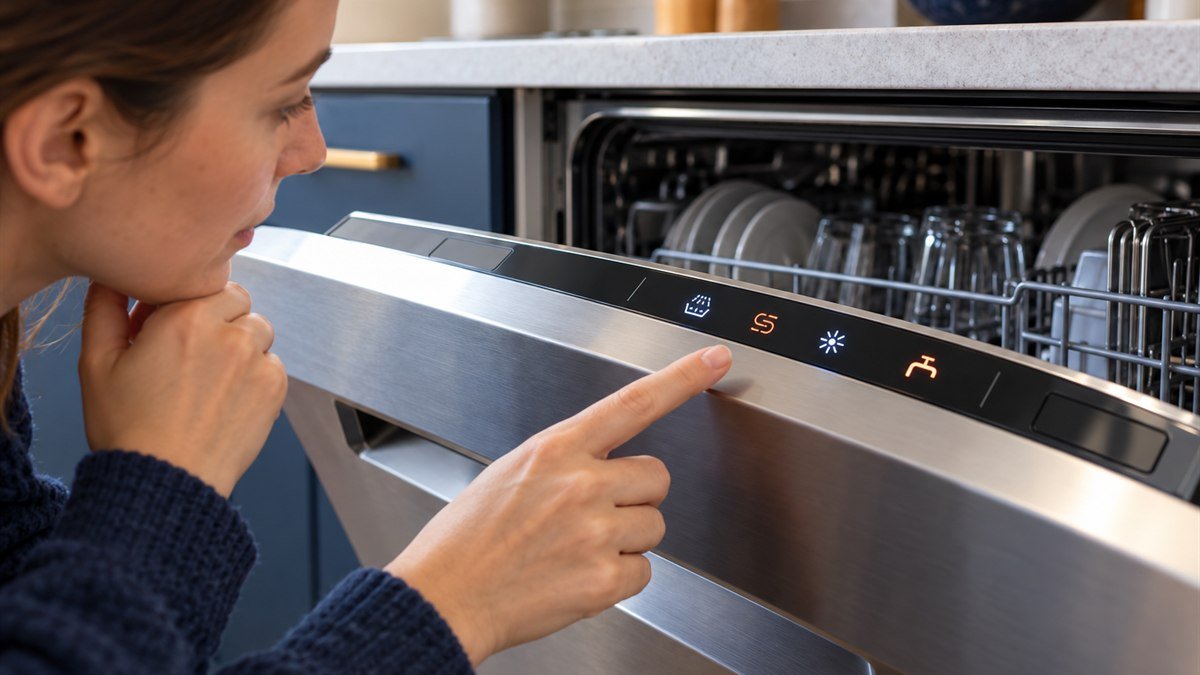
Bosch dishwasher symbols come in two sets. European-style panels use pictures: a faucet for a water problem, a sun for rinse aid, an S for salt and a brush while it washes. Many US panels are LED-only, so they talk in light patterns. Four lights on at once means a water problem, not a code.
Which set is on your machine? Work that out first, and most fixes take you a minute after that. Only two kinds of signal need you: the water symbols, and whatever flashes.
I saw fewer Bosch machines on service calls than Whirlpools or Samsungs. The owners who did have one often got stuck the same way. They’d found a symbol chart online, and it didn’t match the panel in front of them.
Bosch dishwasher symbols at a glance
These are the symbols Bosch documents on its international symbols page and its US error-code list. You won’t see all of them on one panel. Which ones you get depends on the model.
| What you see | What it means | Your move |
|---|---|---|
| Faucet, or a Check water light | Not enough water is coming in. | Open the faucet under the sink. Check the inlet hose for a kink. |
| Sun with dotted rays | Rinse aid is low. | Refill the rinse aid dispenser. |
| Two curved arrows forming an S | Softening salt is low. Only models with a water softener have it. | Top up the salt reservoir with dishwasher salt. |
| Brush | The machine is washing. | Nothing. Let it finish. |
| Light shower over dishes | Pre-rinse is running to loosen dried-on food. | Nothing. |
| Wavy lines | The drying phase. | Nothing. |
| Key | Child lock is on. | Use the long press or button pair in your manual. |
| Phone with wireless waves | Home Connect, Bosch’s Wi-Fi app link. | Managed in the Home Connect app. |
| Star | Favorite: a saved cycle and option combination. | Set it up in the Home Connect app. |
| Red light on the floor | Steady means a cycle is running. Blinking means there’s an issue. | If it blinks, look for a code on the display. |
| Clean light | The cycle has finished. | Unload. |
| H01, H02 on the display | Delay start, set for 1 or 2 hours. | Not an error. Wait, or cancel the delay. |
Three of these want something from you: the faucet, the sun and the S. Everything else in the table just reports where the cycle is or what you’ve switched on.
Why your panel may not match the pictures online
Most symbol charts online picture European models, and so does Bosch’s own international symbols page. Those panels show Eco 50°, a 1h program and a timer that finishes in 3, 6 or 9 hours. If you own a US model, you’ll find different names and fewer pictures.
Take the US model SHP65CM5N. Its Use and Care Manual lists four cycles: Heavy, Auto, Normal and Speed 60. The panel options are Sanitize and AutoAir. There’s no delay button at all. You set a delayed start in the Home Connect app.
Salt is the other mismatch. Bosch US says to use softening salt only if your dishwasher has a water softener function. If yours doesn’t, there’s no S symbol to worry about.
The manual also says refill lights can come on when you use combination tabs, and the cycles still run properly. If you use combination tabs, a lit salt or rinse aid light isn’t a fault you need to fix.
So start with your model number. Bosch has a model number finder on its US support site. On the machines I worked on, the label sat on the edge of the door.
What do the lights on a Bosch dishwasher mean?
On a US Bosch LED panel, the Clean light means the cycle has finished. The Sanitize light comes on at the end of a Sanitize cycle, and the rinse aid light means the dispenser is empty. A dot of light on the floor tells you the machine is running.
Here’s the rest of the legend from the SHP65CM5N manual:
- Clean: lights once the wash cycle has ended.
- Sanitize: lights at the end of a cycle run with the Sanitize option. Bosch raises the temperature and holds it longer for this one. It’s meant for cutting boards and baby bottles.
- Rinse aid refill indicator: the dispenser is out.
- Remaining-time display: how long you’ve got until the cycle ends.
- WLAN display: lit means Wi-Fi is on. Flashing means your home network isn’t available, so check the router.
- Remote Start button lit: you can start the machine from the app. Opening the door switches it off.
- AutoAir button lit: the door will open by itself during drying.
The light on the floor sits just in front of the door. When it’s gone, the cycle is done. You won’t see it at all if the dishwasher is mounted at eye level behind a flush cabinet front.
A dark panel after a cycle is normal. The manual says the cycle has ended when no displays are lit.
If you don’t press a button for 10 minutes, the machine switches itself off as well. Panel won’t wake up at all? Work through our Bosch dishwasher no lights on control panel checks.
Why are all the lights on for my Bosch dishwasher?
When you see all four vertical LEDs on a US Bosch light up at once, water can’t get in or out. Bosch’s manual says this isn’t an appliance error. Flashing LEDs are different. That’s a technical issue, and it needs a power cut of at least 2 minutes.
The four LEDs are the cycle duration lights plus Clean. Bosch lists these causes for the steady pattern, drain side first:
- The garbage disposal plug is still in.
- The drain hose is kinked.
- The drain pump cover is loose, or something is blocking the pump.
- The filter in the inlet or AquaStop hose is blocked.
- The inlet hose is kinked.
- The water faucet is off.
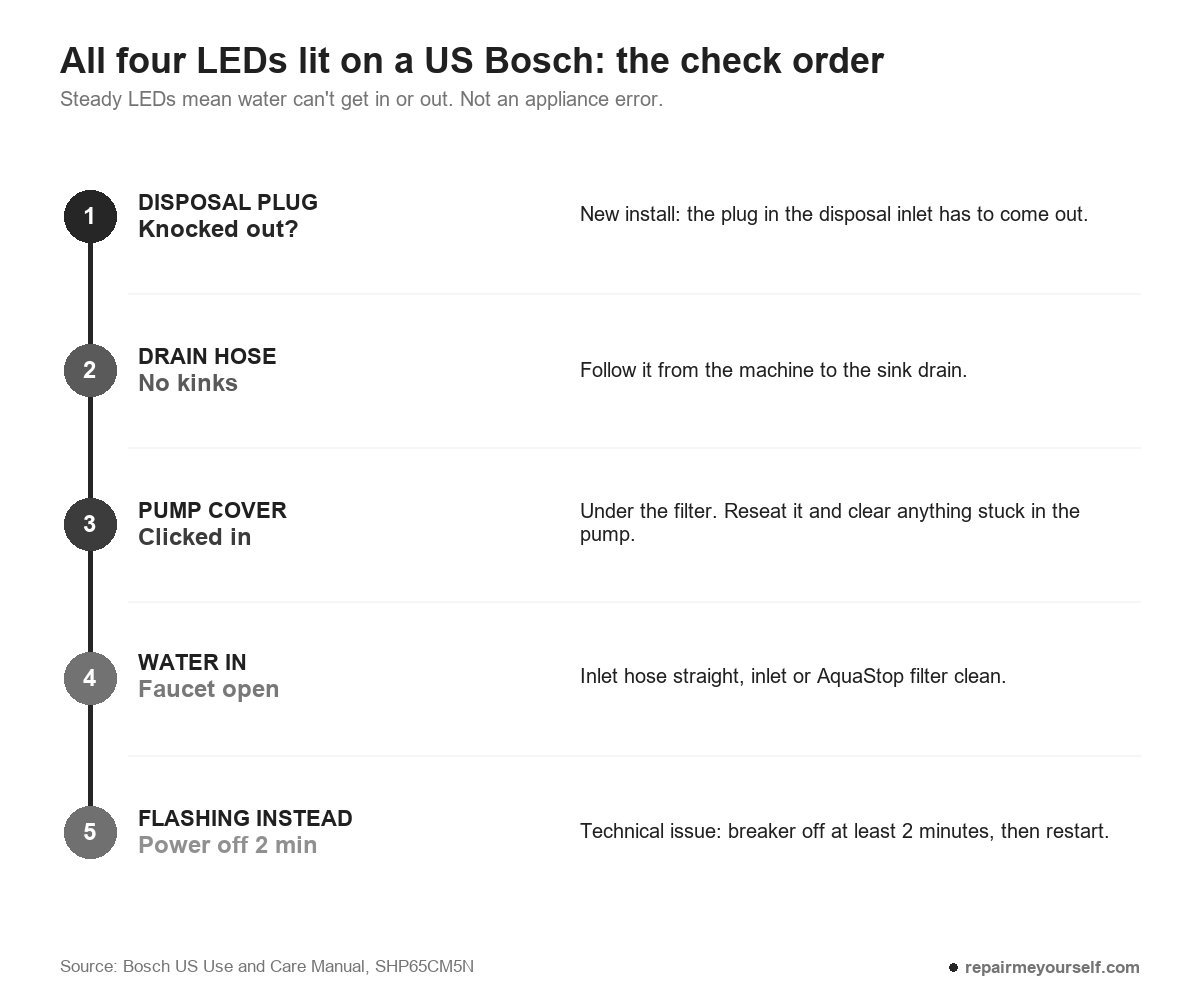
On new installs I checked number one before I opened my toolbag. The drain hose was clamped to the disposal, but the plug inside the disposal inlet was never knocked out. The water had nowhere to go.
Dale, who ran the Ohio shop where I started, made me pull the tech sheet before I touched a panel. On a Bosch, the manual’s troubleshooting table does that job. It’s worth the two minutes before you start pulling hoses.
The pump cover sits under the filter. Unplug the machine first, then lift the filter out, pry the cover up with a spoon and pull it forward until it comes free. Then clear out debris and standing water with a sponge. Some of it may be sharp. Press the cover back until it clicks.
If the drain side checks out and you still have water in the tub, our Bosch dishwasher not draining fixes go further.
If the same four LEDs flash instead, Bosch calls it a technical issue. Press the power button, unplug the machine or switch off its breaker, and wait at least 2 minutes. Then restore power.
If every LED on the panel lights or flashes, the electronics have flagged a fault. Hold the main switch for about 4 seconds to reset it. If it returns, do the 2-minute power cut. If it returns again, contact Bosch customer service.
Is there a child lock on a Bosch dishwasher?
Some Bosch dishwashers have a child lock, shown by a key symbol, which you switch off with a long press or a button combination. Many US models also pause the cycle if the door isn’t closed within 4 seconds of pressing Start. That pause can’t be turned off.
The second one fools people. You press Start on a top-control model, take too long to shut the door, and nothing happens. It looks locked.
Bosch says the same pause kicks in when you set a delay and press Start, open the door during a delay, or open it mid-cycle.
To restart on top controls, press Start and close the door. On front controls, close the door first, then press Start.
If your panel has the key symbol, check its manual for the exact buttons. Bosch’s symbols page doesn’t give one combination for every model.
Program and option symbols, US and European names
Cycle names differ the most between markets. On the US SHP65CM5N, you get four:
- Heavy: pots, pans and burned-on or dried-on food.
- Auto: mixed loads. Sensors adjust temperature and run time to how dirty the water is.
- Normal: Bosch’s most economical cycle and the one its Energy Guide label is based on.
- Speed 60: a one-hour cycle for lightly soiled dishes.
Bosch’s international page pictures a longer list. Eco 50° is the energy-saving cycle and Auto 45-65° handles everyday loads.
Then come 1h, Express 45° for glasses, Express 60°, Glass 40°, Intensive 70° and Machine Care, which deep-cleans the machine itself with a cleaning product.
Option symbols are where you’re most likely to guess wrong:
- Stopwatch with two arrows: SpeedPerfect, which cuts run time by up to 66%.
- Stopwatch with three arrows: SpeedPerfect+, up to 75% shorter depending on the program.
- Wavy lines with a plus: Extra Dry. On the US manual it’s a basic setting called intensive drying.
- Two zones, light over heavy: IntensiveZone, higher pressure and heat in the lower rack.
- Half Load: fewer items, less water and energy.
- Clock: Timer, finishing the cycle in 3, 6 or 9 hours.
- Hygiene+ or Sanitize: an extra-hot finish for cutting boards and baby bottles.
If an option button is dark, you just haven’t switched that option on. It’s not a warning.
Beeps, H01 and the error codes
Some of what you see on a Bosch panel isn’t a symbol at all. Bosch US lists these beep patterns:
- Beeps but won’t start: the door isn’t latched.
- Beeps 3 times: water is pooling at the base. Clean the drain filter and check the hoses and the door seal.
- Beeps 5 times: water at the base has tripped the sensor. This one may need a technician.
- Beeps with a blank display: switch the breaker off for about 10 minutes, then try again.
More beeping fixes are in our Bosch dishwasher won’t start, just beeps page.
H01 or H02 is the delay timer, not a fault. A letter E and two digits, like E15 or E24, is a real error code. Bosch’s US error-code list says most clear with a 30-second power reset at the breaker. E15 is the exception: water in the base. Shut off the water supply and contact support.
Every code and its fix is on our Bosch dishwasher error codes page.
Other questions about Bosch dishwasher symbols
How do you cancel a cycle on a Bosch dishwasher?
Hold the power button for about 4 seconds. All the displays light up and the machine pumps out the water. The cycle ends after about a minute.
How do I turn off the rinse aid light?
Fill the dispenser and the light goes out. If you’d rather skip rinse aid altogether, the US manual lets you switch dispensing off in the basic settings. Press power, then hold the settings button for about 3 seconds until the rinse aid indicator flashes. Step the level down to off and hold settings for 3 seconds again to save.
With the system off, the refill light won’t come on.
What if my symbol isn’t listed anywhere?
It happens. One owner posted this on Reddit:
“What does this little ‘m’ or brontosaurus symbol mean?”
– r/bosch, 11 upvotes
I can’t match that one to a Bosch legend without the model number, and I won’t guess. Bosch support in the US is 1-800-944-2904. Copy the model number off the door edge before you phone. It’s the first thing they’ll ask for.
Washers have their own set, too. If you’ve got a Bosch washer as well, its icons are decoded in our Bosch washer symbols page.