
You press the start button. The display lights up. Nothing happens. If your washer won’t start but has power, you are not alone, and the good news is that most causes are fixable without a technician.
Before you panic, let’s walk through the most common reasons and exactly what to do about each one. This washing machine troubleshooting guide should help you diagnose and fix most issues that could stop a powered washer from running.
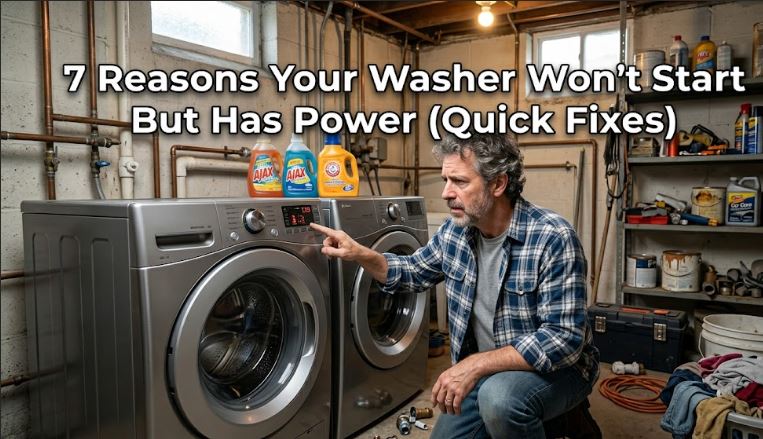
Quick Diagnostic for a Washer That Won’t Start But Has Power
| Symptom | Likely Cause |
|---|---|
| Display on, no response to buttons | Control lock active or faulty control board |
| Washer clicks but doesn’t run | Faulty lid/door switch |
| Lights on, drum doesn’t move | Blown thermal fuse or bad motor |
| Nothing after pressing start | Broken start button or timer |
| Washer stops mid-cycle | Overheating or tripped breaker |
Why Your Washing Machine Won’t Start But Has Power?
While power is important for your washing machine to run, it’s not the only thing. Sometimes your washer may fail to start despite having power and if so, here are seven likely causes:
1. The Control Lock Is Turned On
This one trips up more people than you’d expect. Most modern washers have a control lock feature that disables all buttons, including the start button. It is designed to prevent accidental starts, especially around children.
How to Fix a Control Lock Issue
Look for a “Control Lock” or “Child Lock” indicator light on your panel. Hold the designated button (usually labeled on the panel) for 3 to 5 seconds until the lock light turns off. Then try starting the machine again.
If you can not find the button, check your user manual for the specific combination.
2. The Door or Lid Switch Has Failed
Your washer will not run if it thinks the door is open. This is a built-in safety feature, and it relies entirely on a small switch. If that switch is faulty, your machine gets power but refuses to start.
How to Test and Replace the Door Switch
First, close the door firmly and listen for a click. No click often means the latch is not engaging the switch.
Next, unplug the washer and use a multimeter to test the switch for continuity. No continuity means the switch is bad and needs replacement.
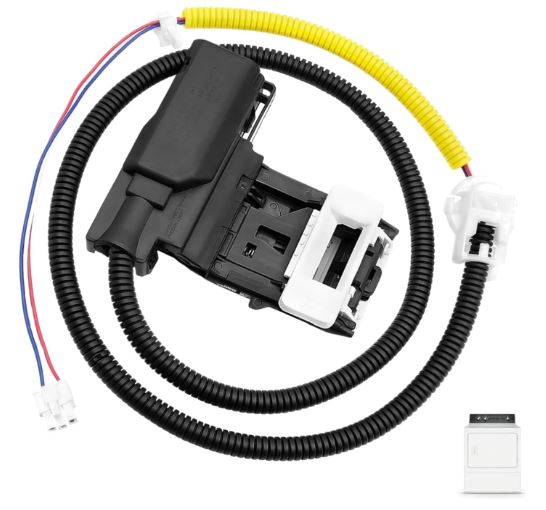
Find the right washer lid lock switch replacement on Amazon.
3. A Thermal Fuse Has Blown
The thermal fuse is your washer’s built-in protection against overheating. When it blows, it cuts all function, even though the display still shows power. This often happens after a long or interrupted cycle.
How to Replace a Blown Thermal Fuse
Unplug the washer and locate the thermal fuse, typically near the exhaust duct or control board depending on the model.
Test it with a multimeter. If you get no continuity, it is blown.
4. The Start Button or Timer Is Broken
Physical buttons wear out over time. If you press start and feel no resistance or the button sticks, the button itself may be the problem.
Similarly, older washers that use mechanical timers can develop faults that prevent the cycle from beginning.
How to Fix a Faulty Start Button or Timer
Inspect the start button for visible damage, sticking, or a mushy feel. If it feels off, the control panel assembly likely needs replacement.
For timer-based washers, test the timer with a multimeter for continuity across the start terminals. If it fails, replace the timer. Your model number (usually inside the door frame) will help you find the right part on Amazon or appliance part sites.
5. The Motor or Motor Control Board Is Faulty
If your washer hums briefly and then stops, or makes no sound at all after you press start, the motor or its control board could be failing.
This is one of the less common causes, but it does happen, especially on older machines.
How to Diagnose a Motor Issue
Listen carefully when you press start. A single click followed by silence often points to the control board not sending a start signal.
Unplug the machine and inspect the motor’s wiring harness for loose or corroded connections. Reseat any loose connectors. If the motor itself has failed, replacement is usually the most cost-effective fix, and you can find brand-specific motors on Amazon by searching your model number.
6. The Water Supply Is Interrupted
Surprisingly, many washers will not start a cycle if they detect no water supply. This is a safety mechanism to protect internal components.
How to Check Your Water Supply
Make sure both the hot and cold water valves behind the machine are fully open. Also check the inlet hoses for kinks or blockages.
Additionally, inspect the inlet valve screens for sediment buildup. Small debris can block water flow and prevent the cycle from starting. Clean the screens with a brush or replace the inlet valve if it is visibly damaged.
7. The Control Board Has Failed
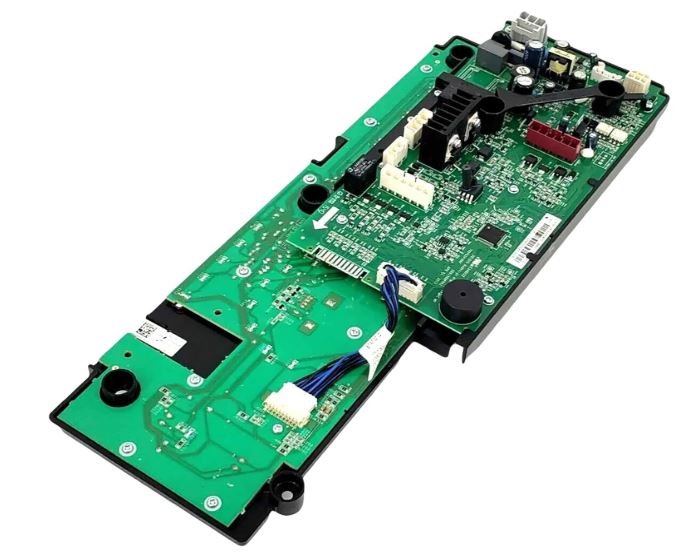
The main control board is essentially your washer’s brain. When it malfunctions, the machine may power on but fail to execute any commands.
This tends to happen after a power surge or after years of use.
How to Address a Faulty Control Board
Start by doing a hard reset. Unplug the washer for one full minute, then plug it back in. This clears temporary errors and sometimes resolves the issue entirely.
If the problem persists, the board likely needs replacement. Search your model number on Amazon to find the exact board. It is a pricier fix but often cheaper than a service call.
DIY vs. Professional Repair Cost Comparison
| Repair | DIY Cost (Parts Only) | Professional Cost |
|---|---|---|
| Door/lid switch | $15 – $40 | $100 – $200 |
| Thermal fuse | $5 – $20 | $80 – $150 |
| Control board | $80 – $200 | $200 – $400 |
| Start button/timer | $20 – $60 | $120 – $250 |
| Motor replacement | $80 – $250 | $250 – $500 |
Frequently Asked Questions
Why does my washer have power but won’t respond to any buttons?
The control lock feature is usually the culprit here. Hold the lock button for 3 to 5 seconds to disable it. If that does not work, a faulty control board may be preventing input recognition.
Can a power surge cause my washer to stop starting?
Yes, absolutely. A surge can damage the control board or blow the thermal fuse. Always use a surge protector and perform a hard reset by unplugging the machine for 60 seconds after any power event.
Is it safe to repair a washing machine myself?
Most basic repairs like replacing a lid switch, thermal fuse, or inlet valve are safe for a careful DIYer. Always unplug the machine first and follow your model’s service manual to avoid injury.
How do I reset a washing machine that won’t start?
Unplug the washer from the wall for one full minute, then plug it back in. Some models also have a reset sequence in the user manual, often involving turning the dial through specific positions.
How long do washing machine control boards last?
A control board typically lasts 10 to 15 years under normal use. Power surges, moisture, and heavy usage can shorten that lifespan considerably. Regular maintenance helps extend it.
Common Parts Lifespan Reference
| Component | Average Lifespan |
|---|---|
| Lid/door switch | 8 – 12 years |
| Thermal fuse | 10 – 15 years |
| Motor | 10 – 20 years |
| Control board | 10 – 15 years |
| Inlet valve | 8 – 12 years |
Stop Guessing and Start Fixing
When your washer won’t start but has power, the problem is almost always one of the seven issues above. Start with the easiest fixes first, like checking the control lock and door switch, before moving to more involved repairs like the control board or motor.
Most of these repairs cost a fraction of a professional service call, and with the right part and a little patience, you can have your machine running again the same day. Bookmark this page, grab your multimeter, and take it one step at a time.

Hi, I’m Barlgan! I created Repair Me Yourself to empower homeowners to tackle appliance repairs with confidence. From decoding error codes to fixing cooling issues, I break down complex repairs into simple, actionable steps that save you time and money.