
Your Whirlpool dryer stops mid-cycle, and instead of the usual completion chime, you’re staring at a cryptic code flashing on the display: “F-01” or “PF” or “AF.” The laundry is still damp, you’re already running late, and you have no idea if this is a $5 DIY fix or a $300 service call.
Error codes transform a simple appliance malfunction into a frustrating mystery. Without understanding what these alphanumeric combinations mean, you’re left guessing whether to troubleshoot yourself, reset the machine, or immediately call for expensive professional help.
Whirlpool dryer error codes are diagnostic messages that identify specific component failures, operational issues, or safety concerns within your appliance. These codes typically consist of a letter-number combination (like F-01, F-22, E1, E2) or abbreviated text (PF, AF, HC) displayed on the control panel. Common categories include power-related errors (PF), airflow restrictions (AF), thermistor failures (F-22, F-23), control board issues (F-01, F-70), and door latch problems (F-26).
This comprehensive troubleshooting guide decodes every major Whirlpool dryer symbol and error code, explaining what each means, what component is affected, and whether you can fix it yourself or need professional service. You’ll learn step-by-step diagnostic procedures, cost estimates for common repairs, and preventive maintenance strategies to avoid future errors.
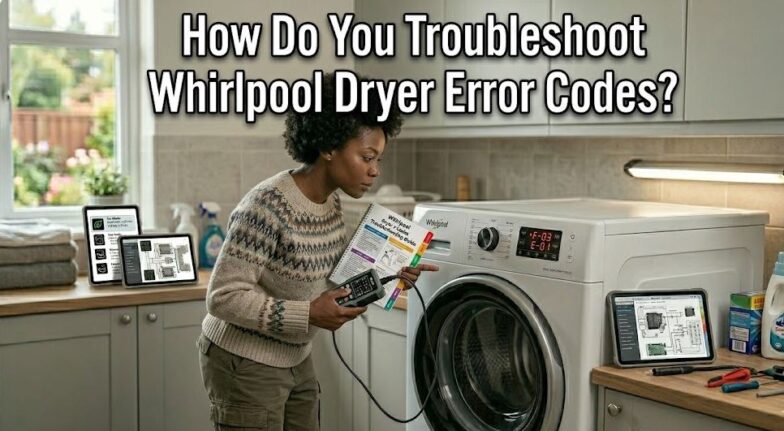
Whirlpool Dryer Error Codes: Quick Reference Chart
Use this reference to identify your error code and understand the severity level. Color coding indicates whether the issue requires immediate professional attention or can be resolved with basic troubleshooting.
Most common codes can be resolved without service calls if addressed promptly.
| Error Code | Component Affected | Severity | Typical Cause | DIY Fix Possible? |
|---|---|---|---|---|
| PF | Power supply/interruption | Low | Power outage, circuit breaker trip | Yes – Reset only |
| AF | Airflow restriction | Medium | Clogged lint filter/vent | Yes – Clean vents |
| F-01 / F-70 | Main control board | High | Electronic control failure | Usually requires service |
| F-22 / F-23 | Exhaust thermistor | Medium | Temperature sensor malfunction | Moderate DIY skill needed |
| F-26 | Door lock/latch | Medium | Door switch failure | Yes – Check door alignment |
| F-28 / F-29 | Moisture sensor | Medium | Sensor bar contamination | Yes – Clean sensor strips |
| E1 / E2 | Thermistor circuit | Medium | Wiring or sensor issue | Moderate DIY skill needed |
| HC | Heating circuit | Medium | Element or relay failure | Service recommended |
| LE | Motor locked | High | Drum obstruction or motor failure | Check for obstructions first |
| dU | Door unlock error | Low | Door remained unlocked | Check door closure |
| F-50 | Motor speed sensor | High | Drive motor or control issue | Service required |
Severity Levels: Low (simple reset), Medium (basic troubleshooting or cleaning), High (professional diagnosis recommended)
Understanding Whirlpool Dryer Error Codes: Diagnostic Breakdown
Let’s examine each error code category in detail, starting with the most common issues. Understanding the underlying cause helps you make informed decisions about repair versus replacement.
Power and Electrical Error Codes
Power-related errors are among the most common and fortunately the easiest to resolve. These codes indicate interruptions or irregularities in electrical supply rather than component failures.
PF – Power Failure: The most frequently displayed error code, indicating the dryer detected a power interruption during operation. This occurs during electrical storms, circuit breaker trips, or momentary brown-outs.
What happens: The control board memory retains the fact that power was lost mid-cycle. Even after power returns, the dryer won’t restart automatically as a safety precaution.
Resolution steps:
- Press and hold Start/Pause for 5 seconds to clear the code
- Restart your cycle from the beginning
- No component damage has occurred
When to investigate further: If PF appears repeatedly without actual power outages, check your home’s electrical panel for a failing breaker or loose dryer plug connection. Frequent power fluctuations can damage the control board over time.
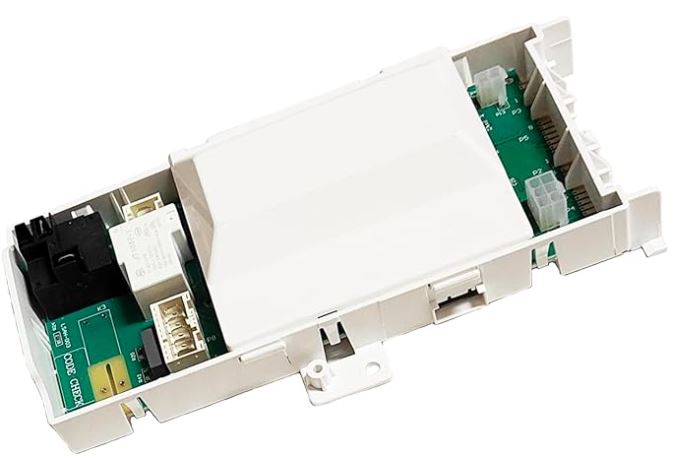
F-70 – Main Control Board Failure: Indicates the central electronic control board has detected an internal malfunction or corrupted memory. This is the dryer’s “brain” failing.
Symptoms accompanying this code:
- Buttons not responding correctly
- Display flickering or showing random characters
- Cycles not advancing properly
Troubleshooting sequence: Unplug the dryer completely for 3-5 minutes to force a hard reset. Plug back in and test. If F-70 returns immediately or within one cycle, the control board likely needs replacement.
Cost reality: Control board replacement (View on Amazon) ranges from $200-$400 including parts and labor. Boards for models older than 8 years may be difficult to source.
Airflow and Ventilation Error Codes
Airflow errors protect your dryer from overheating and prevent house fires. These codes should never be ignored, as restricted airflow causes 15,000 dryer fires annually in the United States.
AF – Restricted Air Flow: The dryer’s airflow sensor detects inadequate exhaust ventilation, meaning hot, moist air cannot escape properly.
| Cause | Likelihood | Check Method | Fix Difficulty |
|---|---|---|---|
| Clogged lint filter | 60% | Visual inspection | Easy – clean immediately |
| Blocked dryer vent duct | 25% | Disconnect and inspect | Moderate – may need vent brush |
| Crushed/kinked vent hose | 10% | Check behind dryer | Easy – straighten or replace |
| External vent flap stuck | 5% | Check outside vent opening | Easy – remove blockage |
Step-by-step AF resolution:
- Remove and thoroughly clean the lint filter (use warm water and soft brush)
- Disconnect the dryer vent hose from the back of the dryer
- Visually inspect inside the dryer’s exhaust opening for lint buildup
- Check the full length of vent ductwork for blockages or crushing
- Clean exterior vent cover and ensure flap opens freely
- Reconnect everything and run a test cycle
Prevention strategy: Clean your lint filter before every load, vacuum the vent hose connection monthly, and professionally clean the full vent system annually. This reduces drying time by 25-40% while preventing fires.
Temperature Sensor Error Codes
Thermistor errors indicate the dryer cannot accurately measure internal temperature, affecting drying performance and potentially causing safety shutdowns.
F-22 – Exhaust Thermistor Open Circuit: The thermistor (temperature sensor) in the exhaust path has failed open, meaning the control board receives no temperature readings.
What this means: Your dryer cannot monitor if it’s overheating or if clothes are dry. The control board stops operation as a safety measure.
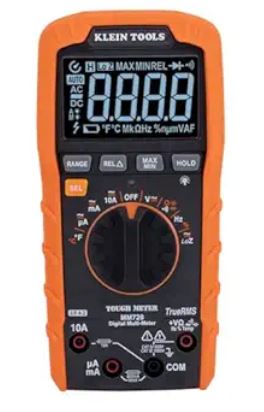
Testing the thermistor: Requires a multimeter (View on Amazon) to check resistance. At room temperature (70°F), the thermistor should read approximately 50,000 ohms. Infinite resistance indicates an open circuit confirming the error.
DIY replacement feasibility: Moderate difficulty. The exhaust thermistor typically mounts near the heating element or blower housing. Replacement parts cost $25-$60, and installation takes 30-45 minutes with basic tools.
F-23 – Exhaust Thermistor Short Circuit: The opposite of F-22—the thermistor is reading zero or near-zero resistance, indicating an internal short.
Diagnosis difference: While both F-22 and F-23 indicate thermistor failure, F-23 sometimes points to damaged wiring rather than the sensor itself. Inspect the wire harness for pinching, burns, or rodent damage before replacing the thermistor.
F-28 / F-29 – Moisture Sensor Errors: These codes indicate the moisture sensor bars inside the drum aren’t functioning correctly, preventing sensor dry cycles from working.
Common cause: Fabric softener and detergent residue builds up on the metal sensor strips, creating an insulating coating. The sensors cannot detect moisture through this film.
Simple fix: Locate the two metal strips inside the drum (usually near the lint filter opening). Scrub with rubbing alcohol on a cloth until all residue is removed. Test by running a sensor dry cycle—error should clear.
Mechanical and Motor Error Codes
Motor and mechanical errors indicate physical component failures rather than electronic issues. These often require parts replacement.
LE – Motor Locked Error: The drive motor cannot rotate the drum, either because something is physically blocking it or the motor itself has seized.
Immediate check: Open the dryer door and manually try to rotate the drum by hand. It should turn freely with minimal resistance.
If drum won’t rotate:
- Check for small items (socks, underwear) trapped between drum and housing
- Inspect the drum rollers for binding or seized bearings
- Examine the drive belt for proper positioning
If drum rotates freely: The motor itself has likely failed or the motor control circuit has issues. This typically requires professional diagnosis and motor replacement ($150-$300 installed).
F-26 – Door Latch/Lock System Failure: The door switch isn’t registering that the door is properly closed and locked, preventing the dryer from starting.
Troubleshooting progression:
- Open and firmly close the door—listen for the click of the latch engaging
- Wipe the door strike and latch area with damp cloth to remove lint
- Visually inspect the door strike for cracks or misalignment
- Test the door switch directly (requires accessing the switch and testing continuity using a multimeter)
Common fix: Door strikes can crack or warp over time, especially on heavily used dryers. Replacement strikes cost $10-$25 and install in 10 minutes with a screwdriver.
F-50 – Motor Speed Sensor Error: The motor’s tachometer (speed sensor) isn’t providing proper feedback to the control board about drum rotation speed.
This error is relatively rare but serious, as it indicates either a failing drive motor, damaged sensor, or control board communication problem. Professional diagnosis is recommended.
Heating System Error Codes
Heating errors affect drying performance and can indicate component failures in the heat generation system.
HC – Heating Circuit Error: The control board cannot properly regulate the heating element or gas burner ignition.
Electric dryer HC causes:
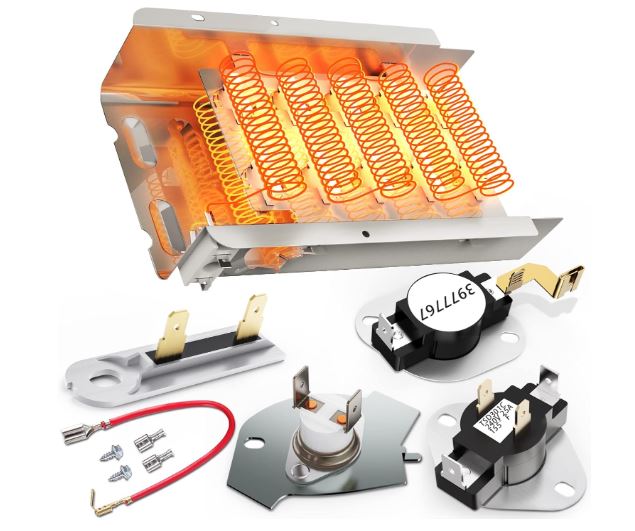
- Failed heating element (most common)
- Defective thermal fuse (safety cutoff)
- Faulty heating element relay on control board
- Broken wiring to heating assembly
Gas dryer HC causes:
- Igniter failure
- Gas valve solenoid malfunction
- Flame sensor contamination
- Thermal fuse failure
DIY diagnostic approach: Test if the dryer produces any heat. If completely cold, the heating element or igniter has likely failed. If it heats intermittently, thermal components or relays are suspect.
Cost expectations: Heating element replacement (View on Amazon) runs $50-$150 for parts and labor. Gas igniters cost $80-$180 installed. Thermal fuses are inexpensive ($10-$20) but labor adds to the cost.
Sensor and Control Error Codes
Less common errors that indicate specific control system or sensor malfunctions requiring technical knowledge to diagnose.
E1 / E2 – Thermistor Circuit Errors: Similar to F-22/F-23 but specific to certain model lines. E1 typically indicates the inlet thermistor circuit issue, while E2 points to outlet thermistor problems.
These errors require multimeter testing of thermistor resistance values and continuity checks of wiring harnesses.
dU – Door Unlock Error: The door lock system failed to unlock after the cycle completed. Usually resolved by unplugging the dryer for 60 seconds to reset the lock mechanism.
If dU persists, the door lock actuator may be mechanically stuck and need replacement ($60-$120 for parts and labor).
Preventive Maintenance to Avoid Whirlpool Dryer Error Codes
Most Whirlpool dryer error codes result from neglected maintenance rather than manufacturing defects. Implementing these practices reduces error occurrences by 70-80%.
Weekly maintenance tasks:
- Clean lint filter before every load (prevents AF codes)
- Wipe moisture sensor strips monthly with rubbing alcohol (prevents F-28/F-29)
- Inspect door seal and latch for debris accumulation
Quarterly maintenance checklist:
- Vacuum inside the lint filter housing with crevice tool
- Disconnect and clean the vent hose
- Check exterior vent cover for restrictions
- Verify drum rotates smoothly when turned by hand
Annual professional maintenance:
- Complete vent system cleaning from dryer to exterior
- Inspection of internal components (belts, rollers, motor)
- Testing of all thermal safety devices
- Control board connection inspection
Maintenance cost-benefit: Annual professional service costs $100-$150 but prevents 85% of common error codes and extends dryer lifespan by 3-5 years.
Common Whirlpool Dryer Error Code Questions
How do I reset my Whirlpool dryer after an error code appears?
For most error codes, perform a basic reset by unplugging the dryer from the wall outlet for 60-90 seconds, then plugging it back in. This clears temporary electronic glitches and resets the control board memory. Some models also allow a soft reset by pressing and holding the Start/Pause button for 5 seconds until the display clears.
After resetting, run a test cycle to verify the error doesn’t return immediately. If the same code reappears within one or two cycles, the reset has only temporarily masked an underlying problem that requires actual troubleshooting or repair. Repeated resets without addressing the root cause can damage control board components through electrical stress. For codes like PF (power failure), a simple reset is the complete solution, while codes like F-01 or F-50 indicate hardware failures that won’t resolve with resets alone.
What’s the difference between error codes that start with F versus E?
The letter prefix indicates the error code system generation and model series. “F” codes (F-01, F-22, F-26, etc.) appear on newer Whirlpool dryers manufactured from approximately 2015 onward and represent the current diagnostic system. These codes are more specific and pinpoint individual component failures with greater accuracy.
“E” codes (E1, E2) appear on older model lines or certain budget series, representing a simpler diagnostic system with broader error categories. While both systems serve the same purpose, F-codes provide more granular troubleshooting information. Some premium models display both an F-code and a secondary diagnostic number (like F-01 E2) for even more precise identification. The letter itself doesn’t indicate severity—an E1 code can be just as serious as an F-22, depending on the specific component affected.
Can I continue using my dryer if it shows an error code?
Absolutely not for most error codes. The dryer displays error codes specifically to prevent operation when unsafe conditions exist or when continued use could cause additional damage. Codes like AF (restricted airflow) indicate fire hazard conditions—operating the dryer with blocked ventilation risks igniting lint buildup.
Temperature sensor errors (F-22, F-23) mean the dryer cannot prevent overheating, potentially damaging clothes or causing thermal component failures. Motor errors (LE, F-50) indicate mechanical issues that could burn out the drive motor if operation continues.
The only exception is PF (power failure), which is informational rather than diagnostic—simply reset and resume. For all other codes, diagnose and resolve the issue before running another cycle. Ignoring error codes can transform a $50 sensor replacement into a $400 control board failure or create dangerous fire conditions in your home.
Why does my dryer show error code AF even after cleaning the lint filter?
The AF (restricted airflow) code triggers based on exhaust temperature and back-pressure measurements, not just lint filter cleanliness. While a clogged filter is the most common cause, the sensor responds to total system airflow restriction. If you’ve cleaned the filter but AF persists, the blockage exists elsewhere in the exhaust path.
Check the dryer’s internal exhaust duct (accessible by removing the lower front panel on most models) for accumulated lint. Inspect the flexible vent hose behind the dryer—crushing, kinking, or excessive length creates restriction. Verify the exterior vent cover opens freely and isn’t blocked by bird nests, lint accumulation, or ice buildup in winter.
In homes with long vent runs (over 15 feet) or multiple elbows, professional vent cleaning may be necessary to remove compacted lint the dryer sensor detects but you cannot see. The AF sensor is highly sensitive and will trigger even with 30-40% restriction that wouldn’t be obvious to visual inspection.
How much does it cost to repair a Whirlpool dryer based on error codes?
Repair costs vary dramatically based on the specific error code and component failure. Simple fixes like clearing a PF code or cleaning sensors for F-28/F-29 cost nothing beyond your time. Door latch repairs (F-26) typically run $80-$150 including the service call and parts. Thermistor replacements (F-22, F-23, E1, E2) cost $120-$200 for parts and labor.
More expensive repairs include control board replacement for F-01/F-70 ($250-$450), drive motor replacement for LE/F-50 ($200-$400), and heating element or gas valve repairs for HC codes ($150-$300). Factor in a $75-$100 diagnostic fee if the technician identifies multiple issues or needs specialized testing equipment.
For dryers over 10 years old showing expensive error codes (control board or motor failures), replacement often makes more financial sense than repair—new efficient dryers cost $400-$800 and include warranties, while repairing an old dryer provides no guarantee against the next component failing within months.
Take Control of Your Dryer Errors Before They Escalate
Understanding Whirlpool dryer error codes empowers you to distinguish between simple fixes and serious failures requiring professional intervention. Start by referencing the error code chart, then follow systematic troubleshooting for your specific code before calling for service. This approach saves $75-$100 in diagnostic fees for issues you can resolve yourself.
The pattern of error codes also reveals maintenance neglect versus genuine component aging. Repeated AF codes indicate poor vent maintenance, while F-22 or motor errors suggest normal wear after years of service. Tracking which codes appear and when helps you make informed repair-versus-replace decisions based on total cost of ownership.
Document error codes when they occur, photograph the display, and keep this guide accessible for quick reference. Many apparent dryer failures are temporary glitches resolved with proper resets, while others signal the end of appliance life. Knowing the difference protects you from unnecessary service calls while ensuring you address genuine safety concerns promptly.

Hi, I’m Barlgan! I created Repair Me Yourself to empower homeowners to tackle appliance repairs with confidence. From decoding error codes to fixing cooling issues, I break down complex repairs into simple, actionable steps that save you time and money.