
Your Whirlpool dishwasher uses a visual language of symbols and icons to guide you through wash cycles, maintenance reminders, and feature activations. These carefully designed indicators replace lengthy text descriptions with intuitive graphics that help you select the perfect settings for every load.
The challenge? Knowing exactly what each symbol means and when to use it for optimal cleaning results.
This troubleshooting guide deciphers every symbol you’ll encounter on your Whirlpool dishwasher—from control panel cycle buttons to display indicators and dispenser markings. You’ll discover which icons activate sensor-based intelligent washing, what flashing lights signal when they appear, and how understanding these symbols prevents common mistakes.
Master this visual language and you’ll unlock features you didn’t know existed while ensuring every dish emerges spotless.
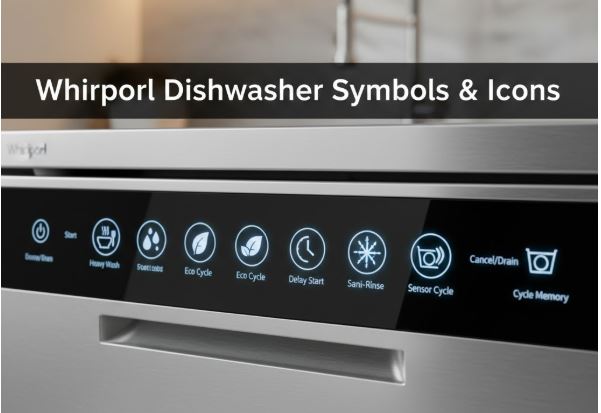
Whirlpool Dishwasher Symbols & Icons Quick Reference
| Symbol/Icon | Location | Function | Best Application |
|---|---|---|---|
| 6th Sense | Control panel | Sensor-based intelligent cycle | Mixed soil levels, optimal resource use |
| ECO text/leaf | Control panel | Energy-efficient standard cycle | Normal soiling, daily use |
| PowerClean P with star | Control panel | Intensive heavy-duty washing | Baked-on food, pots and pans |
| Cristal/Wine glasses | Control panel | Delicate gentle cycle | Fine glassware, fragile items |
| Clock/30 min | Control panel | Quick rapid wash | Light soiling, time constraints |
| Prewash/rinse only | Control panel | Refresh without detergent | Dishes waiting for full load |
| Silent/moon icon | Control panel | Quiet nighttime operation | Reduced noise emission |
| Sanitizing/medical cross | Control panel | Antibacterial high-temp wash | Baby items, cutting boards |
| Self-Clean | Control panel | Machine maintenance cycle | Monthly dishwasher cleaning |
| Sun/star symbol | Display/dispenser | Rinse aid indicator | Refill rinse aid reservoir |
| S letter marking | Display/dispenser | Salt refill required | Add dishwasher salt (hard water) |
| Multizone split rack | Display/option | Half-load washing | Upper or lower rack only |
| Delay hours (1-24) | Display | Delayed start countdown | Off-peak timing |
| WiFi connection lines | Display | Smart connectivity status | App control and monitoring |
Whirlpool Dishwasher Control Panel Cycle Symbols: Understanding Wash Programs
Whirlpool dishwashers feature distinct program symbols that optimize cleaning for specific dish types and soil levels. Understanding these primary cycle indicators helps you match washing intensity to your actual needs.
Intelligent Sensor Programs
6th Sense Symbol: The 6th Sense icon represents Whirlpool’s flagship intelligent washing technology. This sensor-driven program actively monitors water turbidity during the wash cycle, detecting soil levels and adjusting temperature, duration, and spray intensity accordingly. You’ll notice an animation appearing on digital displays when sensors are actively analyzing your load.
The 6th Sense program works brilliantly for mixed loads where some items are lightly soiled while others need aggressive cleaning. Cycle time varies from 40-70°C temperature ranges and can extend up to 20 minutes beyond initial estimates as sensors calibrate to actual conditions. This variability ensures optimal cleaning without wasting water or energy on unnecessarily long cycles.
PowerClean Symbol (P with Star): The distinctive PowerClean icon—typically shown as a capital P with a dotted star behind it—marks Whirlpool’s intensive cleaning program. This cycle delivers maximum spray pressure, extended wash time, and elevated temperatures specifically engineered for heavily soiled cookware.
PowerClean excels with baked-on casserole residue, greasy roasting pans, and cookware that sat overnight with dried food. The program combines aggressive mechanical action with optimal chemical activation, ensuring stubborn soils release completely. However, never use PowerClean for delicate items—the intensive spray pressure can damage fine glassware.
Standard and Specialized Cycles
ECO Program (Text or Leaf Symbol): Whirlpool dishwashers clearly mark the ECO cycle—either with “ECO” text or a leaf icon representing environmental consciousness. This program serves as the standard reference cycle for energy label compliance with European EN 50242 regulations.
ECO balances cleaning performance with resource conservation, making it ideal for normally soiled everyday dishes. The cycle extends duration compared to Quick programs but uses significantly less energy and water. For routine dishwashing without heavy soiling, ECO delivers thorough cleaning while minimizing utility bills.
Cristal/Delicate Symbol (Wine Glasses): The unmistakable wine glass or cup icon marks the Cristal program designed exclusively for delicate items. This gentle cycle reduces water pressure, lowers temperatures to protect heat-sensitive materials, and minimizes mechanical action that could chip fragile items.
Use Cristal exclusively for fine crystal, delicate stemware, and items marked as hand-wash preferred that you choose to machine wash carefully. Regular glassware doesn’t require this gentle treatment and may not dry as thoroughly due to the lower temperatures.
Quick Wash Symbols (Clock or 30 Min): Rapid wash programs appear marked with clock icons or specific time indicators like “30 min” or “Rapid 30.” These abbreviated cycles complete washing in approximately 30-60 minutes, making them perfect for lightly soiled dishes needing quick turnaround.
Quick cycles sacrifice some thoroughness for speed and typically omit or shorten drying phases. The trade-off works well for glasses between uses or dishes that just need freshening, but heavily soiled items require standard cycles for proper cleaning.
Maintenance and Specialty Symbols
Silent Program (Moon Icon): The moon or nighttime symbol indicates the Silent cycle specifically optimized for quiet operation. This program ensures optimal cleaning and drying performance while minimizing noise emission—ideal for running dishwashers overnight or during quiet hours.
Silent cycles typically extend duration slightly compared to standard programs because gentler spray action requires longer contact time. The reduced noise level makes this worthwhile for households where dishwasher operation during sleeping hours provides scheduling convenience.
Sanitizing Symbol (Medical Cross): The medical cross or sanitizing icon activates antibacterial high-temperature washing. This specialized program heats final rinse water to levels that eliminate 99.999% of bacteria, with testing verified by institutions like Institut Pasteur using standardized protocols.
Use sanitizing cycles for baby bottles, cutting boards, pet dishes, or anytime health concerns warrant thorough bacterial elimination. The elevated temperatures consume more energy but deliver peace of mind for hygiene-critical items.
Self-Clean Program: Self-cleaning symbols indicate the maintenance cycle designed to clean the dishwasher itself. Run this program monthly using specialized dishwasher cleaner with an empty tub to remove grease buildup, mineral deposits, and odors from internal components.
The machine clean cycle uses hot water and specific spray patterns to flush residual soils from spray arms, filters, and hidden crevices that regular cycles don’t thoroughly clean. Tank-cleaning cycles also run automatically every 30 cycles on models with recycling water systems.
Whirlpool Dishwasher Display Panel Symbols
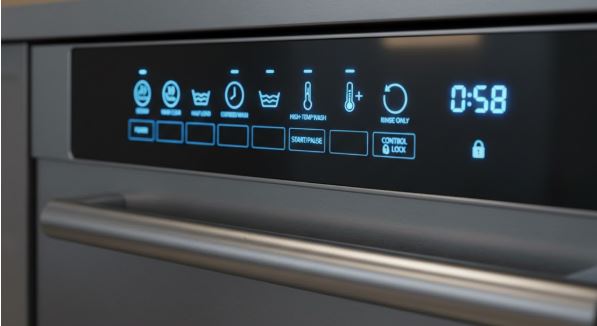
Digital displays on Whirlpool models communicate operational information through symbols, text, and LED indicators that change throughout cycles.
Essential Alert Symbols
Sun/Star Symbol (Rinse Aid): The sun or star symbol appearing on displays or illuminated near the dispenser indicates low rinse aid levels requiring refill. This additive isn’t optional if you want spot-free, properly dried dishes—rinse aid reduces water surface tension so droplets sheet off rather than forming spots.
When this symbol illuminates, open the rinse aid dispenser compartment marked with a matching sun or star icon and fill with liquid rinse aid to the MAX line. The indicator should extinguish once sensors detect adequate reservoir levels.
S Letter Symbol (Salt Indicator): Models designed for European markets or hard water areas display an “S” symbol when the salt reservoir needs refilling. Dishwasher salt prevents limescale formation on dishes and protects functional components from mineral damage.
The salt reservoir is mandatory and must never remain empty on equipped models. After adding salt, run a program without loading to circulate solution properly. The guarantee may not cover damage from salt neglect, as residual saline solution or grains can irreparably corrode stainless steel components.
Closed Water Tap Symbol: A water tap icon with an X or slash indicates the dishwasher cannot access adequate water supply. This flashing alert means either the supply valve under your sink is closed, water pressure is insufficient, or the inlet hose is kinked or blocked.
Check that your water supply valve is fully open and household pressure exceeds minimum requirements. Inspect the inlet hose for kinks and verify the inlet filter screen isn’t clogged with sediment.
Operational Status Indicators
Multizone Symbols (Split Rack Icons): The Multizone feature displays as split rack symbols showing upper, lower, or cutlery rack zones. This energy-saving option allows washing just one rack level when you don’t have a full load, reducing water and energy consumption.
Select which rack zone contains your dishes—the dishwasher operates only the necessary spray arms for that area. This prevents wasting resources on empty rack sections while still delivering thorough cleaning to loaded areas.
Delay Start Hours (01-24): Two-digit numbers from 01 to 24 appearing on displays indicate delay start activation rather than cycle time remaining. These numbers count down hours until the wash cycle actually begins, allowing scheduling during off-peak electricity rates or ensuring cycles complete at convenient times.
To cancel unintended delays, press the delay button repeatedly until numbers disappear, or consult your manual for the specific cancel procedure on your model.
WiFi Connection Symbol: Connected Whirlpool models display WiFi status symbols showing network connection state. This enables remote monitoring and control through the 6th Sense Live app, allowing you to start cycles, receive completion notifications, and download custom programs to your dishwasher.
The setup process requires registering your appliance and connecting to your home network using either WPS or scan-to-connect methods. Once connected, smart features open up remote supervision capabilities from tablets or smartphones.
Whirlpool Dishwasher Dispenser Compartment Symbols
Understanding dispenser markings ensures proper product placement for optimal cleaning results.
| Compartment | Symbol/Marking | Product Type | Usage Guidelines |
|---|---|---|---|
| Main wash (large) | No specific symbol | Tablets, powder, or gel detergent | Fill for every standard cycle |
| Prewash (small) | Roman numeral I or smaller section | Detergent for prewash phase | Only when prewash program selected |
| Rinse aid reservoir | Sun/star icon or text | Liquid rinse aid only | Fill to MAX line, refill monthly |
| Salt reservoir | S letter marking | Dishwasher salt crystals | Bottom of dishwasher, fill completely |
Detergent Dosage Recommendations: For normally soiled items, use approximately 35g of powder detergent or 35ml of liquid detergent in the main compartment. Add an additional teaspoon directly in the tub for heavily soiled loads. If items were rinsed before loading, reduce detergent by 25-50%.
Inside the main dispenser, you’ll find measurement indicators helping with precise dosing. Tablets dissolve completely during modern cycle timing, but powder or gel allows more precise dosage control based on actual soil levels.
Rinse Aid Importance: Never pour rinse aid directly into the tub—it belongs exclusively in the marked dispenser reservoir. The rinse aid dosage adjuster ranges from 1-6, with factory settings typically at level 4. Lower settings dispense less product, while higher settings increase dosage for enhanced drying.
If you see streaks on dishes, reduce dosage to levels 1-3. If dishes aren’t perfectly dry, increase to levels 5-6. Note that plastic items naturally dry poorly regardless of rinse aid settings.
Option Selection Symbols: Customizing Your Wash
Beyond basic cycles, Whirlpool dishwashers offer enhancement options marked by specific symbols that modify standard programs.
Extra Dry/Heated Dry: This option symbol activates extended drying with elevated temperatures. The feature adds significant drying time but dramatically improves results, particularly for plastic containers that typically retain moisture. Some models separate this into distinct options controlling whether heating elements activate during the drying phase.
Half Load/Zone Selection: Half load symbols allow running partial loads efficiently by operating only selected rack zones. This prevents energy and water waste when you don’t have enough dishes for a full load. Ensure items are loaded in the designated zone matching your selection.
Tablet Option: Some models include a tablet-specific symbol indicating settings optimized for detergent tablets rather than powder or gel. This adjustment accounts for different dissolution rates ensuring tablets release completely during the cycle.
Delayed Start: Clock symbols activate delay start features, allowing cycle initiation from 1-24 hours in the future. This scheduling capability enables running dishwashers during off-peak electricity rates or ensuring cycles finish exactly when needed.
Troubleshooting Whirlpool Dishwasher Symbol-Related Confusion
Issue: Symbols Appear Different Than Manual Shows
Whirlpool periodically updates symbol designs across model generations. Your specific model may use slightly different icons than generic guides or manuals from different product series. Always reference documentation matching your exact model number for definitive symbol identification.
Issue: Indicator Stays Lit After Refilling
Salt and rinse aid indicators sometimes remain illuminated for one or two complete cycles after refilling before sensors detect adequate levels. This delay is normal sensor behavior—continue running cycles and the symbol should extinguish.
Issue: Unknown Symbol Suddenly Illuminates
New symbols appearing unexpectedly often indicate reminder features rather than errors. The machine clean reminder flashes after every 30 cycles suggesting maintenance, while rinse aid and salt symbols alert to refill needs.
Frequently Asked Questions
What does the 6th Sense symbol mean on my Whirlpool dishwasher and when should I use it?
The 6th Sense symbol represents Whirlpool’s intelligent sensor-based washing program that automatically adjusts cycle parameters based on actual soil detection. During operation, turbidity sensors measure water cloudiness throughout the wash cycle, then optimize temperature, spray intensity, and duration to match the detected soil level.
This program works exceptionally well for mixed loads containing both lightly and heavily soiled items, or when you’re uncertain about optimal cycle selection. The 6th Sense adapts to your specific load rather than running a predetermined sequence. You’ll notice the estimated time adjusting during initial minutes as sensors gather data—cycle duration can vary from the initial estimate by up to 20 minutes as the system calibrates.
For routine dishwashing when you want the dishwasher to make intelligent decisions about resource usage, 6th Sense delivers thorough cleaning while avoiding the waste of running unnecessarily intensive cycles on lightly soiled loads.
How do I know when to refill rinse aid when I see the sun or star symbol?
The sun or star symbol illuminating on your display or near the dispenser compartment indicates the rinse aid reservoir has dropped below adequate levels and requires refilling. This isn’t an optional reminder—rinse aid is essential for proper drying performance, as it reduces water surface tension allowing water to sheet off dishes rather than forming droplets that leave spots.
Open the rinse aid dispenser compartment inside the door, which is marked with a matching sun or star icon. Fill the reservoir with liquid rinse aid up to the MAX line—avoid overfilling as excess product can overflow during dispensing. The indicator symbol should extinguish once sensors detect the reservoir is adequately filled, though it may take one or two complete cycles before the display updates.
If you use combination detergent tablets with built-in rinse aid, you can sometimes disable the low rinse aid warning through settings menus, though separate rinse aid typically provides superior drying results compared to tablet formulations.
What’s the difference between PowerClean and the regular ECO cycle on Whirlpool dishwashers?
PowerClean and ECO represent opposite ends of the cleaning intensity spectrum, each optimized for different scenarios. PowerClean, marked by a P with a star icon, delivers maximum cleaning power through elevated temperatures, extended wash time, and aggressive spray pressure designed specifically for heavily soiled cookware with baked-on food residue. This intensive program consumes more water and energy but ensures even stubborn soils release completely.
ECO, shown as text or a leaf symbol, serves as the standard energy-efficient cycle for normally soiled everyday dishes. It extends cycle duration compared to quick programs but uses significantly less water and energy than intensive cycles like PowerClean. ECO is designed to meet energy label standards and represents the best balance between cleaning performance and resource conservation for routine dishwashing.
Choose PowerClean when dealing with greasy roasting pans or overnight dried casserole dishes, and select ECO for your typical daily loads where soil levels don’t warrant intensive treatment. Using PowerClean for lightly soiled items wastes energy, while using ECO for heavily soiled cookware may deliver disappointing results.
Can I combine multiple option symbols like Multizone and Extra Dry on my Whirlpool dishwasher?
Most Whirlpool dishwashers allow combining compatible options to customize cycles for specific needs. Multizone and Extra Dry typically work together without conflict—you can wash only the upper rack while extending drying time for better moisture removal from that zone. The control panel either prevents incompatible combinations by not allowing both buttons to illuminate simultaneously, or it automatically deselects conflicting options when you attempt incompatible selections.
However, certain combinations are impossible due to conflicting requirements. Quick or rapid wash programs cannot combine with extra drying options because abbreviated cycles omit extended drying phases by design. Similarly, the tablet option may not work with all cycle types. When you select an option incompatible with your chosen program, the corresponding LED typically flashes rapidly three times and beeps to indicate the selection isn’t allowed.
Your dishwasher’s manual contains a compatibility matrix showing which options work with specific programs. If uncertain, select your desired primary cycle first, then add options—the dishwasher’s logic prevents incompatible combinations automatically.
Why does my Whirlpool dishwasher display show delay hours when I didn’t set a delay start?
If your display unexpectedly shows numbers 01-24, you accidentally activated the delay start feature, which counts down hours until the wash cycle begins rather than showing cycle time remaining. This commonly happens on touch-sensitive control panels where light button contact during cleaning or selection can trigger the delay function.
To cancel an unintended delay, locate the delay start button (often marked with a clock symbol or hours text) and press it repeatedly—each press cycles through delay hour options. Continue pressing until the display no longer shows countdown numbers, indicating delay start is deactivated. Alternatively, some models allow canceling by pressing and holding the start button for several seconds to completely reset the program, though this also clears other customized options you’ve selected.
If button presses don’t clear the delay, turning the dishwasher completely off at the control panel then back on typically resets all settings, though you’ll need to reprogram your desired cycle. Going forward, be aware that delay start buttons are often positioned where they’re easily activated accidentally, especially on models with sensitive touch controls rather than physical buttons.
Unlock Your Whirlpool’s Full Potential Through Symbol Mastery
Whirlpool dishwasher symbols evolve from mysterious icons into an intuitive communication system once you understand their meanings and applications. Each symbol represents carefully engineered features designed to deliver optimal results—from 6th Sense sensors that adapt to your specific loads to Multizone options that prevent wasting resources on partial loads.
Keep this guide accessible for quick reference when exploring new features or encountering unfamiliar symbols or error codes. The symbols on your control panel and display aren’t arbitrary decorations—they’re your direct line to understanding what your dishwasher can do and how to harness its full capability.
Your Whirlpool dishwasher speaks clearly through its visual language. Now that you’re fluent, every load benefits from precisely matched cleaning power, intelligent resource management, and features you may not have realized existed. The difference between adequate results and exceptional performance often comes down to simply selecting the right symbol for your specific needs.

Hi, I’m Barlgan! I created Repair Me Yourself to empower homeowners to tackle appliance repairs with confidence. From decoding error codes to fixing cooling issues, I break down complex repairs into simple, actionable steps that save you time and money.