
Samsung refrigerator symbols fall into three groups. Feature icons light up when you or someone in your house turns on Power Cool, Power Freeze, Vacation or a lock. Status codes like OF OF, AP or a fully flashing panel report a mode. Letter-number codes such as 22E or 83E point to a failed part or a loose connection.
Sort the symbol first, then act. Most of the Samsung refrigerator symbols you’ll worry about belong to the first two groups. They clear with a 3-second press.
Only the fault codes need a part, a reset at the breaker or a technician. Button names change from panel to panel, so match the label printed on yours.
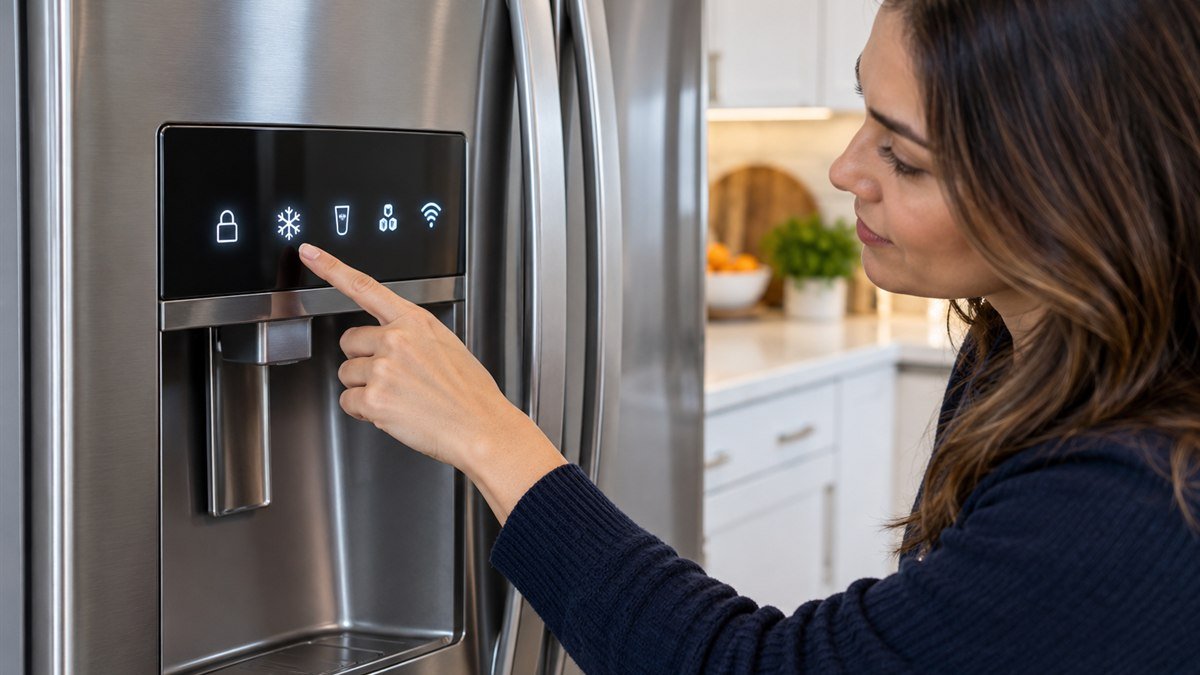
Samsung refrigerator symbols at a glance
These are the icons Samsung documents across its French door, side-by-side, top-freezer and Bespoke panels. Not every model has every icon. If you’re looking at one that isn’t listed, your model’s user manual settles it.
| What you see | What it means | How to turn it on or off |
|---|---|---|
| Lock or key icon lit | Control lock is on. Buttons won’t respond. | Hold the button marked Lock, Control Lock, Door Alarm or Ice Maker Off for 3 seconds. |
| Snowflake (freezer side) | Power Freeze is running at full fan speed. | Hold Freezer (or Power Freeze) for 3 seconds. Samsung’s support pages say it shuts off by itself after about 50 hours on many models. |
| Power Cool indicator (fridge side) | Power Cool is pulling the fridge down fast. | Hold Fridge (or Power Cool) for 3 seconds. Samsung lists about two and a half hours on one-door panels. |
| Umbrella or suitcase | Vacation mode. The fridge section runs warm to save power, while the freezer keeps running. | Press Vacation. On some top-freezer panels, press Fridge once more after the coldest setting. Empty the fridge first. |
| Door Alarm indicator | Door alarm is armed. It beeps if a door stays open more than two minutes. | Press Door Alarm to switch it off. The icon blinks while the alarm sounds. |
| Filter indicator lit or changed color | About six months have passed since the last filter reset. | Replace the filter, then hold Filter Reset for 3 seconds. On many panels it shares a button with Alarm or Ice/Water. |
| Ice Off lit | The ice maker is switched off. | Hold Ice Off or Ice Maker for 3 seconds. |
| Ice Off blinking | The ice bucket is missing or not seated. | Pull the bucket and push it back until it clicks. |
| Cubed or crushed | The ice type the dispenser will deliver. | Press the Ice button to switch. |
| Wi-Fi icon | The fridge is connected to your home network for SmartThings. | Managed in the SmartThings app. |
Remember the 3-second hold. A short tap only changes a setting, while a held press switches the whole feature behind that button on or off.
How do you unlock a Samsung fridge control panel?
To unlock a Samsung fridge control panel, press and hold the lock button for about 3 seconds until the lock icon goes out. On panels without a Lock label, Samsung uses the Door Alarm or Ice Maker Off button for the same 3-second hold.
Panels inside the fridge or on top of a door lock themselves after about a minute without a touch. That’s normal. It’s also why your panel can seem dead the morning after you set it. Samsung Canada lists the Door Alarm hold as the unlock for these.
Your dispenser has its own lock. On models with a water and ice dispenser, Samsung’s support pages say you toggle it by holding Water or Ice for more than 3 seconds.
It doesn’t touch the main panel. So you can have a locked dispenser right next to an unlocked display.
What does OF OF mean on a Samsung refrigerator?
OF OF, O FF, OFF OFF or scrolling temperature bars mean the fridge is in Cooling Off mode, also called Demo or Shop mode. Cooling, ice making and the water dispenser are all switched off. Samsung’s support page says service is not required.
Stores use this mode so the lights and display work on the sales floor without the compressor running. It can also get switched on by accident if two buttons are held together, say while you’re wiping the panel.
Food in a fridge stuck in demo mode will spoil. If your display has read OF OF for hours, move the food out first.
The exit combination depends on your panel. You’ll find these on Samsung’s OF OF troubleshooting page:
- Two buttons on the left: hold the top two left buttons for about 8 seconds, until it chimes.
- Newer three-button and four-button panels: hold the top two left buttons plus the top right button for about 8 seconds.
- French door with Power Freeze: hold Power Freeze and Freezer for about 8 seconds. If that fails, add Fridge.
- French door without Power Freeze: hold Ice Off and Freezer for about 8 seconds.
- Fridge and FlexZone buttons: hold both for about 6 seconds until the display blinks, then touch Door Alarm while it’s still blinking.
- Bespoke and other panels with < and > arrows: hold < and > for 6 seconds, then press O.
- Family Hub: Apps, Fridge Manager, Fridge Settings, Cooling Off, then Deactivate.
Did the combination do nothing? Check the lock icon. A locked panel ignores the demo-mode combination, so unlock it first and try again.
After the chime, give the fridge a few hours before you judge the temperature.
Status codes that are not faults
A few displays look alarming. You don’t need to fix any of them.
- Every icon flashing after power comes back: the fridge is running a self-diagnostic after being plugged in or after an outage. Leave it alone and it settles.
- AP: the fridge is acting as a Wi-Fi access point for SmartThings setup. It clears once setup finishes, or after a while if you never complete it.
- 85C: low voltage was detected, often after a brief outage. Samsung calls it harmless and says to hold OK for 3 seconds to clear it.
Codes that mean a part or connection has failed
Letter-number codes are your fridge reporting a specific fault. Samsung’s refrigerator error code list separates the ones you can clear yourself from the ones that need service.
21E is the freezer fan. 22E or 22C is the fridge fan. Samsung says both usually mean the fan isn’t turning, often because it’s iced up or a door was left open or isn’t sealing.
Close the doors and check the gaskets for a fold. Then see whether the code returns.
83E, 85E and 86E are compressor current and voltage errors. 88 88 is a communication fault that often follows a power blip at startup. For all four, you cut power for 60 seconds at the plug or the breaker, then restore it.
PC ER or PC CH means two boards lost contact. Cut power, disconnect and reconnect the wire harness above the door, then power back up.
Had the doors taken off to get the fridge through a doorway? That harness is the first thing I’d look at.
Codes like 5E, 8E, 14E, 33E, 39E, 40E and 84C cover defrost sensors, ice maker parts and a locked compressor. You’ll need a part for these. Ice-related codes overlap with the fixes in the Samsung ice maker problems walkthrough.
Don’t keep unplugging the fridge to make a code go away. Samsung warns that clearing codes you weren’t told to clear can hinder diagnosis. Your technician needs to see what the board recorded.
Panel dark, frozen or beeping: the order to check it
Check the cheap things before you assume the board has died. On my service calls, a “dead” Samsung panel turned out to be locked or in demo mode more often than broken.
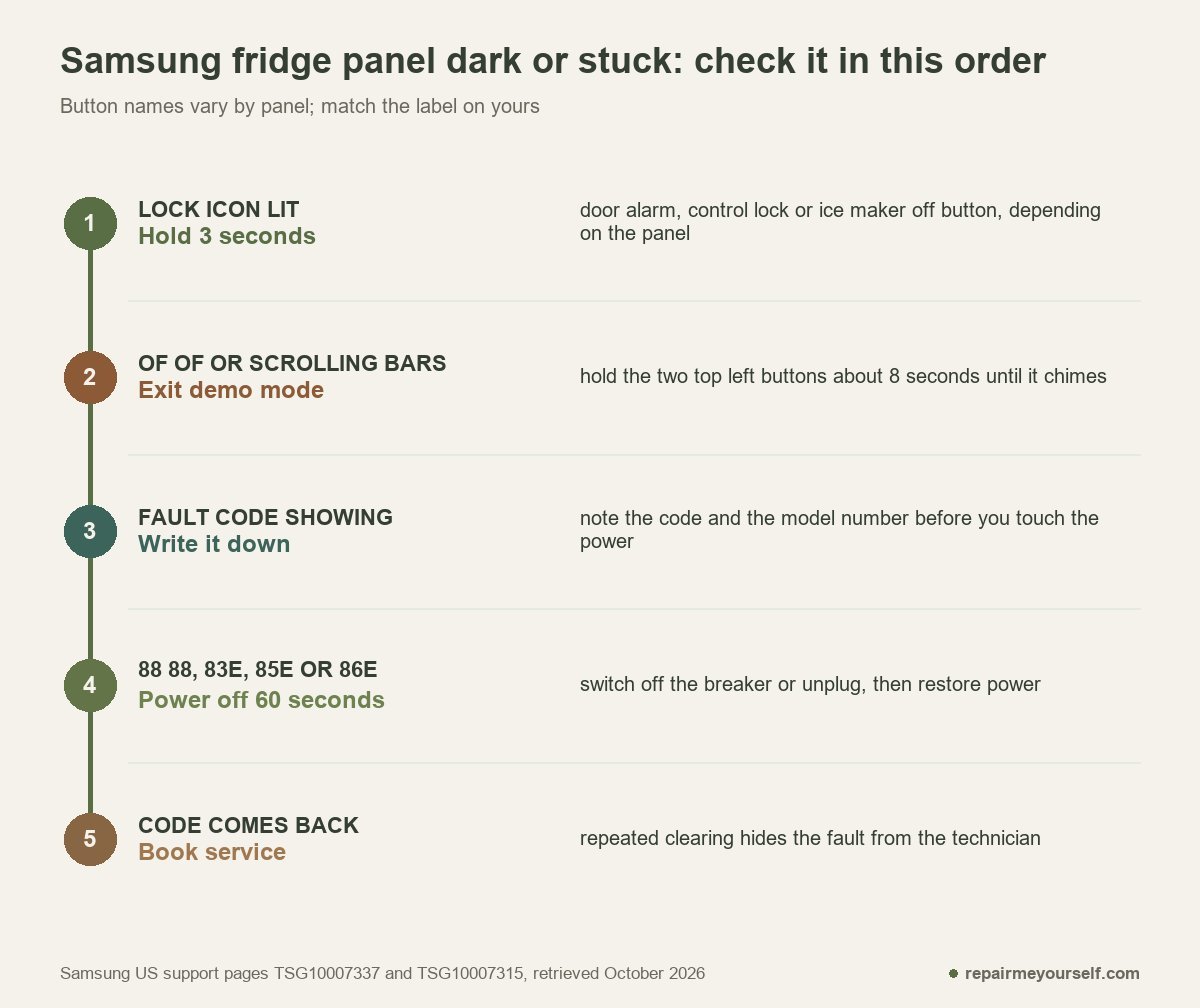
Start with the lock icon and the 3-second hold. Then look for OF OF or scrolling bars.
If you see a code, write it down. Add the model number from the label inside the fridge before you touch the power.
Only then try the 60-second power cycle, and only for the codes Samsung lists it for.
Is the fridge warm while the panel shows normal temperatures? Then your display is fine. Start with the Samsung fridge not cooling checks instead, or the full Samsung fridge reset steps if the panel froze mid-setting.
Stop and get a technician if a compressor code returns after the power cycle, the panel stays blank with the breaker on, or you smell burning near the controls.
Other questions about Samsung refrigerator symbols
What temperature should a Samsung fridge be set to?
Samsung’s US support page recommends 38°F for the refrigerator and -2°F for the freezer. If your display reads those numbers and food still feels warm, look at the cooling system next.
How do you defrost a Samsung refrigerator?
Most Samsung refrigerators are frost-free and don’t need routine defrosting. For heavy frost, unplug the fridge, empty it and leave the doors open until the ice melts. Samsung warns against a hair dryer or any heat source. It says frost that comes back after defrosting needs service.
Why is the Ice Off light blinking on my Samsung fridge?
A blinking Ice Off light on a Samsung fridge means the ice bucket is missing or not seated. Remove the bucket, clear any ice jammed behind it, and push it back until it locks.
If a fault code survives the documented power cycle, have the code and the model number ready before you book service. Those two details decide which part your technician brings. For a sense of which Samsung parts fail most, the Samsung refrigerator reliability review covers the repeat offenders.