
Modern Samsung dishwashers communicate through a sophisticated system of symbols, icons, and LED indicators that control everything from wash intensity to drying methods. These visual cues replace lengthy text labels, creating sleek control panels that pack tremendous functionality into compact spaces. The challenge? Deciphering what each symbol actually means when you encounter it for the first time.
This troubleshooting guide translates every symbol you’ll find on Samsung dishwasher control panels, displays, and dispensers. You’ll discover which icons activate specialized cleaning modes, what LED light patterns indicate when they flash, and how dispenser symbols ensure you’re adding products to the correct compartments. Master these symbols and you’ll unlock your dishwasher’s full potential while avoiding costly mistakes.
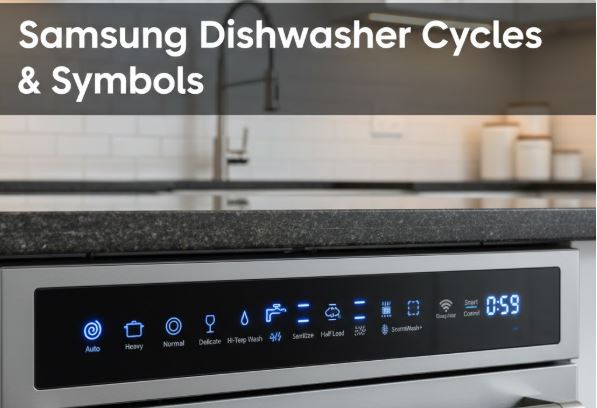
Samsung Dishwasher Symbols Quick Reference
| Symbol/Indicator | Function Category | What It Controls | When to Use It |
|---|---|---|---|
| Auto/Smart Auto icon | Cycle selection | Sensor-based automatic cycle adjustment | Unknown soil levels, mixed loads |
| Pot/pan icon | Cycle selection | Heavy or Intensive wash program | Baked-on food, greasy cookware |
| Wine glass icon | Cycle selection | Delicate cycle for fragile items | Fine crystal, stemware only |
| Clock/lightning bolt | Cycle selection | Express 60 or Quick+ rapid wash | Lightly soiled, time-sensitive loads |
| Lower rack only | Option selection | Half load – bottom rack activation only | Small loads, energy savings |
| Zone Booster Left/Right | Option selection | Intensive cleaning on selected rack section | Heavily soiled items in specific area |
| Speed Booster | Option selection | Reduces cycle time significantly | When faster completion needed |
| Sanitize indicator | Option selection | High-temperature sanitization mode | Baby items, cutting boards, health concerns |
| Dry+ symbol | Option selection | Extended drying with higher temperatures | Plastic items, thorough drying needed |
| Delay Start numbers | Display feature | Hours until cycle begins (1-24) | Off-peak electricity rates, scheduling |
| Snowflake/star icon | Dispenser indicator | Rinse aid compartment marking | Refill rinse aid here |
| Child lock symbol | Safety feature | Control panel lock activation | Prevent accidental button presses |
Samsung Dishwasher Control Panel Cycle Selection Symbols
Normally, Samsung dishwasher cycle symbols appear as buttons or touch-sensitive areas on your control panel. Understanding these primary program indicators helps you match wash intensity to your actual needs.
Primary Cycle Icons
Auto/Smart Auto Symbol: The Auto icon typically appears as a stylized “A” or automatic symbol. This intelligent cycle uses turbidity sensors to measure water cloudiness, then adjusts temperature, duration, and spray intensity accordingly. The dishwasher essentially makes the decisions for you based on real-time soil detection.
During the initial minutes of an Auto cycle, you’ll notice the time estimate adjusting as sensors gather data. This cycle works exceptionally well for mixed loads where some items are lightly soiled while others need more aggressive cleaning.
Heavy/Intensive Icon (Pot Symbol): Represented by heavily soiled dishes or cooking pot icons, this program delivers maximum cleaning power. Water temperatures reach their highest levels, spray arms operate at full pressure, and cycle duration extends significantly compared to normal washes.
The Heavy cycle excels with baked-on casserole dishes, greasy roasting pans, and cookware that sat overnight with dried food residue. However, it’s unnecessarily harsh for everyday dishes and wastes energy when soil levels don’t warrant intensive treatment.
Normal Cycle Indicator: Often shown as standard plates or a simple cycle icon, Normal represents the default setting for everyday dishwashing. This balanced program handles typical food residue from regular meals without excessive energy consumption.
Most households should use Normal as their primary cycle, reserving Heavy for truly stubborn loads. Samsung designs Normal to deliver thorough cleaning for the majority of dishwashing situations.
Others
Delicate/Wine Glass Symbol: The unmistakable wine glass icon marks the gentle cycle specifically engineered for fine glassware and delicate china. This program reduces water pressure, lowers temperatures, and minimizes mechanical action that could chip or damage fragile items.
Samsung explicitly warns against using Delicate for regular glassware, as the lower temperatures and gentler action may leave spots or film. Reserve this cycle exclusively for items marked as hand-wash preferred but that you choose to machine wash carefully.
Express 60/Quick+ Icon: Lightning bolts or clock symbols indicate rapid wash programs completing in approximately 60 minutes. These abbreviated cycles suit lightly soiled items that need quick turnaround—perfect for when you need clean glasses before guests arrive or want to reuse dishes between meals.
The speed comes with tradeoffs. Express cycles omit or shorten drying phases and use higher temperatures to compensate for reduced wash time, consuming more energy per minute of operation.
Specialized Program Symbols
Chef Cycle Indicator: Select Samsung models feature a Chef program designed for simultaneous washing of heavily and lightly soiled items. This cycle pairs with Zone Booster functionality—you load extremely dirty items in the designated intensive zone while placing lightly soiled items elsewhere.
Self Clean Icon: A dedicated self-cleaning symbol activates the maintenance cycle that removes grease buildup, mineral deposits, and odors from internal components. Run this program monthly with an empty tub using specialized dishwasher cleaner or citric acid.
Advanced Samsung Dishwasher Symbols
Beyond basic cycle selection, Samsung dishwashers offer enhancement options marked by specific symbols that modify standard programs.
Cleaning Intensity Options
Zone Booster Symbols (Left/Right): These revolutionary symbols appear on models featuring targeted intensive cleaning. Zone Booster activates five additional nozzles on either the left or right side of the lower rack, concentrating maximum spray power on the most heavily soiled section.
You’ll see “Zone Booster L” and “Zone Booster R” indicators on the control panel. Select both simultaneously to activate intensive cleaning across the entire lower rack. This feature particularly benefits households with mixed load requirements—delicate glassware coexists safely with greasy skillets when you zone the intensive cleaning appropriately.
Storm Wash Indicator: The Storm Wash symbol represents Samsung’s most powerful cleaning mode, surpassing even standard Heavy cycles. This option directs maximum water pressure and temperature to designated areas, making it ideal for the most stubborn baked-on food residue.
Speed Booster Icon: When time matters more than energy efficiency, the Speed Booster symbol reduces cycle duration significantly. This option works with Auto, Normal, and Intensive cycles by intensifying cleaning action and increasing temperatures to compensate for shortened time.
Speed Booster typically cuts 20-40% from standard cycle times. The energy efficiency tradeoff is substantial—you’ll use more electricity per minute of operation.
Drying Enhancement Symbols
Dry+ Indicator: The Dry+ symbol activates extended drying with elevated final rinse temperatures. This option adds approximately 60 minutes to cycle time but dramatically improves drying results, particularly beneficial for plastic containers that typically retain moisture.
Heated Dry Icon: Some models separate standard drying from heated drying options. The heated dry symbol activates the heating element during the drying phase, ensuring items emerge completely dry rather than just air-dried.
AutoRelease Door Indicator: Advanced Samsung models feature an AutoRelease symbol indicating automatic door opening at cycle completion. The door cracks open several inches, allowing steam to escape while a fan creates an air curtain protecting your countertop. This innovation improves drying results by up to 35% compared to sealed drying.
Sanitization and Temperature Options
Sanitize Symbol: The sanitize indicator shows when high-temperature sanitization activates. This option increases final rinse temperature to 70°C (158°F), achieving NSF-certified bacteria elimination of 99.999%. The sanitize light blinks during temperature ramping and remains solid once sanitization levels are reached.
You cannot combine Sanitize with Delicate or Quick cycles—the temperature requirements conflict with these programs’ design parameters.
Hi-Temp Wash Icon: Separate from Sanitize, the Hi-Temp symbol increases main wash temperature specifically to tackle baked-on or greasy soiling. This option works during the cleaning phase rather than just the final rinse.
Samsung Dishwasher Display Panel Symbols and Indicators
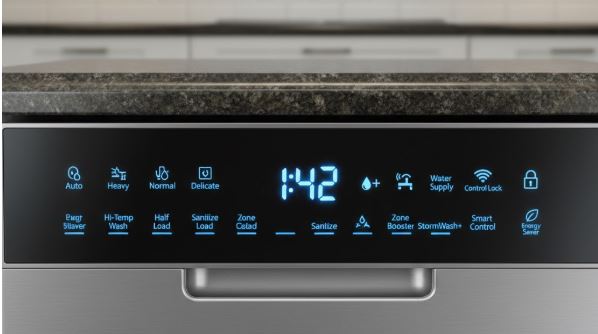
Digital displays on Samsung dishwashers show real-time information through numbers, text, and changing indicator lights.
Time and Progress Indicators
Delay Start Numbers (01-24): When you see two-digit numbers on the display, they represent delay start hours rather than cycle time remaining. These numbers count down from your set delay time until the cycle begins. Delay start allows scheduling washes during off-peak electricity hours or ensuring cycles complete exactly when needed.
To cancel delay start, press the Delay Start button repeatedly until numbers disappear, or hold START for three seconds to cancel the entire program.
Cycle Time Remaining Display: Once a cycle begins, the display shows estimated minutes until completion. Samsung dishwashers dynamically adjust these estimates based on actual water temperature, load detection, and selected options. Time may extend if sensors detect excessive soil or foam.
Progress Indicator Lights: Models with LED progress displays show which phase is active—Wash, Rinse, or Dry. These illuminated arrows or icons help you determine whether you can safely add forgotten items or estimate how much longer until completion.
Status and Alert Symbols
Rinse Aid Indicator (Snowflake/Star): A persistent snowflake or star symbol on the display means rinse aid levels are low. This indicator corresponds to the dispenser compartment marked with a matching symbol. Refill the reservoir to extinguish the alert and restore optimal drying performance.
Child Lock Symbol: When illuminated, the lock icon shows the child safety feature is engaged. All buttons except Power become unresponsive until you deactivate the lock. The specific button combination varies by model—commonly holding specific buttons for three seconds.
WiFi/Smart Control Icon: Connected Samsung models display WiFi status symbols showing network connection state. This enables remote monitoring and control through the SmartThings app, allowing you to start cycles, receive completion notifications, and download custom programs.
Samsung Dishwasher Dispenser Compartment Symbols
Samsung dishwasher dispensers feature clear symbol markings indicating which products belong in each compartment.
| Dispenser Symbol | Product Type | Filling Guidelines | Important Notes |
|---|---|---|---|
| Main wash (no symbol) | Detergent tablets, powder, or gel | Fill for every standard wash | Largest compartment |
| Pre-wash (smaller section) | Detergent for pre-wash phase | Only when pre-wash selected | Not needed for most loads |
| Snowflake/star marking | Rinse aid liquid | Fill to MAX line monthly | Critical for spot-free drying |
| Water softener salt (some models) | Dishwasher salt crystals | Refill when indicator lights | European/hard water models only |
Dispenser Lid Mechanics: The main detergent compartment lid opens automatically during the wash cycle at precisely the right moment. Never place detergent directly in the tub bottom—it dissolves during pre-drain before the main wash begins, wasting product and compromising cleaning.
Rinse Aid Importance: The snowflake or star symbol marks the rinse aid reservoir. This additive isn’t optional if you want spot-free, properly dried dishes. Rinse aid reduces water surface tension, allowing water to sheet off rather than forming droplets that leave spots.
Special Feature Symbols for Advanced Samsung Dishwasher Models
Premium Samsung dishwashers incorporate unique technologies with corresponding symbols.
WaterWall Technology Indicators
WaterWall Symbol: Models featuring WaterWall technology display a distinctive symbol representing the linear wash system. Unlike traditional rotating spray arms, WaterWall creates a moving wall of water that sweeps back and forth, providing more consistent coverage.
Water Reflector Indicator: WaterWall models include a water reflector component. If improperly seated or blocked, specific error codes (7E/7C) appear. The reflector must move freely for WaterWall operation—obstructions trigger immediate cycle interruption.
Rack Selection Symbols
Upper Rack Only Icon: This symbol activates only the upper spray nozzle for small loads placed exclusively on the top rack. Using this feature with light loads reduces water consumption and cycle time while providing adequate cleaning for glasses and small items.
Lower Rack Only (Half Load) Symbol: The counterpart to upper-only washing, this symbol operates only the lower nozzle. Combine with Zone Booster or Storm Wash for heavily soiled pots and pans loaded in the bottom rack while saving energy by not running unused upper components.
Samsung Dishwasher LED Light Patterns: What Blinking Lights Mean
Not all Samsung dishwashers have digital displays. Models with LED indicators instead use light patterns to communicate status and error codes.
Single Blinking Light: One flashing LED typically indicates a minor issue like a stuck button or door not properly latched. Check that all buttons depress and release normally, and verify the door clicks shut completely.
Multiple Blinking Patterns: Complex blinking sequences represent specific error codes. Count the blinks in each sequence—for example, four blinks followed by a pause then four more blinks translates to error code 4C/4E (water inlet problem). Consult your model’s manual for the complete blinking pattern interpretation chart.
Troubleshooting Samsung Dishwasher Symbol-Related Confusion
Issue: Symbols Appear But Nothing Happens
Verify the child lock isn’t engaged—a small lock icon usually appears when active. Press and hold the designated unlock button combination until the symbol disappears.
Ensure you’re closing the door within three seconds after pressing START. Samsung dishwashers require door closure shortly after activation to prevent accidental starts when the door is open.
Issue: Unknown Symbol Suddenly Illuminates
New symbols appearing unexpectedly often indicate reminder features rather than errors. The rinse aid snowflake, for example, simply alerts you to refill rather than signaling malfunction.
Check whether you accidentally activated a feature. Delay Start, child lock, and specialty options can engage with unintended button presses.
Issue: Symbol Meanings Vary From Older Models
Samsung periodically updates symbol designs and introduces new features. The exact icons on newer models may differ from symbols shown in older manuals or online guides. Always reference documentation specific to your model number for definitive symbol identification.
Frequently Asked Questions
What does the snowflake symbol mean on my Samsung dishwasher display?
The snowflake or star symbol on your Samsung dishwasher display indicates the rinse aid reservoir is running low and needs refilling. This symbol corresponds directly to the rinse aid dispenser compartment inside the door, which is also marked with a matching snowflake or star icon.
Rinse aid is essential for proper drying performance—it reduces water surface tension so water sheets off dishes rather than forming droplets that leave spots. When you see this symbol illuminate, open the dispenser compartment marked with the snowflake, and fill it with liquid rinse aid up to the MAX line. The symbol should extinguish once the reservoir is adequately filled, though it may take one or two cycles before the indicator updates.
How do I use the Zone Booster symbols on my Samsung dishwasher?
Zone Booster symbols appear as “Zone Booster L” and “Zone Booster R” on Samsung control panels, allowing you to activate intensive cleaning power on either the left or right side of the lower rack. This feature is perfect when you have a mixed load—place heavily soiled pots and pans on the side where you activate Zone Booster, while delicate items remain safe on the opposite side receiving standard spray intensity.
To use Zone Booster, load your extremely dirty items in the designated area (usually marked inside the lower rack), select your desired wash cycle, then press the Zone Booster L or R button before starting. You can activate both L and R simultaneously to create intensive cleaning across the entire lower rack for maximum power. Zone Booster cannot be combined with Delicate or Quick cycles, as these programs are incompatible with intensive cleaning settings.
What’s the difference between Speed Booster and Express 60 symbols on Samsung dishwashers?
Speed Booster and Express 60 serve different purposes despite both reducing wash time. Express 60 is a complete wash cycle designed specifically for lightly soiled items, lasting approximately one hour total. It’s a standalone program you select instead of Normal, Auto, or Heavy cycles.
Speed Booster, on the other hand, is an option you add to existing cycles like Auto, Normal, or Intensive to make them faster. It doesn’t change which cycle you’re running—it modifies how that cycle operates by intensifying cleaning action and increasing temperatures to compensate for reduced time.
Speed Booster typically cuts 20-40% from your selected cycle’s duration. You’ll use more energy per minute with Speed Booster activated, but save time when that matters more than maximum efficiency. Choose Express 60 for quick, light loads, and Speed Booster when you want a thorough cycle completed faster.
Can I combine multiple option symbols like Sanitize and Dry+ on my Samsung dishwasher?
Many Samsung dishwasher option symbols can be combined for enhanced results, but some combinations are incompatible due to conflicting requirements. Sanitize and Dry+ work well together—in fact, they complement each other since Sanitize raises final rinse temperature for bacteria elimination while Dry+ extends drying time with continued heat.
However, you cannot combine Sanitize with Delicate or Quick cycles, as the high temperatures required for sanitization conflict with the gentle, low-temperature design of these programs. Similarly, Zone Booster options don’t work with Delicate or Quick cycles. Speed Booster can combine with most cycles but not with programs already designed for speed.
Your dishwasher’s control panel will either prevent incompatible combinations by not allowing both buttons to illuminate simultaneously, or it will automatically deselect conflicting options when you choose incompatible features. When in doubt, check your model’s manual for the complete compatibility matrix.
Why does my Samsung dishwasher show delay start numbers when I didn’t set a delay?
If your display shows numbers 01-24 when you didn’t intentionally activate delay start, you likely pressed the Delay Start button accidentally while selecting your cycle or options. These numbers represent hours until the wash cycle will begin, not the cycle time remaining.
To cancel an unintended delay, press the Delay Start button repeatedly—each press cycles through delay hour options. Keep pressing until the display no longer shows numbers, indicating delay start is deactivated. Alternatively, press and hold the START button for three seconds to completely cancel the program, then restart without the delay.
On some models, simply turning the dishwasher off and back on clears delay settings, though this also resets any other customized options you selected. Going forward, be aware that the Delay Start button is often positioned where it’s easy to accidentally activate, especially on touch-sensitive control panels.
Symbol Mastery Leads to Dishwashing Success
Samsung dishwasher symbols transform from mysterious icons into an intuitive control language once you understand their meanings and applications. Each symbol represents carefully engineered features designed to deliver optimal cleaning results when used appropriately—from Zone Booster’s targeted intensity to AutoRelease’s enhanced drying.
Keep this guide accessible for quick reference when encountering unfamiliar symbols or exploring new features. The time invested in understanding your control panel symbols pays immediate dividends through better cleaning results, reduced energy waste from selecting inappropriate cycles, and confidence that you’re maximizing your appliance’s capabilities.
Your Samsung dishwasher communicates clearly through its symbol system. Now that you speak the language, every load will benefit from precisely matched cleaning power, timing, and drying methods.

Hi, I’m Barlgan! I created Repair Me Yourself to empower homeowners to tackle appliance repairs with confidence. From decoding error codes to fixing cooling issues, I break down complex repairs into simple, actionable steps that save you time and money.