
Error codes on your Samsung dishwasher aren’t cryptic warnings meant to baffle you. They’re precise diagnostic messages designed to pinpoint exactly what’s preventing optimal operation. From water supply issues to temperature malfunctions, each alphanumeric code corresponds to a specific problem with a targeted solution.
The challenge lies in translating these codes into actionable fixes rather than immediately calling for expensive service, and that’s where this troubleshooting guide comes in. This comprehensive guide decodes every common Samsung dishwasher error code, explains what triggered it, and walks you through proven troubleshooting steps.
You’ll discover which codes resolve with simple DIY fixes in minutes, which require basic maintenance, and when professional intervention becomes necessary. Armed with this knowledge, you’ll restore your dishwasher to full function while avoiding unnecessary repair bills.
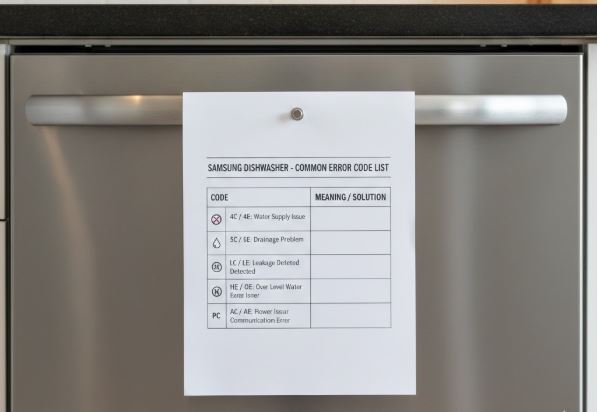
Samsung Dishwasher Error Code List & Quick Reference
| Error Code | Primary Issue | Root Cause | Fix Complexity |
|---|---|---|---|
| 4C / 4E | Water inlet failure | Supply valve closed, low pressure, clogged inlet filter | Easy |
| 5C / 5E / SC / SE | Drainage blockage | Clogged filter, kinked drain hose, sink backup | Easy |
| OC / OE | Water overflow | Faulty inlet valve, excessive suds, unlevel dishwasher | Medium |
| LC / LE | Water leak detected | Actual leak or moisture in base pan, door seal issue | Medium |
| 1E / IE (WaterWall) | Clogged filter | Dirty fine filter restricting water flow | Easy |
| 1E / IE (Rotary) | Overheating | Excessive water temperature, thermistor problem | Medium |
| HC | High temperature | Water temperature exceeds 176°F | Medium |
| 3C / 3E | Water temperature error | Incorrect thermistor readings, heating element issue | Hard |
| 7C / 7E | WaterWall reflector jam | Reflector blocked, packing tape not removed | Easy |
| 9E | Insufficient water level | Low water pressure, sensor malfunction | Medium |
| bE / 6E | Stuck button | Button pressed too long or mechanically jammed | Easy |
| CE | Control panel communication | Electronic communication failure | Medium |
| AP | Access Point mode | WiFi pairing mode active | Easy |
Samsung Dishwasher Water Supply Error Codes: 4C, 4E, and 9E
Water inlet problems prevent your Samsung dishwasher from filling properly, halting cycles before they begin. These codes specifically diagnose supply-side issues rather than drainage problems.
4C and 4E Errors: Water Supply Failure
The 4C and 4E codes are interchangeable designations indicating your dishwasher cannot access sufficient water. The appliance monitors fill time—when water doesn’t reach the required level within a set timeframe, these codes appear.
Immediate Troubleshooting Steps: Check the water supply valve under your sink. This valve must be fully open, with the handle positioned parallel to the pipe. Partially closed valves restrict flow enough to trigger the error without completely blocking water.
Using a water pressure gauge (View on Amazon), verify that the household water pressure meets Samsung specifications of 20-120 PSI. Pressure below 20 PSI prevents adequate filling regardless of valve position. Low pressure throughout your home indicates a broader plumbing issue requiring professional assessment beyond dishwasher troubleshooting.
Inlet Filter Inspection: Disconnect power and water supply to your dishwasher. Remove the inlet hose from the water valve connection and examine the small mesh screen filter inside the valve opening. Sediment, rust particles, and mineral deposits accumulate here over months of use, progressively restricting water flow.
Clean this filter screen thoroughly under running water using an old toothbrush. For stubborn mineral buildup, soak the screen in white vinegar for 15 minutes before scrubbing. This simple maintenance step resolves the majority of 4C/4E errors.
FloodSafe Hose Considerations: Samsung specifically advises against using FloodSafe or auto-shutoff hoses with their dishwashers. These safety hoses contain internal mechanisms that can restrict water flow or completely block it when they detect moisture, triggering false 4C/4E errors even when nothing is actually wrong with the dishwasher.
9E Error: Insufficient Water Detection
The 9E code indicates the water level sensor detects inadequate water in the tub. This differs from 4C/4E codes—water may be entering, but not reaching sufficient levels for the selected cycle.
Diagnostic Approach: Empty the dishwasher completely and start a Normal cycle without dishes. Observe whether the tub fills to appropriate levels. If water enters but the error persists, the water level sensor itself may be malfunctioning despite adequate water presence.
Check for dishes or containers that flipped upside-down during a previous cycle and filled with water. This displaced water confuses level sensors, making them register insufficient available water for cleaning.
Power Cycle Solution: Turn off the dishwasher at the circuit breaker for two minutes, then restore power. This full reset clears temporary sensor glitches that sometimes cause false 9E readings. If the error immediately returns, the water level sensor or its wiring harness requires professional diagnosis and potential replacement.
Samsung Dishwasher Drainage System Error Codes: 5C, 5E, SC, SE, and OE
Drainage errors appear when your Samsung dishwasher cannot evacuate water properly, leaving standing water in the tub after cycles complete.
5C, 5E, SC, and SE Codes: Drain Obstruction
These four codes all indicate identical drainage problems—Samsung uses different code variations across model series, but the underlying issue remains consistent.
Primary Troubleshooting Sequence: Start with the most common culprit—your kitchen sink’s drain and garbage disposal. Samsung dishwashers typically share drain lines with sink plumbing. Run your disposal for 30 seconds with cold water flowing to clear any accumulation. A clogged disposal or sink drain prevents dishwasher drainage even when the dishwasher’s internal components function perfectly.
Clean the dishwasher’s filter assembly located at the tub bottom. Remove the lower rack, twist the cylindrical filter counterclockwise, and lift it out. Disassemble the filter components and rinse thoroughly under warm water, removing trapped food particles, grease, and debris. This filter catches everything before it reaches the drain pump, and blockages here are the second most common cause of drainage errors.
Drain Hose Inspection: Examine the drain hose connection under your sink. The hose must maintain a high loop positioning—Samsung specifies the hose end must be positioned at least 10 inches above the dishwasher floor to prevent water from siphoning back during fill cycles.
Check for kinks, sharp bends, or compression points where furniture or stored items press against the hose. Even partial restriction reduces drainage efficiency enough to trigger error codes during the drain cycle.
Air Gap and Knockout Plug Verification: If your installation includes an air gap device (the small chrome cylinder on your countertop or sink), remove its cover and clean inside. Debris accumulation blocks drainage flow.
For dishwashers connected to garbage disposals, verify the knockout plug was removed from the disposal’s dishwasher inlet port. Installers occasionally forget this step, leaving a solid plug that completely blocks drainage—the dishwasher appears to have a major malfunction when it’s actually just an installation oversight.
OC and OE Codes: Water Overflow
The OC and OE codes signal excessive water in the dishwasher tub, either from overfilling during the fill cycle or from water not draining as expected.
Immediate Response: The dishwasher automatically activates its drain pump when overflow is detected, attempting to remove excess water. Allow this drainage process to complete—interrupting it can worsen the problem.
Verify you’re using proper dishwasher detergent rather than regular dish soap. Hand dishwashing liquid creates excessive suds that confuse water level sensors. The foam registers as water, triggering overflow protection even when actual water levels are normal.
Mechanical Causes: Check whether the dishwasher sits perfectly level. Use a level tool across the front edge—an unlevel installation causes water to pool incorrectly, triggering premature overflow sensors.
If overflow codes persist without visible leaking, the water inlet valve may be stuck open, continuously filling the tub beyond programmed limits. This mechanical failure requires professional repair—the valve assembly needs replacement.
Samsung Dishwasher Temperature-Related Error Codes: HC, 1E, IE, and 3C/3E
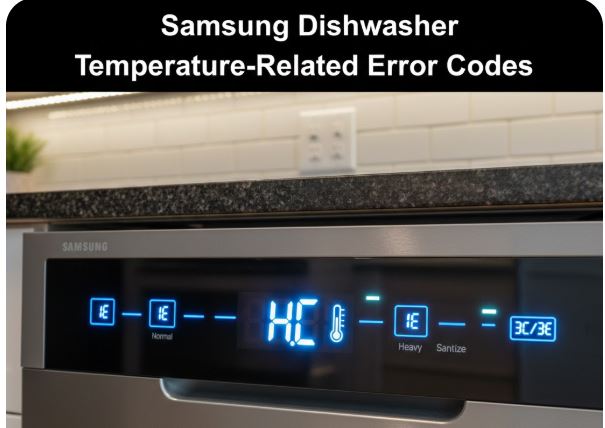
Temperature regulation ensures proper sanitization and detergent activation. When heating systems malfunction, these specific codes alert you to thermal problems:
HC Error: Excessive Heat Detection
The HC code appears when water temperature exceeds 176°F (80°C)—approaching boiling temperatures that can damage dishes and internal components.
Corrective Actions: Verify your home’s water heater isn’t set excessively high. Residential hot water should not exceed 120-140°F for safety and efficiency. Water heaters accidentally set to 160°F+ can trigger HC errors immediately when hot water enters the dishwasher.
Power cycle the dishwasher by turning off the circuit breaker for 30 seconds, then restoring power. Empty the dishwasher, add normal detergent quantities, and run a standard cycle. If HC returns, the issue likely involves the heating element relay stuck in the closed position or thermistor malfunction.
1E and IE Codes: Model-Specific Temperature Issues
These codes have completely different meanings depending on your dishwasher model type.
For WaterWall Models: 1E or IE indicates the fine filter at the tub bottom is clogged, restricting water flow through the WaterWall system. Clean this filter according to your manual’s instructions—it requires monthly maintenance for optimal performance.
For Rotary Spray Arm Models: 1E or IE signals overheating similar to HC codes. The water temperature inside exceeded safe limits. Follow the same troubleshooting as HC errors—power cycle, check incoming water temperature, and verify thermistor function.
3C and 3E Codes: Temperature Sensor Malfunction
These codes indicate the thermistor (temperature sensor) provides incorrect or inconsistent readings to the control board.
Testing Procedure: Empty the dishwasher, add standard detergent, and run a Normal cycle. If the error persists through a complete cycle, the thermistor itself likely failed and requires replacement.
Check thermistor wiring connections for looseness or corrosion. Disconnect power, locate the thermistor (usually near the heating element at tub bottom), and verify wire harness connections seat properly. Reconnect any loose wires and test.
If wiring checks out but errors continue, professional thermistor replacement becomes necessary. This component directly measures water temperature, and when it fails, the dishwasher cannot properly regulate heating.
Samsung Dishwasher WaterWall-Specific Error Codes: 7C and 7E
Samsung’s innovative WaterWall technology replaces traditional rotating spray arms with a linear water wall that sweeps back and forth. This system includes a reflector component that can trigger specific errors.
7C and 7E Codes: Reflector Movement Obstruction
These codes appear when the WaterWall reflector cannot move freely through its complete range of motion.
Resolution Steps: Open the dishwasher and visually inspect the WaterWall reflector at the back of the tub. Check whether packing tape or shipping materials remain attached—new dishwasher owners frequently encounter this error because they didn’t remove all packaging before first use.
Ensure the reflector sits correctly in its mounting channels. Remove it completely, check for debris in the tracks, wipe clean, and reseat the reflector firmly. It should move smoothly by hand without binding or resistance.
Look for large items blocking the reflector’s path—oversized pans, cutting boards positioned incorrectly, or utensils that fell behind the lower rack can obstruct movement.
Power Cycle Requirement: After clearing obstructions and verifying proper reflector positioning, power cycle the dishwasher for two minutes by turning off the circuit breaker. This reset clears the error code from memory. The 7C/7E code rarely requires professional service—it’s almost always a simple obstruction issue.
Control Panel and Electronic Error Codes
Several codes indicate electronic or button-related issues rather than mechanical problems.
bE and 6E Codes: Stuck Button Detection
The control panel detected a button remaining depressed longer than normal operation allows—either genuinely stuck mechanically or triggered by accidental continuous pressing.
Troubleshooting Method: Press every button on the control panel individually, listening and feeling for normal click responses. Stuck buttons may not depress fully or fail to spring back to their neutral position.
If a button physically jams, disconnect power and try working it free by pressing repeatedly. Sometimes detergent residue or spills cause temporary sticking that clears with manipulation.
When no buttons appear stuck but the error persists, the control panel itself malfunctioned and requires professional replacement.
CE Code: Communication Failure
CE indicates the control panel cannot communicate with other dishwasher components through the wire harness network.
Turn the dishwasher completely off and back on. If this simple restart doesn’t clear CE codes, internal wiring connections have loosened or corroded, or the main control board failed. Professional diagnosis becomes necessary to pinpoint which component in the communication chain malfunctioned.
AP Code: Access Point Mode
AP isn’t an error—it indicates the dishwasher entered WiFi pairing mode for connecting to your smartphone via Samsung’s SmartThings app.
If you’re not attempting to pair a device, simply restart the dishwasher to exit AP mode. This occasionally activates through accidental button combinations on touch-sensitive control panels.
LED Blinking Patterns for Non-Display Samsung Dishwasher Models
Samsung dishwashers without digital displays communicate errors through blinking LED light combinations. Count the blinks carefully to identify the corresponding error.
| Blink Pattern | Corresponding Error Code | Issue |
|---|---|---|
| 4 blinks | 4C / 4E | Water supply failure |
| 5 blinks | 5C / 5E | Drainage obstruction |
| 7 blinks | 7C / 7E | WaterWall reflector blocked |
| 9 blinks | 9E | Insufficient water level |
| Continuous rapid blinking | Multiple possible codes | Power cycle and observe pattern after reset |
Watch the blinking sequence through several cycles—LEDs blink, pause, then repeat. The number of blinks before the pause identifies your specific error code. Refer to the code meanings above once you’ve identified the pattern.
Also Read: LG Dishwasher Error Codes Explained
Frequently Asked Questions
What’s the difference between 4C and 4E error codes on Samsung dishwashers?
4C and 4E are identical error codes indicating the same water supply problem—Samsung simply uses different code variations across their model lineup. Both codes mean the dishwasher failed to fill with sufficient water within the expected timeframe, typically within 10 minutes of cycle initiation.
The troubleshooting approach remains identical regardless of whether your specific model displays 4C or 4E. Check that your under-sink water supply valve is fully open, verify household water pressure exceeds 20 PSI, and inspect the inlet valve filter screen for sediment or mineral buildup.
Samsung also cautions against using FloodSafe or auto-shutoff hoses, as these can restrict water flow and trigger false 4C/4E errors. If these basic checks don’t resolve the issue, the water inlet valve itself may have failed and requires professional replacement.
How do I fix the 7E error code on my Samsung WaterWall dishwasher?
The 7E error specifically indicates the WaterWall reflector—the moving component that creates the linear water curtain in WaterWall models—cannot move freely through its complete range. This is one of the easiest Samsung dishwasher errors to fix yourself without any technical expertise or tools required.
Open your dishwasher and locate the reflector at the rear of the tub. First, check for packing tape or shipping materials that weren’t removed during installation—this is extremely common with new dishwashers. Remove the reflector entirely by lifting it from its tracks, inspect the channels for debris or food particles, wipe everything clean, and reseat the reflector firmly.
Ensure no large items like cutting boards or oversized pans obstruct its path. After correcting these issues, power cycle your dishwasher by turning off the circuit breaker for two minutes. The 7E error should clear and not return unless something blocks the reflector again.
Why does my Samsung dishwasher show 5E error even after cleaning the filter?
Persistent 5E drainage errors after filter cleaning typically indicate the problem exists in your home’s drain system rather than within the dishwasher itself. Samsung dishwashers share drain lines with your kitchen sink and garbage disposal, meaning clogs in these shared areas prevent proper dishwasher drainage.
Run your garbage disposal for 30-60 seconds with cold water flowing to clear any accumulation—if you recently installed a new disposal, verify the knockout plug was removed from the dishwasher inlet port, as forgetting this step completely blocks drainage. Check whether your sink drains slowly, which signals a clog in the main drain line affecting both fixtures.
Inspect the drain hose under your sink for kinks, sharp bends, or sagging sections that create water pockets. The hose must maintain a high loop with the endpoint at least 10 inches above the dishwasher floor. If your installation includes an air gap device on the countertop, remove its cover and clean inside. When all external factors check out but 5E persists, the internal drain pump may have failed or become obstructed with debris that passed through the filter, requiring professional service.
What should I do when my Samsung dishwasher displays OE error code?
The OE code signals water overflow—the dishwasher detected excessive water in the tub either from overfilling during the fill cycle or from drainage failure allowing water accumulation. The dishwasher automatically runs its drain pump when this error appears, attempting to remove excess water and protect your floor from flooding.
First, verify you’re using proper dishwasher detergent rather than regular dish soap, as hand dishwashing liquid creates excessive suds that confuse water level sensors into thinking more water is present than actually exists. Check that the dishwasher sits perfectly level using a level tool across the front edge—unlevel installation causes water to pool incorrectly and trigger premature overflow detection.
Look for dishes that flipped upside-down during washing and filled with water, displacing the normal water volume. If these checks reveal no issues and OE codes persist, your water inlet valve may be stuck open, continuously filling beyond programmed limits. This mechanical failure requires professional valve replacement, as DIY repair involves working with both electrical and plumbing connections beyond typical homeowner comfort levels.
How do I clear error codes on my Samsung dishwasher after fixing the problem?
Samsung dishwashers don’t have a traditional reset button, but you can clear error codes by performing a complete power cycle. Turn off the circuit breaker controlling your dishwasher and leave it off for a minimum of two minutes—this duration allows internal capacitors to fully discharge and the control board to completely reset its memory.
After two minutes, restore power by turning the circuit breaker back on. Power up the dishwasher and select a new cycle. If you properly addressed the underlying issue that caused the error code, it should not reappear. However, if the same code returns immediately or within one to two cycles, you haven’t yet resolved the root problem—the error will keep recurring until the actual mechanical or electronic issue is fixed.
Simply clearing codes without addressing causes wastes time and can allow minor problems to escalate into major failures. Some error codes like 7E for WaterWall reflectors clear immediately after correction and power cycling, while others like thermistor failures will persist until the component is replaced regardless of how many times you reset the dishwasher.
Master Samsung Error Codes: Faster Fixes, Better Results
Samsung dishwasher error codes eliminate guesswork from appliance troubleshooting. Instead of wondering what’s wrong, you receive precise diagnostic information identifying exactly which system malfunctioned. Many codes resolve through simple fixes you can complete yourself in under 10 minutes—cleaning filters, checking valves, or removing WaterWall obstructions.
Even when codes indicate issues requiring professional repair, understanding their meaning empowers you with knowledge. You’ll know whether it’s urgent or can wait, what components need attention, and whether you’re dealing with a minor inconvenience or significant repair.
Keep this guide accessible for quick reference when the codes or symbols appear. The difference between a five-minute DIY solution and an unnecessary $150 service call often comes down to simply understanding what your dishwasher is communicating. Samsung designed these codes to help you—now you speak the language fluently.

Hi, I’m Barlgan! I created Repair Me Yourself to empower homeowners to tackle appliance repairs with confidence. From decoding error codes to fixing cooling issues, I break down complex repairs into simple, actionable steps that save you time and money.