
That flashing green light on your Mitsubishi air conditioner has you worried. It started blinking out of nowhere. Maybe it’s accompanied by other symptoms like reduced cooling or strange noises. Or perhaps the unit still works but that persistent blinking makes you wonder if something’s wrong.
Mitsubishi uses light patterns as a communication system. Each blink sequence tells you something specific about your AC’s status or problems. Learning to read these signals transforms you from confused homeowner to informed troubleshooter.
A blinking green light on Mitsubishi Electric air conditioners indicates operational status, diagnostic codes, or system errors depending on blink frequency and pattern. Single slow blinks typically show normal operation, while rapid or irregular patterns signal specific component failures requiring attention. Most issues resolve through resets, cleaning, or minor repairs.
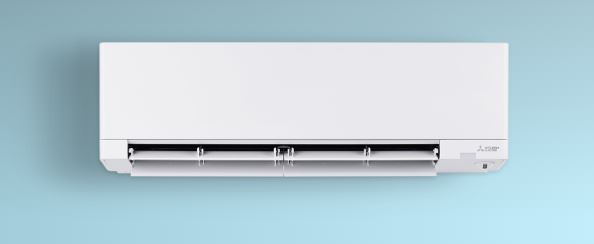
Understanding Mitsubishi Air Conditioner’s Light Communication System
Mitsubishi engineered their light indicators as diagnostic tools. Unlike simple on/off indicators, these LEDs communicate through timing and patterns.
The green operation light serves multiple purposes simultaneously. During normal function, it confirms the unit is powered and ready. When problems occur, it switches to diagnostic mode displaying error codes.
Blink patterns follow specific timing sequences measured in flashes per interval. Counting accurately is essential for correct diagnosis. Patterns repeat after brief pauses, making them identifiable once you know what to watch for.
Different Mitsubishi model lines use slightly varying light codes. MSZ wall-mounted units differ from MXZ outdoor units and MLZ floor-mounted systems. Always reference your specific model’s documentation alongside general troubleshooting.
Normal vs. Error Mitsubishi Air Conditioner Blink Pattern Recognition
Learning to distinguish normal operation from error conditions saves unnecessary worry and service calls. Not every blinking light indicates problems.
Normal Operation Patterns
These green light behaviors indicate healthy AC operation. Seeing these patterns means your system functions as designed.
Slow single blinks every 3-4 seconds show standby mode. The unit has power but isn’t actively cooling or heating. This is completely normal when the thermostat is satisfied.
Steady illumination without blinking during active cooling or heating is standard. The green light stays solid when the compressor runs and the system delivers conditioned air.
Brief rapid blinking during startup lasting 10-30 seconds is normal. The control system initializes, runs self-diagnostics, and establishes communication between components.
Rhythmic patterns during defrost mode in heating season are expected. The system reverses operation temporarily to melt ice from outdoor coils. This happens every 30-90 minutes in cold weather.
Error Pattern Characteristics
Error patterns look distinctly different from normal operation. These require investigation and potential corrective action.
Two quick blinks followed by pause indicate sensor-related problems. Temperature sensors, pressure sensors, or other monitoring devices report values outside normal ranges.
Three blinks in rapid succession signal communication failures between indoor and outdoor units. Wiring issues or control board problems prevent proper data exchange.
Five or more rapid blinks suggest serious component failures. Compressor issues, refrigerant problems, or critical system faults require immediate attention.
Irregular or random blinking without consistent patterns often indicates power supply problems. Voltage fluctuations or electrical issues affect the control system.
Comprehensive Mitsubishi Air Conditioner Error Code Identification Chart
Mitsubishi’s blink codes correspond to specific diagnostic trouble codes. This reference helps identify exactly what each pattern means.
| Blink Pattern | Error Code | Component Affected | Severity | Typical Cause |
|---|---|---|---|---|
| 1 slow blink/3 sec | None | System status | Normal | Standby mode |
| 2 quick blinks | E1 | Room temperature sensor | Medium | Sensor failure or disconnection |
| 2 blinks + 1 blink | E2 | Heat exchanger sensor | Medium | Thermistor malfunction |
| 3 quick blinks | E3 | Communication error | High | Wiring or control board issue |
| 4 quick blinks | E4 | Outdoor unit sensor | Medium | Condenser temp sensor failure |
| 5 quick blinks | E5 | Compressor protection | High | Overload or electrical fault |
| 6 quick blinks | E6 | Indoor fan motor | Medium | Motor failure or obstruction |
| 7 quick blinks | E7 | Outdoor fan motor | Medium | Condenser fan problem |
| 8+ rapid blinks | Multiple codes | Various systems | Critical | Multiple failures or control board |
Why Is the Green Light Blinking on My Mitsubishi Air Conditioner?
Understanding the root causes behind each blink pattern enables effective troubleshooting. Here’s what each common pattern actually means and how to fix it.
Two-Blink Pattern: Temperature Sensor Issues
Two green lights are the most common blinking pattern on a Mitsubishi air conditioner, often signaling temperature sensor problems. These sensors measure air temperature to regulate cooling and heating cycles.
Root Cause: Temperature sensors (thermistors) fail from age, moisture exposure, or physical damage. Loose connections create intermittent readings that trigger error codes. Sensor drift over time causes readings outside acceptable parameters.
Diagnostic Steps: Access the indoor unit by removing the front panel. Locate the temperature sensor, typically a small bulb or probe near the evaporator coil area. Check wire connections for tightness and corrosion.
Immediate Fixes: Disconnect and reconnect the sensor connector firmly. Clean any corrosion using electrical contact cleaner. Verify the sensor hangs freely in airflow without touching cold surfaces.
Testing Procedure: Use a multimeter to measure sensor resistance at room temperature. Typical readings range from 5-15 kΩ at 70°F. Resistance should change smoothly when gently warmed with your hand.
Replacement Solution: Order the exact sensor using your model number. Sensors cost $15-40 and install in 10 minutes. Simply unplug the old sensor and plug in the new one. No calibration needed.
Preventive Measures: Keep the sensor area clean and dry. Ensure proper drainage prevents condensation accumulation near electrical components. Check sensor connections annually during routine maintenance.
Three-Blink Pattern: Communication Failures
Three blinks indicate the indoor and outdoor units can’t communicate properly. This prevents coordinated operation and effective cooling.
Root Cause: Communication happens through low-voltage wires connecting indoor and outdoor units. These wires corrode, break, or short circuit from environmental exposure. Control board failures also interrupt communication signals.
Diagnostic Steps: Inspect the wire bundle running between units. Look for obvious damage, cuts, or areas where animals might have chewed insulation. Check connections at both indoor and outdoor terminal blocks.
Immediate Fixes: Tighten all terminal connections on both units. Corrosion creates resistance that disrupts communication. Clean terminals with contact cleaner and a wire brush.
Testing Procedure: Measure voltage on communication wires with a multimeter. Typical communication circuits use 12-24V DC. No voltage or fluctuating readings indicate wiring or control board problems.
Wiring Repair: If wires show damage, splice with weather-resistant connectors or run new communication cable. Use shielded twisted-pair cable for best results. Route away from power lines to prevent interference.
Control Board Consideration: If wiring tests good but communication still fails, control boards need replacement. This requires professional service unless you’re experienced with electronics.
Four-Blink Pattern: Outdoor Temperature Sensor Failure
Four blinks point to the outdoor unit’s temperature sensor experiencing problems similar to indoor sensor failures but in a harsher environment.
Root Cause: Outdoor sensors endure extreme temperatures, moisture, and physical stress. Ice buildup in winter damages sensor clips. Summer heat accelerates sensor degradation.
Diagnostic Steps: Access the outdoor unit by removing service panels. The outdoor temperature sensor typically mounts on or near the condenser coil. Inspect for physical damage, ice, or disconnection.
Immediate Fixes: Remove any ice or debris blocking the sensor. Ensure the sensor maintains good contact with the surface it measures. Verify wire connections are dry and tight.
Environmental Protection: If repeated failures occur, the sensor may need relocation to a more protected area. Some technicians add weather shields to vulnerable sensors.
Replacement Process: Outdoor sensors follow the same replacement procedure as indoor units. Match the exact part number. Installation takes 15-20 minutes including accessing the outdoor unit.
Five-Blink Pattern: Compressor Protection Activation
Five blinks indicate serious protection circuits activated to prevent compressor damage. This pattern demands immediate attention.
Root Cause: Compressor protection activates from electrical overload, overheating, or mechanical binding. Low refrigerant causes compressors to overheat. Electrical issues create overcurrent conditions.
Diagnostic Steps: Check if the outdoor unit is extremely hot. Listen for unusual compressor sounds like grinding or squealing. Measure amperage draw with a clamp meter. Readings exceeding nameplate ratings by 10% indicate problems.
Immediate Fixes: Turn off the system completely and let the compressor cool for 30 minutes. Check that outdoor unit has adequate clearance. Blocked airflow causes overheating. Clean condenser coils thoroughly.
Electrical Testing: Verify supply voltage matches specifications. Low voltage forces compressors to draw excessive current. Test capacitors. Failed capacitors prevent proper compressor starting.
Refrigerant Considerations: Low refrigerant causes compressor overheating and protection activation. This requires professional service to locate leaks, repair them, and recharge the system properly.
Professional Service Needed: If protection continues activating after cooling and cleaning, internal compressor problems or refrigerant issues require professional diagnosis. Don’t repeatedly restart. This damages compressors further.
Six-Blink Pattern: Indoor Fan Motor Problems
Six blinks signal that the indoor blower motor isn’t functioning correctly. This prevents proper air circulation and cooling distribution.
Root Cause: Fan motors fail from bearing wear, electrical problems, or control issues. Dust buildup on fan blades creates imbalance causing motor strain. Capacitor failures prevent motor starting.
Diagnostic Steps: With the unit off, manually spin the fan blade. It should rotate freely with slight resistance. Rough rotation or binding indicates bearing failure. Check for visible dust or debris blocking the fan.
Immediate Fixes: Clean the fan blade and motor housing thoroughly. Remove any obstructions preventing rotation. Check that the fan blade hasn’t loosened on the motor shaft.
Electrical Testing: Measure voltage at motor terminals when the unit calls for fan operation. Proper voltage but no motor operation indicates motor failure. No voltage points to control board or wiring issues.
Capacitor Testing: Fan motors use run capacitors maintaining rotation. Failed capacitors prevent starting or cause weak operation. Test capacitance with a meter. Readings should match capacitor markings within 10%.
Motor Replacement: Failed motors require replacement. Match exact specifications including voltage, RPM, and mounting configuration. Motor replacement takes 45-90 minutes for experienced DIYers.
Seven-Blink Pattern: Outdoor Fan Motor Failure
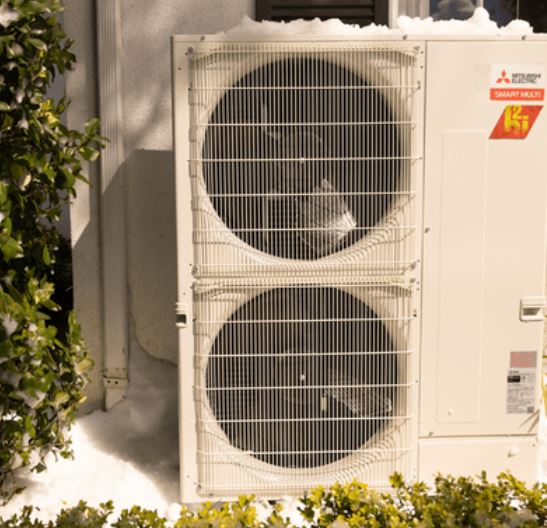
Seven blinks indicate the condenser fan motor isn’t operating. Without this fan, the outdoor unit overheats and can’t reject heat effectively.
Root Cause: Outdoor fan motors endure harsh conditions including rain, snow, heat, and debris. Bearing failures are common after 8-12 years. Electrical connections corrode from moisture exposure.
Diagnostic Steps: Visually inspect the outdoor fan. With power on, check if it attempts to spin. Listen for humming indicating motor receives power but won’t rotate. Check for debris in the fan assembly.
Immediate Fixes: Remove leaves, sticks, or other debris from the fan area. Lubricate motor bearings if your model has lubrication ports. Ensure fan blades aren’t damaged or bent.
Manual Testing: With power off, manually spin the fan blade. Smooth rotation suggests electrical problems rather than mechanical failure. Rough or locked rotation means bearing failure.
Electrical Diagnosis: Check voltage at motor terminals. Proper voltage with no motor operation confirms motor failure. Use a clamp meter to verify the motor isn’t drawing current.
Replacement Considerations: Outdoor fan motors cost $60-150 depending on size and brand. Installation requires disconnecting refrigerant lines if the fan assembly doesn’t provide adequate clearance. Consider professional installation for safety.
Eight or More Blinks: Multiple System Failures
Rapid blinking exceeding seven flashes indicates multiple problems or serious control system failures requiring comprehensive diagnosis.
Root Cause: Multiple component failures rarely occur simultaneously unless triggered by electrical events. Lightning strikes, power surges, or voltage problems damage several components at once. Complete control board failure produces random blink patterns.
Diagnostic Steps: Check the entire system methodically. Test power supply voltage and stability first. Inspect both indoor and outdoor units for obvious damage, burnt components, or burnt smell.
Immediate Actions: Turn off the system completely to prevent additional damage. Document all symptoms and blink patterns. Check if recent storms or electrical events occurred.
Professional Diagnosis Required: Multiple error codes exceed typical DIY diagnosis capability. Professional technicians use specialized diagnostic equipment identifying all affected components.
Cost Considerations: Multiple failures often cost 40-60% of new unit prices to repair. For systems over 10 years old, a replacement split-system AC unit (View on Amazon) might be more economical than extensive repairs.
Mitsubishi Air Conditioner Blinking Green Light; Step-by-Step Troubleshooting
Follow this systematic approach regardless of which specific pattern you’re seeing. This methodology ensures thorough diagnosis without missing critical steps.
Initial Observation and Documentation
Accurate observation forms the foundation of successful troubleshooting. Document symptoms completely before touching anything.
Count blink patterns carefully over multiple cycles. Patterns repeat. Observe at least three complete cycles to ensure accuracy. Note how long each blink lasts and pauses between sequences.
Record all other symptoms beyond just the light. Listen for unusual sounds, check for strange smells, note cooling performance changes, and monitor any error messages displayed.
Check if symptoms appeared suddenly or developed gradually. Sudden changes suggest specific failure events. Gradual degradation indicates component wear or environmental factors.
Document recent events that might relate. Power outages, storms, maintenance work, or system modifications could all contribute to current problems.
Take photos or videos of the blinking pattern. This helps when consulting manuals or speaking with technicians. Visual records prevent miscommunication about patterns.
Basic Reset Procedures
Many blinking light issues resolve with proper system resets. Always try resetting your Mitsubishi air conditioner before assuming component replacement is necessary.
Power Cycle Reset: Turn off the unit using the remote control. Wait 2 minutes. Turn off the circuit breaker for 5 minutes. Restore power and test operation.
Control Board Reset: Access the indoor unit and locate the reset button on the control board. Press once with a paperclip. The light should flash all segments confirming reset.
Remote Control Reset: Remove batteries from the remote. Press all buttons to discharge residual power. Reinstall batteries and re-pair with the indoor unit.
Factory Reset: Access advanced settings through the remote control menu. Select factory reset option. This erases all custom settings but often clears persistent error codes.
Monitor the system for 15-20 minutes after resetting. Some errors take time to reappear if the underlying problem persists.
Physical Inspection and Cleaning
Many blink patterns result from dirty components or physical obstructions. Thorough cleaning resolves surprising numbers of issues.
Filter Cleaning: Remove and clean air filters thoroughly. Dirty filters restrict airflow triggering multiple sensor errors. Wash reusable filters with mild detergent and dry completely.
Coil Cleaning: Clean both indoor evaporator and outdoor condenser coils. Use coil cleaner spray following product directions. Dirty coils cause overheating and multiple error conditions.
Fan Inspection: Check both indoor and outdoor fans for obstructions. Remove any debris. Ensure fans spin freely without scraping or binding.
Drainage Verification: Ensure condensate drains flow freely. Blocked drains cause water backup that damages electrical components and triggers errors.
Electrical Connections: Tighten all visible electrical connections. Check for corrosion and clean terminals. Loose connections cause intermittent problems and error codes.
Sensor Testing and Replacement
If resets and cleaning don’t resolve blinking, test sensors directly. Most blink patterns relate to sensor failures.
Resistance Testing: Disconnect suspected sensors and measure resistance with a multimeter. Compare readings to specifications in your service manual. Out-of-range readings confirm sensor failure.
Visual Inspection: Examine sensors for physical damage, corrosion, or disconnection. Check that sensors mount correctly without touching cold surfaces that affect readings.
Temperature Response Test: Measure resistance while gently heating the sensor with your hand. Resistance should change smoothly and predictably. Erratic readings indicate failed sensors.
Replacement Decision: If sensors test bad or show obvious damage, replacement is straightforward. Order exact OEM parts using your model number for guaranteed compatibility.
Advanced Electrical Diagnostics
When basic troubleshooting doesn’t identify the problem, electrical testing pinpoints failures requiring professional attention.
Voltage Testing: Measure supply voltage at the unit. Should be 230V ±10% for most residential Mitsubishi systems. Measure while the system runs. Voltage drops under load indicate supply problems.
Amperage Measurement: Use a clamp meter measuring current draw for each motor and the compressor. Compare to nameplate ratings. Excessive current indicates component failure.
Control Voltage Testing: Check low-voltage circuits typically running 12-24V DC. These control communication and sensors. Absent or incorrect control voltage indicates power supply or control board failure.
Capacitor Testing: Test all capacitors with a capacitance meter. Compare readings to markings on the capacitor body. Failed capacitors show zero, infinite, or significantly reduced capacitance.
Ground Fault Testing: Check for unwanted current flow to ground. Ground faults trigger protection circuits and cause intermittent operation. This requires specialized testing equipment.
Reducing/Preventing Blinking Light Issues on Mitsubishi Air Conditioner
Most blinking light problems stem from preventable causes. Regular maintenance dramatically reduces error frequency and keeps your system running smoothly.
Monthly Maintenance Tasks
Consistent monthly attention catches developing problems before they trigger error codes and blinking lights.
Clean or replace air filters without fail. Set phone reminders. This single task prevents more problems than any other maintenance activity.
Visually inspect both indoor and outdoor units for obvious issues. Look for debris accumulation, animal nests, or physical damage.
Check condensate drainage. Pour a cup of water in the drain pan and verify it flows freely without backing up.
Test system operation through all modes and fan speeds. Brief testing identifies degrading performance before complete failures occur.
Listen for new or unusual sounds. Bearing wear, loose components, or developing problems announce themselves audibly before causing failures.
Quarterly Deep Cleaning
Every three months, perform thorough cleaning beyond basic filter maintenance. This prevents accumulation-related errors.
Clean indoor evaporator coils using coil cleaner spray. You can even get a mini-split cleaning kit (View on Amazon) to use, which features a coil cleaner, adjustable sprayer, and odor-treatment tab.
Follow product directions carefully. Dirty coils cause temperature sensor errors and overheating.
Clean outdoor condenser coils similarly. These accumulate much more dirt from environmental exposure. Use a garden hose on gentle setting after applying cleaner.
Inspect and clean the indoor fan and motor assembly. Dust imbalance causes vibration and eventual motor failure.
Check outdoor fan blades for damage or imbalance. Clean thoroughly and ensure secure mounting on the motor shaft.
Inspect electrical connections at both units. Tighten any loose terminals and clean corrosion from terminal blocks.
Annual Professional Service
Professional technicians catch problems beyond typical homeowner capabilities. Schedule service before each cooling season.
Technicians measure refrigerant pressures and temperatures verifying correct charge. This prevents compressor damage and efficiency loss.
Electrical testing identifies developing problems in motors, capacitors, and control boards before they fail completely.
Thorough system performance testing under load conditions reveals issues that might not appear during light usage.
Technicians update firmware on newer smart-enabled systems. Firmware updates often resolve subtle control system bugs.
Professional cleaning reaches areas inaccessible to homeowners and uses specialized equipment for superior results.
When Blinking Lights Indicate Replacement Rather Than Repair
Some blinking light situations indicate that repair economics don’t favor fixing the existing system. Know when to consider replacement (View on Amazon) instead.
Age and Efficiency Considerations
Systems over 12-15 years old with major component failures often cost more to repair than modern units save in efficiency.
Compressor failures cost $1,200-2,500 to repair professionally. This represents 40-60% of new system costs for older units.
Modern Mitsubishi systems achieve 25-30 SEER efficiency ratings. Pre-2015 systems typically run at 13-16 SEER. Efficiency improvements pay for upgrades within 5-7 years through reduced electricity costs.
R-22 refrigerant systems face obsolescence as refrigerant becomes scarce and expensive. Converting to modern R-410A requires complete system replacement.
Multiple Simultaneous Failures
When several components fail together, repair costs escalate quickly beyond economic rationality.
If control boards, compressors, and motors all need replacement, total costs often exceed 80% of new system prices.
Multiple failures suggest the entire system reached end-of-life rather than isolated component problems. Additional failures will likely follow soon after current repairs.
Parts availability becomes problematic for discontinued models over 10 years old. Extended wait times for scarce parts add to overall costs and inconvenience.
Replacement Benefits
New systems offer advantages beyond just fixing current problems. These benefits offset replacement costs.
Modern Mitsubishi systems include Wi-Fi connectivity, smartphone control, and advanced scheduling features improving convenience significantly.
Improved dehumidification and air filtration enhance comfort and air quality beyond what older systems delivered.
Quieter operation from improved fan and compressor designs creates more pleasant indoor environments.
Better cold-weather heating performance extends useful operation into temperature ranges that defeated older heat pumps.
Longer warranties protect your investment. New systems typically include 7-12 year warranties versus minimal coverage on repairs.

Emergency Operation During Troubleshooting
Sometimes you need cooling immediately while diagnosing blinking light issues. These temporary measures keep you comfortable without compromising safety.
Bypassing Error Codes Temporarily
Some error codes can be temporarily bypassed for emergency operation while awaiting repairs or parts.
This requires accessing service mode through specific remote button combinations. Consult your service manual for exact procedures. They vary by model.
Service mode often allows forcing operation despite error conditions. Use this sparingly. Running with active problems can cause additional damage.
Monitor operation closely if running in bypass mode. Watch for overheating, unusual sounds, or worsening symptoms.
Never bypass serious error codes like compressor protection. These safety features prevent catastrophic damage to expensive components.
Alternative Cooling Methods
While troubleshooting extends beyond comfortable limits, temporary alternatives maintain bearable conditions.
Portable air conditioners provide targeted cooling for essential spaces like bedrooms. Rental units are available if you don’t want to purchase.
Strategic fan placement improves air circulation and comfort even without air conditioning. Window fans exhausting hot air at night provide significant relief.
Closing curtains during peak sun hours reduces heat gain substantially. Combined with fans, this often creates acceptable conditions.
Consider temporary relocation to cooler parts of your home, air-conditioned public spaces, or hotels during extended repair periods in extreme heat.
Understanding Warranty Coverage for Blinking Light Issues on Mitsubishi Air Conditioner
Warranty coverage varies significantly based on problem type, system age, and whether you’ve maintained proper service records.
Most Mitsubishi systems include 5-year parts warranties on major components and 7-12 year compressor warranties. Labor coverage typically extends only 1-2 years.
Warranty claims require proof of proper installation and annual professional maintenance. Keep all service records documenting maintenance history.
Some error codes indicate improper installation rather than component failure. These problems might not qualify for warranty coverage even on new systems.
Extended warranties purchased separately from third-party providers often exclude sensor failures and minor component problems while covering major failures.
Read warranty terms carefully before paying for repairs. Communicate with Mitsubishi dealers about potential warranty coverage before authorizing expensive repairs.
Frequently Asked Questions
Is a blinking green light always bad on my Mitsubishi AC?
No, not always. A blinking green light isn’t automatically a problem. Single slow blinks occurring every 3-4 seconds indicate normal standby mode when the unit has power but the thermostat is satisfied and no cooling is needed. This is completely normal behavior. Brief blinking during the first 10-30 seconds after startup is also normal as the control system initializes, runs self-diagnostics, and establishes communication between indoor and outdoor units.
Additionally, rhythmic blinking patterns during defrost cycles in heating mode are expected and indicate proper operation. Only rapid blink patterns (2 or more quick blinks in succession), multiple flashes followed by pauses, or persistent irregular blinking that doesn’t follow normal patterns indicate actual problems requiring attention. Learn to distinguish between these normal standby blinks (slow and consistent) versus error code patterns (rapid and in specific sequences) to avoid unnecessary worry and service calls.
Can I reset error codes without fixing the underlying problem?
Yes, you can reset error codes, but they’ll return immediately if the underlying problem still exists. Resetting only clears the visual indicator and error log stored in the control board’s memory. It doesn’t repair failed sensors, fix wiring problems, or replace worn components. Think of error codes like your car’s check engine light. You can clear the code, but if the oxygen sensor is still bad, the light comes back on. Use resets as diagnostic tools rather than solutions.
After resetting, monitor how quickly the error returns. If it comes back within minutes, you have a persistent hardware problem requiring actual repair. If the error doesn’t return or takes days to reappear, you might have had a temporary glitch from power fluctuations or environmental conditions. Proper diagnosis always involves identifying root causes.
Resets help determine whether problems are intermittent software glitches that clear permanently or ongoing hardware failures that need component replacement. Never repeatedly reset the same error code hoping it will stay gone. This wastes time and can allow small problems to escalate into major failures.
How do I read blink codes if my AC is in a hard-to-see location?
Use your smartphone camera to record the blinking pattern in video mode. Modern smartphones capture clear video even in low light conditions where the LED might be difficult to see directly. Record for at least 60 seconds to capture multiple complete pattern cycles. Then review the video in slow motion or frame-by-frame, pausing as needed to count blinks accurately. This method works far better than trying to count rapidly flashing lights in real-time while standing on a ladder or craning your neck.
Alternatively, position a mirror at an angle that reflects the indicator light to a more accessible viewing location. A small hand mirror or even your phone’s front camera in selfie mode can work. For units mounted very high on walls, consider using binoculars to observe the pattern from floor level. Some Mitsubishi models also include secondary indicator locations or display panels that show error codes alphanumerically instead of through blink patterns. Check your unit’s control panel or indoor display screen. Finally, if you’re working with a helper, have them stand where they can clearly see the light and verbally count out the pattern to you.
Why does my blinking pattern change or disappear randomly?
Intermittent problems cause changing or disappearing blink patterns. This happens when the underlying fault comes and goes rather than remaining constant. Loose electrical connections create this behavior. When vibration or thermal expansion causes a loose terminal to make intermittent contact, error codes appear and disappear seemingly at random. Temperature-dependent failures also cause pattern changes. A component might fail when hot but work when cool, creating errors that appear only during extended operation.
Developing component failures exhibit changing symptoms as they progressively degrade. A sensor reading slightly out of range might trigger errors only at certain temperatures, causing the pattern to appear under specific conditions. Environmental factors like humidity, outdoor temperature extremes, or wind affecting outdoor unit components can create situation-dependent errors.
Document every pattern you observe over several days, noting the time, outdoor temperature, how long the unit had been running, and what mode it was in. These patterns often reveal that errors occur during specific conditions like “only after running in heat mode for 30+ minutes” or “only when outdoor temp exceeds 95°F.” This information proves invaluable for diagnosis by identifying exactly when the problem manifests.
Should I keep using my AC if it shows a blinking error code?
It depends entirely on the specific error code. Not all errors are equally serious. Minor sensor errors (2-4 blink patterns) typically allow continued operation, though efficiency and comfort may suffer. The system might cycle more frequently, not maintain precise temperatures, or use more electricity than normal, but continued operation won’t cause damage in most cases. However, serious error codes require immediate shutdown to prevent catastrophic damage.
Five-blink patterns indicating compressor protection activation demand immediate attention. Running with active compressor overload can destroy the compressor within hours, creating repair costs of $1,500-2,500. Similarly, error codes related to refrigerant pressure problems or electrical faults should not be ignored. When in doubt, reference your owner’s manual’s error code severity ratings.
Manuals typically classify codes as informational (safe to operate), warning (reduced performance but safe), or critical (immediate shutdown required). If you don’t have the manual, err on the side of caution. Shut down for any persistent error code and diagnose properly before continued operation. The few hours of discomfort from turning off the AC beats thousands in repair bills from damage caused by operating with serious faults.
Getting Your Mitsubishi Back to Normal Operation
Blinking green light on a Mitsubishi air conditioner often feels intimidating but it usually indicates fixable problems. Most issues resolve through systematic troubleshooting following the diagnostic methods outlined here.
Start with simple solutions like cleaning and resetting before assuming major repairs are necessary. These quick fixes solve surprising numbers of problems without any cost beyond your time.
Document everything you observe and test. Write down exact blink patterns, environmental conditions, symptoms, and which solutions you’ve tried. Good notes help professional technicians diagnose efficiently if DIY efforts don’t succeed.
Know your limits. Some problems require professional expertise and specialized tools. Attempting advanced repairs without proper knowledge can worsen problems and void warranties.
Your Mitsubishi will stop blinking and return to reliable operation. Just follow the diagnostic path matching your specific light pattern.

Hi, I’m Barlgan! I created Repair Me Yourself to empower homeowners to tackle appliance repairs with confidence. From decoding error codes to fixing cooling issues, I break down complex repairs into simple, actionable steps that save you time and money.