
You hear a strange noise from the washing machine. Your energy bill spikes out of nowhere. You come home to a puddle under the fridge. These aren’t random bad luck — they’re warning signs your appliances tried to send you, and you had no way to receive them.
Most homeowners only discover appliance problems after the damage is done. A slow leak goes unnoticed for weeks. An overworked AC runs hotter and hotter. A freezer temperature creeps up until your food is ruined.
Wi-Fi sensors change that completely. In this guide, you’ll discover exactly how Wi-Fi sensors work, which appliances benefit most, what types of sensors to use for different problems, and three highly rated, affordable options you can order today. By the end, you’ll know how to turn your home into a self-monitoring system that catches problems before they cost you thousands.
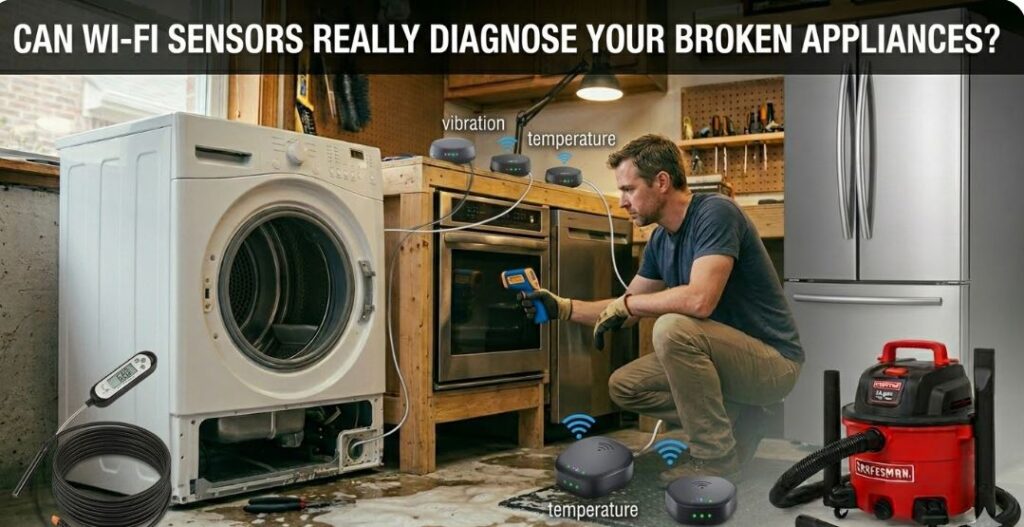
Quick-Reference Summary Table
| Sensor (View on Amazon) | Best For |
|---|---|
| Govee WiFi Thermometer Hygrometer H5179 | Fridge, freezer, HVAC, basement |
| YoLink Water Leak Sensor Starter Kit | Washer, dishwasher, water heater |
| Emporia Vue 3 Home Energy Monitor | HVAC, dryer, water heater, fridge |
How Wi-Fi Sensors Actually Work for Appliance Troubleshooting
Wi-Fi sensors connect to your home network and continuously monitor physical conditions — temperature, humidity, water presence, energy consumption — then push that data directly to your smartphone in real time. Instead of waiting for an appliance to fail completely, you catch the early warning signs before they become expensive disasters.
They Monitor Conditions, Not Just Events
Most people think of sensors as alarm devices — they go off when something bad happens. Wi-Fi sensors do more than that. They log ongoing data so you can see trends developing over time. A refrigerator losing efficiency won’t suddenly fail; it’ll show a slow temperature drift over days. Sensors catch that drift.
They Send Instant Alerts to Your Phone
The moment a reading goes outside your preset range — a temperature too high, a drop of water detected, an unusual energy spike — you get a push notification, email, or SMS. You don’t have to be home. You don’t have to check manually.
They Give You Historical Data to Work With
This is what separates smart sensors from basic alarms. When you bring in a repair technician, you can show them a graph of exactly when the anomaly started, how it progressed, and what conditions looked like before and after. That data can cut diagnostic time significantly.
The 4 Types of Wi-Fi Sensors That Matter Most
Different appliance problems call for different sensor types. Here’s a breakdown of what each type detects and where it belongs in your home.
| Sensor Type | What It Detects | Primary Appliances |
|---|---|---|
| Temperature & Humidity | Cooling failures, humidity buildup | Fridge, freezer, HVAC, dehumidifier |
| Water Leak | Slow drips, flooding, hose failures | Washer, dishwasher, water heater, fridge |
| Energy Monitoring | Efficiency drops, abnormal power draw | HVAC, dryer, water heater, oven |
| Vibration | Unbalanced loads, worn bearings | Washing machine, dryer |
Temperature & Humidity Sensors
These are your first line of defense for almost every major appliance. A temperature spike inside your refrigerator signals a failing compressor or a door seal letting warm air in. Excess humidity near your HVAC unit can indicate a clogged condensate drain line.
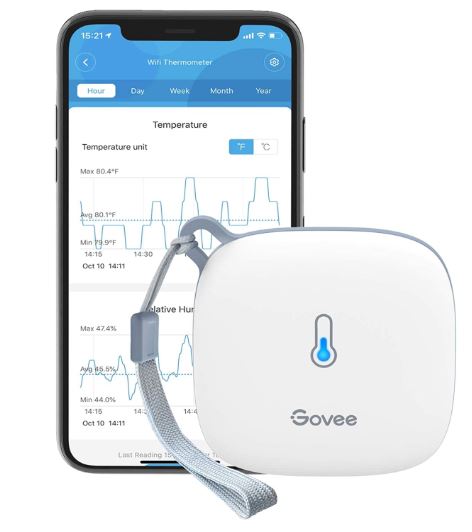
The Govee WiFi Thermometer Hygrometer H5179 (View on Amazon) is one of the most popular options on Amazon. It uses a Swiss-made SHT30 sensor accurate to ±0.54°F and ±3% relative humidity, updates every 2 seconds, stores up to 2 years of data, and sends instant alerts when readings go outside your set range. It works with Alexa and costs around $19–$25.
Place one inside your fridge or freezer to catch cooling failures early. Put another near your HVAC air handler to monitor for humidity issues. A third in your basement can warn you about moisture affecting nearby appliances like a water heater or dehumidifier.
Water Leak Sensors
A single undetected leak under a washing machine or dishwasher can cause thousands in water damage and mold remediation. These sensors sit on the floor beneath appliances and trigger an alert the moment they detect moisture.
The YoLink Water Leak Sensor Starter Kit (View on Amazon) uses long-range LoRa technology — up to ¼ mile range — so it reaches basements and garages where regular Wi-Fi struggles. It continues working even during internet or power outages through its Device-to-Device (D2D) pairing. Battery life runs up to 5 years. It sends SMS, email, and push notifications and integrates with Alexa and Home Assistant. The kit costs around $40–$55.
Place sensors under your washing machine, dishwasher, refrigerator, and water heater — these four appliances account for the vast majority of household water damage claims.
Energy Monitoring Sensors
An appliance’s energy consumption tells you a lot about its health. A refrigerator drawing significantly more power than usual is working harder than it should — often a sign of dirty condenser coils, a failing compressor, or a degraded door gasket. A dryer running longer than normal usually points to poor venting or lint buildup.
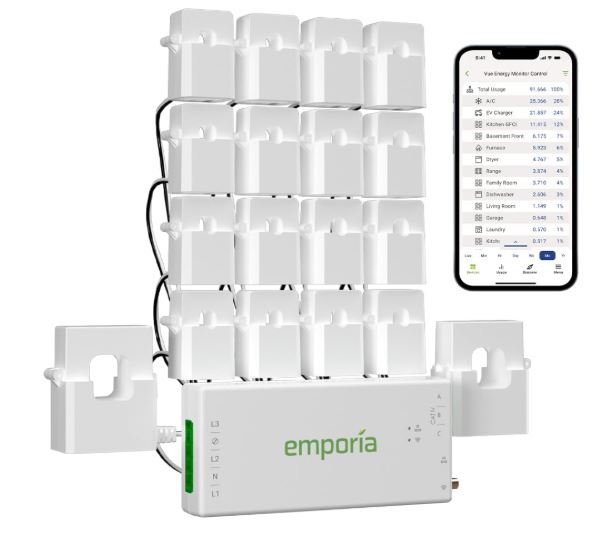
The Emporia Vue 3 Home Energy Monitor (View on Amazon) installs in your home’s electrical panel using clamp-on sensors on individual circuits. It monitors up to 16 circuits simultaneously, delivers second-by-second data in the app, and is UL-certified for safety. At $120–$150, it covers your entire home at once — AC, water heater, dryer, oven, and more.
When your HVAC circuit suddenly shows higher-than-normal draw on a mild weather day, that’s a red flag worth investigating before the unit seizes up completely.
Vibration Sensors
Less commonly discussed but highly useful, vibration sensors (View on Amazon) detect when a washing machine is shaking more than normal — a clear sign of an unbalanced drum or worn bearings. When your washer starts vibrating excessively, a vibration sensor sends you an alert before the machine damages the floor, tears a hose, or walks itself across the laundry room. Many smart multi-sensors include vibration detection alongside temperature and motion, making them a versatile add-on for laundry appliances.
Which Appliances Benefit Most From Wi-Fi Sensors?
Not every appliance needs a sensor, but several high-value, high-risk ones absolutely should be monitored. Prioritizing these will give you the best return on a modest investment.
| Appliance | Recommended Sensor | Warning Sign to Watch For |
|---|---|---|
| Refrigerator / Freezer | Temperature + Water Leak | Rising internal temp, pooling water |
| Washing Machine | Water Leak + Vibration | Leaking hoses, abnormal shaking |
| HVAC / AC Unit | Temperature + Humidity + Energy | Humidity spikes, energy draw increase |
| Water Heater | Water Leak + Temperature | Pooling water, temperature irregularity |
| Dishwasher | Water Leak | Slow leak at base or door seal |
| Dryer | Energy + Vibration | Longer run times, excessive vibration |
Refrigerator and Freezer
These are the highest priority for temperature sensors. A fridge that slowly warms from 37°F to 44°F over a few days will ruin food before you notice anything visually. A sensor alerts you in hours, not days. A water leak sensor underneath catches ice maker line failures and condensate overflow.
HVAC and Air Conditioning
Your HVAC unit is typically your most expensive appliance. A humidity sensor near the air handler catches condensate drain clogs early. An energy monitor on the AC circuit reveals efficiency drops that signal refrigerant issues, dirty coils, or a failing blower motor — all far cheaper to fix when caught early.
Washing Machine and Dishwasher
Both connect to water supply lines that degrade over time. The average washing machine hose fails within 8–10 years. A water leak sensor under each appliance is cheap insurance. A vibration sensor on the washer can flag drum bearing wear before it turns into a full drum replacement.
Water Heater
Water heaters fail suddenly and catastrophically. A slow drip around the base is often the only warning. A leak sensor placed directly under the unit gives you days or weeks of advance notice to address a developing failure before the tank floods your utility room.
Real Troubleshooting Scenarios: Sensors in Action
Seeing how these sensors play out in real situations makes it much easier to understand their value. Each of these scenarios represents a common household appliance problem that a sensor would catch before it becomes a repair bill.
Catching a Refrigerator Compressor Problem Early
A Govee temperature sensor inside the fridge alerts you that the internal temp has crept from 37°F to 44°F over two days. You check the condenser coils — clogged with dust. A quick clean solves it. Without the sensor, you’d have discovered the problem only when your food spoiled and the compressor was already under serious strain.
Stopping a Washing Machine Leak at 2am
A YoLink sensor under your washer sends a push notification overnight. You wake up to a small puddle rather than a flooded laundry room. The drain hose clamp was loose — a $5 fix rather than a flooring replacement job.
Identifying HVAC Inefficiency Before Full Failure
The Emporia Vue shows your AC circuit drawing 15% more power than it did this time last year on similar weather days. You schedule a maintenance visit. The technician finds a refrigerant issue — caught before a complete system failure that could have cost $3,000 or more to replace the compressor.
What Wi-Fi Sensors Can’t Do
Wi-Fi sensors are powerful diagnostic tools, but it’s worth being honest about where their limits are. Understanding these limitations helps you use them effectively rather than expecting them to do everything.
They Detect Symptoms, Not Root Causes
Sensors tell you something is wrong — not precisely what is wrong. A temperature alert from your fridge means there’s a cooling problem; it doesn’t tell you whether the issue is a door gasket, a condenser coil, a refrigerant leak, or a failing compressor. Physical inspection is still required.
They Depend on Your Wi-Fi and Power
Most sensors require a stable 2.4 GHz Wi-Fi network and won’t support 5 GHz connections. Remote notifications also depend on your internet being active. The YoLink system partially addresses this with offline D2D operation, but it’s a consideration for all other sensor types.
They’re Not a Substitute for Routine Maintenance
Sensors monitor conditions passively — they don’t replace cleaning condenser coils, flushing water heater sediment, changing HVAC filters, or inspecting hoses. Think of sensors as the early warning system that tells you when maintenance is urgently needed, not as a replacement for doing it.
Also Read:
- What are the Best Home Appliance Diagnostic Tools Worth Buying?
- What are the Essential Appliance Repair Tools for Homeowners?
Frequently Asked Questions
Do Wi-Fi sensors work with all smart home platforms?
Most popular sensors work with Amazon Alexa and Google Assistant. The Emporia Vue works with Alexa. For deeper integration with platforms like Home Assistant, YoLink and Emporia are both strong choices with well-documented APIs and community support.
How many sensors do I actually need to start?
For a typical home, start with one temperature sensor per critical appliance (fridge, freezer, HVAC), water leak sensors under every water-connected appliance (washer, dishwasher, water heater, fridge with ice maker), and an energy monitor if you want whole-home circuit visibility. That covers the highest-risk scenarios without overcomplicating things.
Will installing a Wi-Fi sensor void my appliance warranty?
No. These sensors are completely external and non-invasive. They don’t connect to, modify, or interact with the appliance itself in any way. They simply monitor the environment around the appliance.
What happens if my Wi-Fi or internet goes down?
Most sensors store data locally for a period and resync when connectivity returns. The YoLink system can operate in limited capacity offline via its D2D protocol, allowing it to trigger paired sirens or shutoff valves even without internet — a significant advantage over purely Wi-Fi dependent sensors.
How accurate are consumer-grade Wi-Fi sensors?
The Govee H5179 uses a Swiss SHT30 sensor accurate to ±0.54°F for temperature and ±3% for humidity — more than sufficient for appliance monitoring. Energy monitors like the Emporia Vue are accurate to ±2%, which is industry-standard for residential circuit monitoring.
Can I monitor appliances remotely while traveling?
Absolutely — that’s one of the biggest advantages. As long as your home Wi-Fi is active, you’ll receive real-time alerts on your phone anywhere in the world. This makes sensors particularly valuable for vacation homes, rental properties, and frequent travelers.
Do I need a hub for these sensors?
It depends on the product. The Govee sensor connects directly to your home Wi-Fi with no hub required. The YoLink system requires the YoLink Hub, which comes included in the starter kit. The Emporia Vue requires no separate hub but does need installation inside your electrical panel.
Conclusion
Wi-Fi sensors won’t fix a broken appliance — but they will alert you the moment something goes wrong, often days or weeks before a minor issue becomes a catastrophic failure.
A $25 temperature sensor inside your freezer could save you hundreds in lost food and a compressor repair. A $45 water leak kit under your washing machine could save you thousands in water damage and mold remediation. A $130 energy monitor on your electrical panel gives you a complete health dashboard for every major appliance in your home.
The technology is affordable, installation is simple, and the payoff is real. Start with the appliance you trust least, place a sensor, and build your monitoring network from there. Your future self — and your wallet — will thank you.

Hi, I’m Barlgan! I created Repair Me Yourself to empower homeowners to tackle appliance repairs with confidence. From decoding error codes to fixing cooling issues, I break down complex repairs into simple, actionable steps that save you time and money.