
Your Bosch washing machine communicates through a visual language of symbols and icons that streamline your laundry routine. These indicators on the control panel, detergent drawer, and display screen aren’t arbitrary—they’re carefully designed shortcuts that prevent fabric damage while maximizing cleaning performance. Ignoring or misinterpreting these symbols can result in shrunken sweaters, faded colors, or unnecessarily long wash cycles.
This comprehensive guide decodes every symbol you’ll encounter on your Bosch washer, from program indicators to maintenance alerts. By the end, you’ll confidently select the right settings for any fabric type, understand what your machine needs when alerts appear, and protect both your investment and your wardrobe.
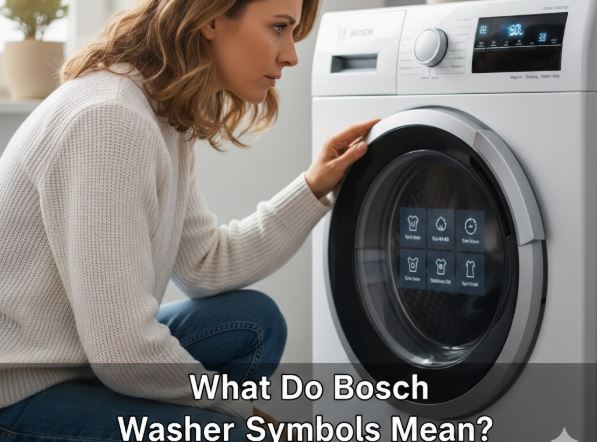
Quick Bosch Washing Machine Symbols Guide
| Symbol/Icon | Location | Meaning | Recommended Action |
|---|---|---|---|
| Key/Lock | Display panel | Child lock activated | Hold start button 3-5 seconds to deactivate |
| Droplets (1-5 dashes) | Display | Water consumption level | Informational – shows program efficiency |
| Plug (1-5 dashes) | Display | Energy consumption indicator | Lower dashes = more efficient |
| Soap bubbles/Foam | Display | Excess foam detected | Reduce detergent amount next wash |
| Water tap crossed | Display | Low water pressure or kinked hose | Check supply hose and tap |
| Reload/Add laundry | Display | Door can be opened mid-cycle | Press pause, add items (under 50°C only) |
| Circle with “C” or numbers | Control panel | Temperature selection | Adjust based on fabric care labels |
| Spiral/Twisted fabric | Control panel | Spin speed in RPM | Higher number = drier clothes, more wear |
| Roman numeral I | Detergent drawer | Pre-wash compartment | Use only when pre-wash selected |
| Roman numeral II | Detergent drawer | Main wash detergent | Primary compartment for all washes |
| Flower symbol | Detergent drawer | Fabric softener/starch | Do not exceed MAX line |
Bosch Washing Machine Symbols: Control Panel Programs and Settings
Understanding the program selector symbols helps you match wash cycles to your laundry needs. Bosch designs these programs with specific fabric types, soil levels, and care requirements in mind.
Core Program Symbols Explained
Cotton/Cotton Boll Symbol: The cotton boll or shirt icon represents the most frequently used program for durable fabrics. This cycle uses higher temperatures up to 90°C and vigorous drum action suitable for towels, bedding, and white cotton items. The Cottons Eco variation maintains cleaning power while reducing energy consumption through extended wash times.
Synthetic/Flask Symbol: Synthetic fabrics including polyester, nylon, and blended materials require gentler treatment than cotton. The flask or test tube symbol indicates moderate temperatures between 30-60°C with reduced agitation. Using this program prevents pilling and shape distortion common when synthetics face excessive heat or mechanical stress.
Delicates/Flower Symbol: The flower icon signals the gentlest machine wash available for silk, satin, lace, and other fragile fabrics. This program combines low temperatures around 30°C, minimal drum movement, and reduced spin speeds below 800 RPM. The extra water and careful handling prevent stretching and fiber damage.
Wool/Yarn Ball Symbol: Machine-washable wool items demand specialized care to avoid felting and shrinkage. The wool program, marked by a yarn ball icon, employs cold to lukewarm water with specially timed gentle agitation that mimics hand washing. Only use this for garments specifically labeled as machine-washable or hand-washable wool.
Specialized Program Indicators
AllergyPlus/Medical Cross: For households with sensitive skin or allergy concerns, this program extends wash time at defined temperatures above 60°C with higher water levels. The combination ensures thorough allergen and bacteria removal from bedding and clothing.
Quick Wash/Clock Symbol: When time is limited and clothes are lightly soiled, the clock or lightning bolt symbol activates abbreviated cycles lasting 15-30 minutes. This convenience comes with tradeoffs—reduced cleaning power and suitability only for small loads under 2-3.5kg.
AntiStain Program: Rather than a single symbol, this feature typically appears as text and allows selection of up to 16 specific stain types. The machine then automatically adjusts temperature, drum movement, and soaking time to target stains like grass, chocolate, red wine, or oil.
Bosch Washing Machine Display Panel Symbols: Real-Time Information and Alerts
Modern Bosch washers with digital displays provide continuous feedback about cycle status and machine condition.
Operational Status Indicators
Temperature Display (C with Circle): The current or selected wash temperature appears as degrees Celsius. A star symbol instead indicates cold water washing. Temperature directly impacts cleaning effectiveness and energy consumption—lower temperatures preserve colors and reduce bills while higher temperatures tackle heavy soiling.
Water and Energy Consumption Bars: One to five dashes next to water droplets show the selected program’s water usage. Similarly, dashes beside a plug icon indicate energy consumption. These real-time metrics help environmentally conscious users optimize their washing habits.
Washing/Rinsing/Spinning Process Indicators: Dynamic symbols show which cycle phase is active. A basin with wavy lines represents the wash phase, a basin with spray indicates rinsing, and a spiral shows the spin cycle. Knowing the current phase helps estimate remaining time and decide whether to pause the cycle.
Maintenance and Alert Symbols
Child Lock (Key Icon): When the key symbol illuminates, all control panel buttons except power become disabled. This safety feature prevents cycle interruption or setting changes from curious children. Deactivation requires holding the start button or designated key button for three to five seconds.
Foam Detection Alert: Excessive suds from too much detergent trigger automatic additional rinse cycles. The foam or bubble symbol warns you to reduce detergent quantity in future washes. Over-sudsing extends cycle time, wastes water, and can leave residue on fabrics.
Door Lock/Reload Indicator: A locked padlock symbol shows the door is secured during operation. When this symbol extinguishes mid-cycle on compatible models, you can press pause and add forgotten items—but only on cycles below 50°C when water levels and temperatures allow safe door opening.
Low Water Pressure Warning: A crossed-out water tap indicates insufficient water supply pressure or blockages in the inlet hose. Check that the tap is fully open, hoses aren’t kinked, and the inlet filter isn’t clogged with sediment.
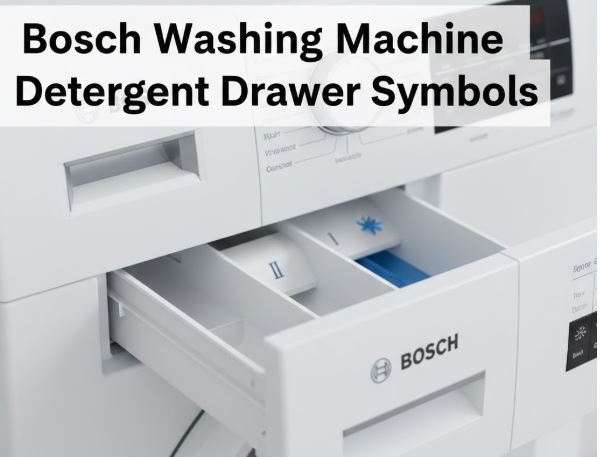
Bosch Washing Machine Detergent Drawer Symbols: Proper Compartment Usage
The detergent drawer contains three compartments, each serving distinct functions in the wash cycle. Misusing these compartments leads to wasted products and suboptimal results.
Standard Drawer Layout
| Compartment Symbol | Purpose | Products to Use | Usage Notes |
|---|---|---|---|
| I (Roman numeral one) | Pre-wash detergent | Standard liquid or powder detergent | Only fills when pre-wash function selected |
| II (Roman numeral two) | Main wash detergent | Detergent, bleach, stain removers | Primary compartment used every cycle |
| Flower icon | Fabric softener/starch | Liquid softener or starch | Never exceed MAX marking |
Pre-wash Compartment (I): This smaller section receives detergent only when the pre-wash button is activated on your program. Pre-wash adds a preliminary cleaning phase before the main cycle, beneficial for heavily soiled items but unnecessary for typical loads.
Main Wash Compartment (II): The largest section holds detergent for every standard wash cycle. You can also add descalers, bleach, or stain removal products here according to manufacturer instructions. The machine automatically flushes this compartment during the wash phase.
Softener Compartment (Flower): The flower symbol clearly marks where fabric softener or liquid starch belongs. This compartment releases during the final rinse cycle. Exceeding the MAX line causes overflow and residue buildup in the drawer mechanism.
Bosch Washing Machine i-DOS Intelligent Dosing System Symbols
Higher-end Bosch models feature the i-DOS automatic dosing system that revolutionizes detergent management.
Understanding i-DOS Indicators
i-DOS 1 and i-DOS 2 Compartments: Unlike manual drawers, i-DOS models have reservoir chambers that hold entire bottles of liquid detergent and fabric softener. The i-DOS 1 reservoir typically holds detergent while i-DOS 2 holds softener, though this is programmable.
Droplet vs. Flower Icons: On i-DOS panels, a water droplet indicates detergent while a flower represents fabric softener. Some models allow switching i-DOS 2 between softener and a second detergent type for specialized needs.
Dosage Level Settings: Light, medium, and heavy settings correspond to soil levels. The machine sensors automatically calculate precise amounts based on load weight, fabric type, and selected program—reportedly saving up to 38% of detergent compared to manual dosing.
Rectangular Symbol with Warning Triangle: This alert indicates the detergent drawer isn’t properly inserted or the i-DOS sensor isn’t detecting full closure. Remove the drawer, ensure the connector at the back seats properly, and reinsert until you hear a click.
Bosch Washing Machine Fabric Care Label Symbols: Matching Programs to Garment Tags
Your washing machine symbols work in tandem with garment care labels to prevent damage.
Temperature Guidance
| Care Label Dots | Temperature Range | Suitable Bosch Programs | Fabric Examples |
|---|---|---|---|
| 1 dot | 30°C maximum | Delicates, Wool | Silk, fine synthetics, acrylic |
| 2 dots | 40-60°C | Synthetics, Easy Care | Polyester blends, colored cotton |
| 3 dots | Up to 90°C | Cotton, Cottons Eco | White towels, heavily soiled linens |
Cold Wash Symbol (Snowflake or Single Dot): Garments marked for cold washing risk color bleeding or shrinkage at higher temperatures. Use 20-30°C programs for these items.
Hand Wash Basin Symbol: Items showing a hand in water should use the Delicates or Wool program as machine alternatives. Never use regular cotton cycles for these garments.
Crossed-Out Washing Tub: The prohibited washing symbol means dry cleaning only or specialist cleaning required. Your washing machine cannot safely clean these items regardless of program selection.
Bosch Washing Machine Advanced Features and Special Function Symbols
Beyond basic programs, Bosch washers include optimization features marked by specific symbols.
SpeedPerfect (Lightning Bolt): Reduces cycle duration by up to 65% while maintaining cleaning performance through intensified washing action. Best for lightly to normally soiled items when time is critical.
EcoPerfect (Leaf Symbol): Extends cycle time but significantly reduces energy consumption. Ideal for normally soiled laundry when you can afford longer wash times for lower utility bills.
Easy-Iron (Iron with Minus): Deactivates the final spin or reduces spin speed, leaving garments slightly damp with fewer creases. Particularly beneficial for shirts and blouses that benefit from drip-drying.
Water Plus (Multiple Droplets): Increases water volume during washing and rinsing. Recommended for sensitive skin conditions or areas with soft water where extra rinsing removes detergent residue more effectively.
Soak Function (Basin with Pause Lines): Extends pre-treatment time by holding laundry in water before the main wash begins. Particularly effective for stubborn stains that benefit from prolonged exposure to detergent solution.
Bosch Washing Machine Spin Speed Symbols: Balancing Efficiency and Fabric Care
| Spin Speed (RPM) | Symbol Indicator | Best For | Residual Moisture |
|---|---|---|---|
| 1400-1600 | High number or multiple fan blades | Heavy cotton, towels, jeans | 40-50% – nearly dry |
| 800-1000 | Medium number or single fan blade | Synthetics, blended fabrics | 55-65% – moderately wet |
| 400-600 | Low number | Delicates, wool | 70-80% – quite wet |
| 0 (No Spin) | Crossed fan blades | Hand wash items, swimwear | 90%+ – dripping wet |
Higher spin speeds extract more water, reducing dryer time and energy consumption. However, aggressive spinning stresses fibers and increases wrinkles. Match spin speed to fabric durability—delicate items require gentle extraction while durable cottons tolerate maximum speeds.
Troubleshooting Bosch Washing Machine Symbol-Related Issues
Issue: Programs Won’t Start Despite Selection
Check whether the child lock key symbol is illuminated. If active, buttons won’t respond until you deactivate by holding the designated button combination.
Verify the door is fully closed—the door lock symbol should illuminate when properly secured. Insufficient closure prevents safety mechanisms from allowing cycle initiation.
Issue: Excessive Cycle Duration Beyond Displayed Time
Foam detection symbols during the cycle indicate automatic additional rinses are extending duration. Reduce detergent quantity in your next load.
Unbalanced load detection causes the machine to repeatedly redistribute laundry before spinning. The machine extends the cycle attempting to balance the drum. Manually redistribute items and restart.
Issue: Clothes Remain Soapy After Washing
The fabric softener compartment (flower symbol) should never contain detergent. Check you’re using compartment II for detergent and the flower compartment exclusively for softener.
If using i-DOS, verify the dosage level matches your actual soil level. Heavy setting on lightly soiled items can leave residue.
Issue: Detergent Drawer Retains Product After Cycle
Blocked siphon tubes in the drawer prevent proper flushing. Remove the drawer completely and rinse under warm water, clearing any residue from the compartments and siphon mechanisms.
Low water pressure, indicated by the crossed tap symbol, may prevent adequate flushing. Increase water supply pressure or check for kinked supply hoses.
Maintaining Symbol Knowledge: Quick Tips for Long-Term Success
Store your user manual where you can quickly reference model-specific symbols. Photographing the control panel symbol guide provides accessible backup documentation.
When purchasing new garments, photograph care labels before cutting them out. This preserves washing instructions for items where tags cause irritation.
Create load sorting habits based on program symbols rather than just colors. Separate by fabric type first—cotton with cotton, synthetics with synthetics—to optimize program selection and protect delicate items from harsh cycles.
Periodically review less-used program symbols to maintain familiarity. Specialized functions like AllergyPlus or Outdoor programs may appear infrequently but prove invaluable for specific situations.
Also Read:
Frequently Asked Questions
What does the key symbol mean on my Bosch washing machine and how do I turn it off?
The key or padlock symbol indicates the child lock safety feature is activated, preventing any button presses from changing settings or interrupting cycles. This protection stops children from accidentally opening doors mid-cycle or altering programs.
To deactivate child lock on most Bosch models, press and hold the start button for three to five seconds until the key symbol disappears from the display. Some models require holding a dedicated button marked with a key icon instead. If the standard method doesn’t work, consult your specific model’s manual for the exact button combination, as this varies across Bosch series. The child lock automatically resets after powering off the machine, though some models remember the setting between uses.
How do I know which detergent drawer compartment to use for my Bosch washing machine?
Bosch detergent drawers feature three distinct compartments marked with Roman numerals and symbols. Compartment I (Roman numeral one) is for pre-wash detergent and only fills when you’ve selected the pre-wash function button on your control panel. Compartment II (Roman numeral two) is the main wash compartment where you add detergent for every normal cycle—this is also where bleach and stain removers go according to product instructions.
The compartment marked with a flower symbol is exclusively for fabric softener or liquid starch, never detergent. This section releases during the final rinse cycle, so adding detergent here wastes product and leaves clothes improperly cleaned. For i-DOS models, you’ll fill larger reservoir chambers instead, with one typically designated for detergent by a droplet icon and another for softener by a flower icon. Always check your model’s drawer guide, as some variations exist across the product line.
Why is my Bosch washing machine showing foam or bubble symbols during the wash?
The foam detection symbol illuminates when sensors detect excessive suds in the drum, typically caused by using too much detergent or the wrong detergent type. Modern high-efficiency Bosch washers require less detergent than older machines because they use less water—many users inadvertently overdose based on traditional measurements.
When foam detection activates, the machine automatically adds extra rinse cycles to remove surplus bubbles, extending total wash time and increasing water consumption. To prevent this issue, reduce your detergent amount by 25-50% in the next wash, especially if you have soft water. Always use HE (high efficiency) detergent formulations in modern washers, as regular detergents create excessive suds. If the problem persists despite correct dosing, try switching detergent brands, as some formulations produce more foam than others even at recommended amounts.
What’s the difference between SpeedPerfect and EcoPerfect symbols on Bosch washers?
SpeedPerfect, typically shown as a lightning bolt or double arrow symbol, reduces wash cycle duration by up to 65% while maintaining cleaning performance through intensified washing action and optimized water temperatures. This option is perfect when you need clean clothes quickly or for lightly soiled items, though it consumes more energy due to concentrated heating and action.
EcoPerfect, usually represented by a leaf or “E” symbol, takes the opposite approach—extending cycle time significantly while reducing energy consumption by up to 50%. This eco-friendly option heats water more gradually and relies on extended soaking and washing time rather than high temperatures. For normally soiled everyday laundry where urgency isn’t a factor, EcoPerfect delivers excellent results with substantially lower utility costs. You typically cannot select both options simultaneously, as they represent fundamentally different washing philosophies balancing speed versus efficiency.
When should I use the extra rinse or water plus features indicated by droplet symbols?
The extra rinse symbol, often shown as a basin with additional water drops or spray lines, adds one to three supplementary rinse cycles beyond the standard program. This feature benefits people with sensitive skin, allergies, or dermatological conditions by more thoroughly removing detergent residue and potential irritants from fabric fibers.
Water Plus increases the overall water volume throughout the wash and rinse phases rather than just adding cycles. This option is particularly useful in soft water areas where insufficient water can concentrate detergent too heavily, or when washing extremely bulky items like comforters that need extra water for proper movement and cleaning. Both features increase water consumption and extend cycle time, so reserve them for situations where standard programs leave clothes feeling stiff or soapy, or when washing items for people with known skin sensitivities. Regular use for standard laundry unnecessarily increases resource usage without meaningful benefits.
Master Your Bosch Washer: Symbol Fluency Delivers Results
Bosch washing machine symbols transform from cryptic icons into an intuitive language once you understand their purposes and applications. Each symbol serves as a precise communication tool—whether guiding program selection, indicating operational status, or alerting you to maintenance needs.
The time invested in learning these symbols pays dividends through properly cleaned clothes, extended garment lifespans, and optimized machine performance. Reference this guide whenever unfamiliar symbols appear, and soon you’ll navigate your control panel instinctively.
Your Bosch washer incorporates decades of engineering expertise into its symbol system. By respecting these indicators and matching programs to fabric requirements, you’re ensuring every load receives appropriate care while maximizing the efficiency and longevity of your investment.

Hi, I’m Barlgan! I created Repair Me Yourself to empower homeowners to tackle appliance repairs with confidence. From decoding error codes to fixing cooling issues, I break down complex repairs into simple, actionable steps that save you time and money.