
There’s a particular kind of frustration that every appliance repairer knows. You can hear something wrong — a rattle, a grinding, a faint burning smell — but you can’t see it. The source is somewhere behind a drum, beneath a pump housing, inside a duct, or deep within a wall cavity that would take an hour to properly access. So you either disassemble half the appliance on a hunch, or you leave it and hope the problem resolves itself.
An inspection camera changes that dynamic entirely. It’s a flexible, camera-tipped cable that goes where your eyes can’t — into spaces too tight, too dark, too awkward, or too far to see any other way — and streams live video to a screen or your phone. What used to require significant disassembly to investigate now takes five minutes to assess with clarity.
What most guides won’t tell you is that inspection cameras vary enormously in ways that matter specifically for appliance work. Diameter, cable stiffness, image quality in zero light, articulation capability, waterproofing — these specs determine whether a camera is genuinely useful inside a washing machine drain or just barely capable of seeing inside an open dryer duct. This guide goes deep on what actually separates useful from frustrating when it comes to appliance inspection cameras, and which specific models earn a place in a serious home repair toolkit.
Why Inspection Cameras Are Genuinely Useful for Appliance Repair
The honest case for an inspection camera in a home repair toolkit isn’t that it replaces disassembly — it’s that it lets you decide intelligently whether disassembly is necessary at all. That distinction saves more time than the camera itself.
Consider a washing machine that’s making a grinding noise during the spin cycle. The possible causes include a worn drum bearing, a foreign object lodged between the drum and the tub, a failing pump with debris in the impeller, or a damaged drum paddle creating friction. Without an inspection camera, you’re either guessing which component to pull or disassembling significant portions of the machine to look. With a camera, you feed the cable through the door seal, through the drain filter access point, or through a small panel opening and look directly at the areas of interest. The investigation takes minutes rather than hours.
The same logic applies across every major appliance category. A refrigerator compressor area clogged with dust and debris. A dishwasher drain hose blocked at a bend you can’t see from either end. A dryer duct with a lint accumulation deep enough to restrict airflow but not at a point accessible from either the machine or the wall vent. A garbage disposal with a foreign object wedged against the grinding plate. An oven with a rodent nest in the lower cavity accessed through the broiler drawer opening. In every case, the camera turns an invisible problem into a visible one — and visibility is the prerequisite of effective repair.
What Makes an Inspection Camera Good for Appliance Work Specifically
Most inspection camera reviews are written for plumbers, auto mechanics, or HVAC technicians — professionals with very different spatial constraints and working conditions than appliance repair. The specs that matter for looking inside a car engine are not the same ones that matter for navigating behind a washing machine drum or through a refrigerator’s drain pan.
Camera Diameter
This is the most important specification for appliance work, and the number most buyers underestimate. The camera head needs to fit through the access points available on a given appliance — lint trap slots, drain filter openings, door seal gaps, panel holes — without forcing or causing damage.
Most washing machine lint trap openings and drain filter ports accept cameras up to around 9mm diameter comfortably. Dishwasher drain hose access points are tighter — 8mm or below is safer. Refrigerator drain channels are often as narrow as 6–7mm and require a slim camera to navigate without lodging. If you want maximum versatility across all appliance types, a camera of 5.5mm to 7mm diameter handles the widest range of access points. The 9mm cameras common in automotive inspection tools are often too large for the tighter appliance access points.
Cable Length and Stiffness
Appliance inspection work rarely requires more than 10–12 feet of cable — most appliances are contained units where the area of interest is never more than three or four feet from the access point. What matters more than raw length is cable stiffness. A cable that’s too stiff won’t navigate around bends inside a machine. One that’s too flexible collapses on itself and can’t be pushed forward with any control.
The ideal appliance inspection camera cable has a semi-rigid construction — stiff enough to push through a confined space without buckling, flexible enough to navigate a 90-degree bend inside a drum or cabinet. Test this if you can before buying, or look specifically for cables described as semi-rigid or with steel-braided construction.
Image Quality at Short Range
Most inspection camera reviews emphasize image quality under various lighting conditions — but for appliance work, the specific challenge is close-range imaging. You’re often looking at a surface 2–6 inches from the camera lens, not 12–18 inches away. A camera optimized for long-range inspection may have a fixed focus that produces blurry images at the close distances typical of appliance interiors.
Look for cameras with an adjustable focus or a focus range that explicitly includes short distances — 1 inch to 12 inches covers the majority of appliance inspection scenarios. Many manufacturers don’t specify this clearly, which is why checking user reviews from appliance-specific use cases is more informative than specifications alone.
LED Lighting Brightness and Adjustability
Inside an appliance, ambient light is essentially zero. The camera’s built-in LEDs are the only light source, and they need to be bright enough to illuminate a surface 3–6 inches away without washing it out completely. Adjustable LED brightness is a meaningful feature for appliance work — at close range, maximum brightness on many cameras creates overexposed, detail-destroying glare on light-colored surfaces. The ability to dim the LEDs for close-range work dramatically improves image usefulness.
Waterproofing Rating
Appliance interiors are frequently wet environments. Dishwasher drain systems, washing machine tubs, refrigerator drain channels, and dishwasher spray arms all involve water, detergent residue, and condensation. An IP67 rating — meaning the camera head is protected against immersion up to 1 meter for 30 minutes — is the right standard for appliance inspection work. IP54 (splash resistant) is acceptable for dry appliance interiors like dryers and oven cavities but not for drain system investigation.
Display Type: Phone App vs. Built-in Screen
Inspection cameras come in two configurations: those that connect to your phone via WiFi or Bluetooth and use an app as the display, and those with a built-in screen on the handle unit.
Phone-connected cameras have the advantage of a large, high-resolution display — your phone screen is almost certainly better than any built-in screen at a comparable price. The disadvantage is that you need a free hand for the phone, which can be awkward when you’re simultaneously positioning the cable with one hand and working in a confined space.
Built-in screen cameras are more self-contained — everything is in one unit. They’re easier to use one-handed and don’t depend on phone battery or WiFi connectivity. The trade-off is that built-in screens at consumer price points tend to be small (2.4 to 4.5 inches) and lower resolution than a modern phone screen.
For appliance work where you’re often working alone in a confined space, built-in screen cameras have a practical advantage. If you’re working with a helper or can prop your phone in position, the larger phone screen of a WiFi model gives you a better image.
The Best Inspection Cameras for Home Appliance Repair
Here’s a practical guide to four inspection cameras worth considering for home appliance diagnostics, based on verified Amazon listings and manufacturer specifications.
1. Teslong NTS300 Semi-Rigid Dual Lens Inspection Camera
The NTS300 is one of Teslong’s most established models, with over 3,400 Amazon ratings and a 4.6-star average — a strong trust signal for a home tool. Professional home inspectors regularly cite it as a go-to for wall cavities, HVAC ducts, and appliance internals.
Its defining advantage is the dual-lens design: a forward-facing and a side-viewing camera in one probe, eliminating the need to reposition during inspection.
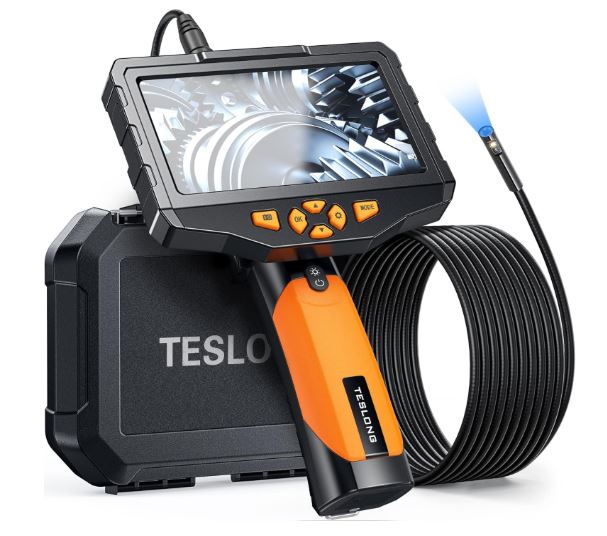
Key features:
- 5″ IPS display, 1080p resolution
- Dual lens (forward + side view) with 6+1 adjustable LEDs
- Semi-rigid cable up to 16.4 ft — retains its shape during use
- IP67 waterproof, 5,000mAh battery (~5 hours runtime)
- 32GB built-in storage, metal-reinforced casing
The lack of articulation is the main limitation — tight corners require manually shaping the cable. Best for longer runs and open appliance cavities like dryer ducts or refrigerator coils.
2. Teslong TD450S Two-Way Articulating Borescope
The TD450S is Teslong’s most popular mid-range articulating borescope, backed by nearly 700 Amazon reviews at 4.7 stars. Professionals and DIYers alike praise its steering precision and image quality, with multiple reviewers noting it outperforms pricier brands like Snap-on and Milwaukee at the price point.
The two-way articulating lever lets you steer left or right smoothly without physically bending the cable — a significant upgrade over semi-rigid designs for navigating around appliance internals.
Key features:
- 4.5″ IPS display, 1080p resolution
- 8.5mm two-way articulating probe, 5 ft cable
- 8 high-intensity adjustable LEDs
- IP67 waterproof, 3,000mAh battery (~4 hours)
- 32GB built-in storage, microphone and speaker included
- No app or Wi-Fi needed — fully standalone
The 5 ft cable handles most home appliances comfortably. For deeper duct or pipe inspections, it may be limiting.
3. Kaiweets Generic Articulating Borescope — Industrial Inspection Camera
This is a white-label unit from a lesser-known seller, and that’s the central issue. Without a traceable brand, there’s no reliable warranty support, no manufacturer to contact if the unit fails, and limited accountability for the specs listed.
On paper the specs are competitive, but user feedback reveals inconsistencies not found in established brands.
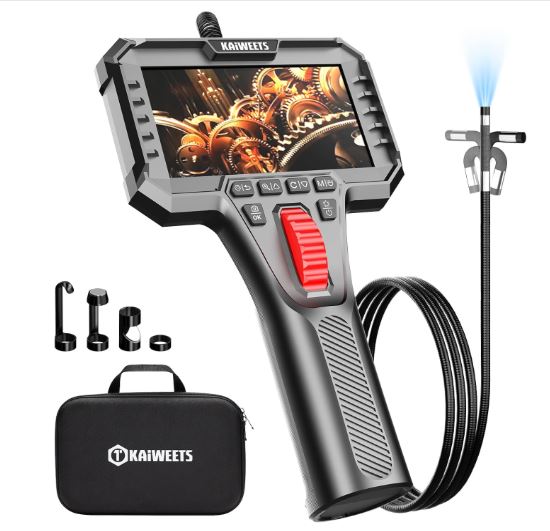
Key features:
- 5″ IPS display, 1080p resolution
- 8.5mm two-way articulating probe, 5 ft cable
- Adjustable LEDs, IP67 waterproof (probe only)
- 3,000mAh battery, 32GB SD card included
Some users report articulation axis misalignment — where the camera steers in a direction that doesn’t match what’s shown on screen. For occasional, low-stakes use it may suffice, but for regular appliance diagnostics the lack of brand trust is a meaningful risk.
4. Teslong Two-Way Articulating Videoscope — 4.5″ Screen, 3.2ft Gooseneck
This is Teslong’s entry-level articulating option — a solid pick if your inspections are focused on compact appliances and budget is a priority. It shares Teslong’s brand reliability and comes with a carry case, making it a complete out-of-the-box solution.
The short cable is the defining trade-off. At 3.2 ft, it works well for ovens, washing machines, and refrigerators but rules it out for any longer reach inspection.
Key features:
- 4.5″ IPS LCD display, 1080p, 2MP CMOS sensor
- 8.5mm probe with 180° two-way articulation, 60° field of view
- 8 adjustable LED lights, IP67 waterproof
- 3.2 ft gooseneck cable
- Carry case included
A reliable entry point into articulating cameras, but the cable length meaningfully limits its versatility compared to the TD450S.
Comparison Table for the Best Inspection Camera
| Feature | Teslong Inspection Camera NTS300 | Teslong Two-Way Articulating Borescope | Kaiweets Two-Way Articulating Borescope Camera | Teslong Two-Way Articulating Videoscope |
|---|---|---|---|---|
| Screen | 5″ IPS | 4.5″ IPS | 5″ IPS | 4.5″ IPS |
| Resolution | 1080p | 1080p | 1080p | 1080p |
| Cable Length | Up to 16.4 ft | 5 ft | 5 ft | 3.2 ft |
| Articulation | ❌ Semi-rigid | ✅ 2-way | ✅ 2-way | ✅ 2-way 180° |
| Dual Lens | ✅ Yes | ❌ No | ❌ No | ❌ No |
| Waterproof | IP67 | IP67 | Probe only | IP67 |
| Battery | 5,000mAh (~5 hrs) | 3,000mAh (~4 hrs) | 3,000mAh | Not specified |
| Storage | 32GB built-in | 32GB built-in | 32GB SD card | Built-in |
| Amazon Rating | ⭐ 4.6 (3,400+) | ⭐ 4.7 (686+) | ⭐ Unverified | ⭐ 4.5+ |
| Brand Trust | ✅ High | ✅ High | ❌ Unknown | ✅ High |
| Est. Price | ~$150–200 | ~$130 | ~$60–90 | ~$80–100 |
Our pick: The Teslong Two-Way Articulating Borescope delivers the best overall value for home appliance inspections — articulation, image quality, and brand credibility at a mid-range price. Choose the Teslong Inspection Camera NTS300 if you need longer reach or dual-lens coverage. The Teslong Two-Way Articulating Videoscope is a sound budget choice for compact appliances.
Inspection Camera Applications by Appliance
| Appliance | Access Point | Recommended Diameter | What to Look For |
|---|---|---|---|
| Washing Machine | Door seal gap, drain filter port | 7–9mm | Foreign objects, drum damage, debris in pump |
| Refrigerator | Drain channel, condenser area, door seal | 5.5–7mm | Ice blockages, debris, gasket condition |
| Dishwasher | Drain hose access, spray arm ports | 5.5–8mm | Blockages, debris in sump, spray arm clogs |
| Dryer | Lint trap slot, exhaust duct entry | 7–9mm | Lint buildup, blockages, drum damage |
| Oven / Range | Broiler drawer opening, rear panel gap | 7–9mm | Debris, rodent nesting, element condition |
| Garbage Disposal | Drain opening | 5.5–7mm | Foreign objects, grinding plate condition |
| HVAC Duct | Vent opening | 9mm+ | Debris, mold, duct condition |
Tips for Getting the Most From an Inspection Camera on Appliances
The camera is only as useful as the technique used to operate it. A few practical habits dramatically improve what you can see and interpret.
Clean the lens before each use. Dust, grease residue, and condensation on the camera lens produce blurred, hazy images that look like interior damage. A quick wipe with a lint-free cloth before inserting the camera ensures the image you see reflects the appliance interior rather than lens contamination.
Move slowly. The instinct is to push the camera through quickly to find the problem area. Slow, deliberate movement gives the camera time to focus and your eyes time to process what’s on screen. Fast movement produces motion blur and missed details.
Use the brightness adjustment. At close range — 2–4 inches from a surface — maximum LED brightness often washes out detail. Reduce brightness until you can see texture and color accurately rather than a blown-out white image.
Record video rather than relying on photos. Video capture gives you a continuous record of everything the camera sees as you navigate, which is far more useful for later diagnosis than a series of still images. Most appliance faults are easier to understand in the context of the surrounding area, which video captures naturally.
Mark your entry point. When you find something of interest, note how far the cable is inserted (most cameras have depth markings on the cable) so you can correlate what you’re seeing with the physical location inside the appliance.
Frequently Asked Questions
What size inspection camera fits inside most home appliances?
A 5.5mm to 8.5mm diameter camera covers the majority of home appliance access points comfortably. The 5.5mm diameter is the most versatile — it fits every appliance access point that larger cameras can navigate, plus many narrower openings they can’t. If you can only choose one diameter for general appliance work, 5.5mm to 7mm is the right range.
Can I use an inspection camera inside a running appliance?
For most appliances, no — and it’s not safe to try. The camera should be used with the appliance powered off to avoid mechanical hazards (rotating drums, pump impellers) and electrical risks. The exception is passive systems with no moving parts — like a refrigerator drain channel or a dishwasher sump with the machine off — where the camera can be used safely during operation only if there’s no risk of contact with moving parts or live electrical components.
How far can an inspection camera see inside an appliance?
Most appliance inspection work happens at distances of 2–12 inches from the camera lens. Beyond that, LED lighting becomes insufficient to illuminate the target clearly without additional light sources. Cable length determines how far into an appliance you can reach, but effective visual range at any given camera position is typically limited to the immediate area around the camera head. The camera is a close-range investigation tool, not a long-distance viewer.
Is a WiFi inspection camera better than one with a built-in screen?
It depends on how you work. WiFi cameras connected to your phone offer a larger, higher-resolution display that makes details easier to see. Built-in screen cameras are more self-contained, easier to use one-handed, and don’t depend on phone battery life or app connectivity. For solo appliance repair work, built-in screen cameras are often more practical. For collaborative work where someone else monitors the screen while you position the cable, a phone-connected model gives the monitor a much better view.
Can an inspection camera see inside a refrigerator drain channel?
Yes — provided the camera diameter is slim enough. Refrigerator drain channels are typically 6–8mm in diameter. A 5.5mm camera navigates these comfortably. This is one of the most useful appliance inspection applications — a blocked refrigerator drain channel causes water pooling inside the fridge and under the vegetable drawers, and the blockage is almost always ice or debris that’s clearly visible on camera.
What should I look for when inspecting a washing machine with an endoscope?
Insert the camera through the door seal gap or drain filter port and look for foreign objects between the drum and outer tub — coins, buttons, underwire, small socks — which are a common cause of grinding and rattling noises during spin cycles. Also inspect the drum surface for cracks or damaged paddles, the door seal for mold accumulation or tears at the rear of the gasket where it’s invisible from outside, and the pump area for debris blocking the impeller.
Do inspection cameras work in wet appliance environments?
An IP67-rated inspection camera works safely in wet environments — it can be submerged up to 1 meter for 30 minutes. This covers all wet appliance interiors including dishwasher sumps, washing machine tubs, and drain systems. Always verify the IP rating of any camera before using it in contact with water. IP54-rated cameras are splash-resistant only and should not be submerged or used in drain channels where full immersion is possible.
Also Read:
- What Are the Best Gas Leak Detectors for Home Use?
- What Safety Tools to Use When Fixing Home Appliances?
Conclusion
An inspection camera is one of those tools that feels optional until you use it for the first time — and then it becomes indispensable. The ability to look inside an appliance before committing to disassembly changes how you approach every repair. It replaces guesswork with evidence, turns a two-hour disassembly into a five-minute investigation, and often reveals that the problem is simpler — or in a completely different location — than symptoms suggested.
For most home appliance repair work, the DEPSTECH DS450 is the strongest all-round recommendation — it combines the slim diameter, close-range image quality, and IP67 waterproofing that appliance work specifically demands, at a price that makes it a practical addition to any home toolkit. If you prefer a self-contained built-in screen unit, the Teslong NTS500 is the better choice and adds the convenience of one-handed operation that makes solo repair work significantly easier.
Either way, the first time you feed a camera through a door seal gap and immediately spot the coin that’s been rattling in your washing machine drum for three months — you’ll understand exactly why this tool earns its place.
Browse inspection cameras on Amazon and find the right model for the repairs you do.

Hi, I’m Barlgan! I created Repair Me Yourself to empower homeowners to tackle appliance repairs with confidence. From decoding error codes to fixing cooling issues, I break down complex repairs into simple, actionable steps that save you time and money.